logo

WordPress Design Agency

020 3355 8747

Message Us
  • Home
  • About Impact®
    Learn More About Impact Media®
    • Meet The Team
       
    • Why WordPress
       
    • Careers
       
    • Giving Back
       
    • 100K Tree Challenge
       
    James Coates
    Schedule a discovery call with UX Specialist James
    Book A Call
  • WordPress Services
    Learn More About Our Services
    • WordPress Web Design
       
    • UX Design
       
    • WordPress Development
       
    • WordPress Support & Maintenance
       
    • WordPress Evolve Retainer
       
    • WordPress Multisite Development
       
    • WooCommerce
       
    • Replatform To WordPress
       
    • WordPress Consultancy
       
    • Integrations & Plugins
       
    • WordPress Managed Hosting
       
    • WordPress Health Check
       
    James Coates
    Schedule a discovery call with UX Specialist James
    Book A Call
  • Our Process
  • Case Studies
  • Insights
  • Contact Us
WordPress Design Agency
020 3355 8747
logo logo
Book A Call
Back
Menu
  • Home
     
  •  
    About Impact Media
    Learn More About The Impacters
    • Meet The Team
       
    • Why WordPress
       
    • Careers
       
    • Giving Back
       
    • 100K Tree Challenge
       
  •  
    Our Services
    Discover How We Can Help
    • WordPress Web Design
       
    • UX Design
       
    • WordPress Development
       
    • WordPress Support & Maintenance
       
    • WordPress Evolve Retainer
       
    • WordPress Multisite Development
       
    • WooCommerce
       
    • Replatform To WordPress
       
    • WordPress Consultancy
       
    • Integrations & Plugins
       
    • WordPress Managed Hosting
       
    • WordPress Health Check
       
  • Our Process
     
  • Case Studies
     
  • Insights
     
  • Contact Us
     
020 3355 8747
Mon - Fri • 9am - 5pm
Close

Oops! We could not locate your form.

Home / Insights / Is Your WordPress Website Holiday Ready?
Back

Is Your WordPress Website Holiday Ready?

Published 13.10.21
13th October 2021
Last Updated 14.07.26
14th July 2026

Newer
16 Min Read
Vikki Baker
Vikki Baker
WooCommerce
Older
16 Min Read
 
Vikki Baker
Vikki Baker
 
WooCommerce

The season of gifting and sales is the most important time of year for many eCommerce retailers, and the worst possible time for your website to let you down. Whether you’re gearing up for Black Friday, Christmas, or the post-Christmas sales, preparation needs to start months in advance.

wrapped gift to represent black friday, christmas, and january sales

If this is your most busy period, any issues or downtime could be extremely costly.

Whether from:

  • Your server not being able to handle increased traffic load.
  • DDoS attacks or a hack.
  • Bugs and faults due to your site or plugins being out of date. 

Have you allowed enough time for any new pages or seasonal design changes to be implemented by your developers? Are your seasonal or sale pages ready and optimised for search?

There’s lots to consider, from both a technical standpoint, and from a more onsite, content related standpoint. So how do you prepare for this period and keep your site up and running smoothly. How do you ensure everything is ready to take full advantage of this busy time?

This post covers everything you need to consider, from technical maintenance and security, to seasonal content, performance under load, and how to get the most out of today’s search landscape.

Maintenance 

Important all year round, but if it isn’t managed, come your busiest periods, your site can fall down.

WordPress, WooCommerce & Plugin Updates

This one seems simple but is of great importance for functionality and security. It’s incredible how many sites we find that are riddled with out-of-date core versions and plugins. Keeping your WordPress, WooCommerce, PHP (which we’ll address separately further down the page) and plugins up-to-date is vital.

They are updated and patched for good reason. They continually make improvements to performance and security, to ensure your website is working well, and is protected. Older versions are no longer supported, which means security risks and potential compatibility issues that could cause things to break at the worst possible moment.

Staging Sites

Now, you don’t want to just go to your live site, press update all, and hope for the best. This could cause issues in itself. The latest version of WordPress or WooCommerce might not be compatible with the current version of a plugin you use, or new features could change things unexpectedly onsite.

This is where staging sites come in. A staging site is an identical duplicate of your live site, hosted on a separate server hidden from Google and visitors. It gives you a safe environment to test code changes, plugin and theme updates, or WordPress Core and PHP version changes without any risk to your live site. You can identify bugs, clashes, or issues before anything goes near your visitors. Learn more about what a staging site is and why you should have one.

PHP 

PHP is the open-source scripting language that underpins WordPress and much of the web. It receives regular updates and periodic new version releases that bring significant changes requiring development work to websites and plugins, to ensure compatibility with the latest, most secure version. If your site is running an outdated and unsupported PHP version, now is the time to address it, not in the middle of your peak trading period. Find out more about PHP here.

Backups

Are you making and safely storing regular backups for if the worst happens? A recent, reliable backup is your best safeguard if something takes your site out of commission during peak trading.

If this all seems a lot and you struggle to get it done internally, take a look at our Support & Maintenance plans. They cover WordPress, WooCommerce and plugin updates, back up and ongoing performance optimisation. Most also include a staging site for testing before deployment.

If your site is running an out-of-date and unsupported PHP version, we can audit it for you. Then carry out the development work required to polish its codebase, and ensure it’s compatible with a new PHP version. Find out more about PHP here, or simply get in touch.

Hosting

Is your hosting robust enough for an increase in traffic? Would a sudden spike take it down?

Make sure your web host offers scaling options to keep you up and running during unusually busy periods. Also consider how easy it is to contact your hosting provider if something does go wrong. Some of the cheaper, more basic providers are notoriously difficult to reach, and offer little in the way of scaling or emergency support.

Find out about how moving to our managed WordPress hosting, massively improved performance for our client Tollring.

Performance

Site speed has always mattered for conversions, but it’s now also a confirmed Google ranking factor through Core Web Vitals. During peak trading periods, the combination of higher traffic, heavier promotional pages, and increased checkout activity can put real strain on your site’s performance, and a slow site will both rank less well and convert less effectively.

Before the peak season arrives, run your key pages through Google PageSpeed Insights and address the most impactful issues. Things to review include:

  • Largest Contentful Paint (LCP) – How quickly does your main content load? Large hero images and unoptimised media are common culprits.
  • Cumulative Layout Shift (CLS) – Does your page visually jump around as it loads? This is particularly disruptive on mobile.
  • Interaction to Next Paint (INP) – How quickly does your site respond when a user interacts with it? Bloated JavaScript can drag this down.
  • Image optimisation – Are images compressed and served in modern formats (WebP or AVIF)? Are they lazy-loaded where appropriate (below the fold)?
  • Caching – Is a quality caching plugin in use? Is your CDN (Content Delivery Network) correctly configured?

If your site tends to struggle under load, speak to your hosting provider or development partner about capacity well in advance. You may also want to consider a virtual queuing system if you’re expecting an unusually high volume of visitors at a specific time, such as a flash sale or product launch.

Security

Again, this is always important. Poor security could lead to your website going down, or getting hacked, during the busiest times of the year.

Keeping your site and plugins up-to-date, along with quality hosting, are a great start for keeping your site secure, but there are additional measures you can take to ensure your site doesn’t go down, get hacked and filled with spammy links, or even worse, have your sensitive customer data breached.

SSL Certificates

This shouldn’t have to be said anymore, but we still come across sites without SSL certificates. 

An SSL is a standard security technology that protects data transferred between a website server and a browser. The SSL encrypts data passed between the servers and browsers to ensure that the data remains private.

Browsers like Chrome will actively penalise websites without an SSL certificate. They display a message to all visitors, warning that the website they are about to view has an unsecure connection.

Please, if you haven’t yet moved from HTTP to HTTPS, get it done!

WAFs (Website Application Firewalls) & Security Solutions

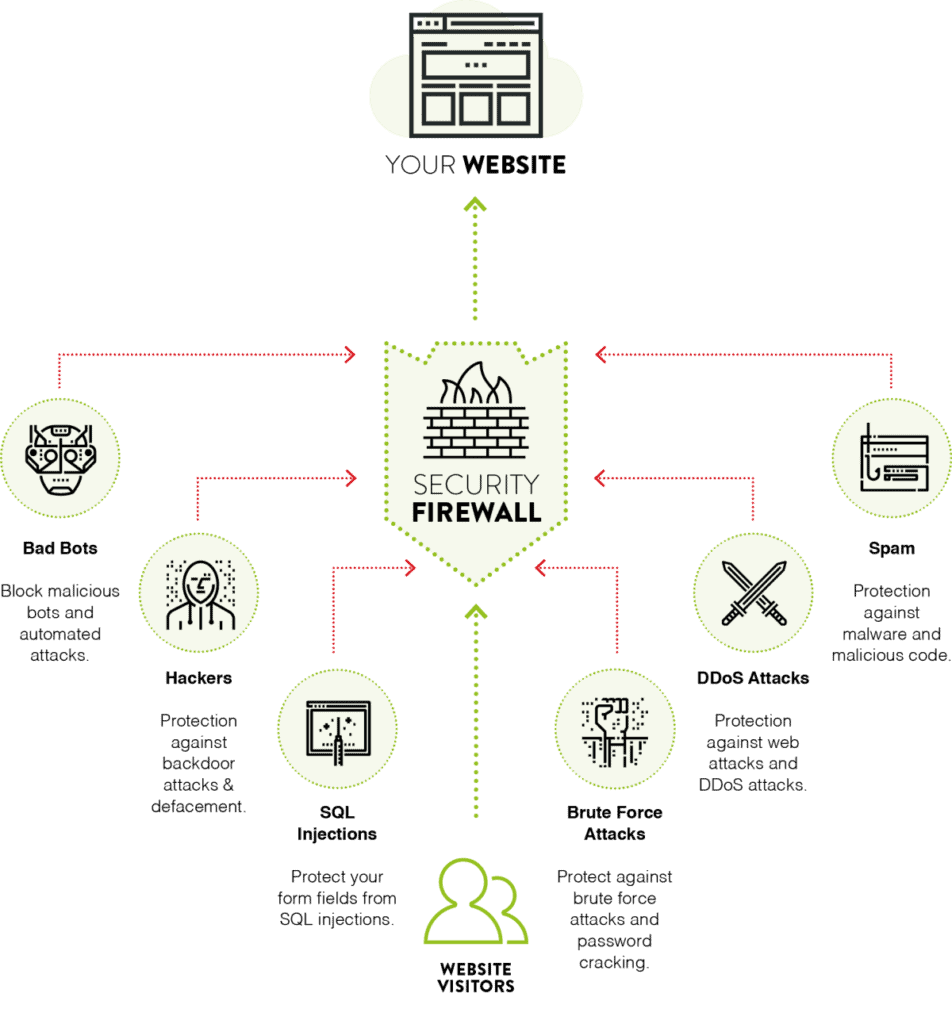
A quality WAF acts as a gatekeeper for your website, inspecting and filtering all traffic before it reaches your website. It sends potentially malicious traffic away, whilst letting good traffic (your users) in.

Not all Firewalls are created equally, and some are less efficient. You want a cloud-based Website Firewall which routes and screens traffic via cloud proxy servers. So it is filtered before it gets anywhere near your website. As it operates outside of your website it doesn’t put any strain on your website or server resource. This is particularly important during high-traffic periods, where an application-level firewall (which screens traffic after it hits your server) could itself contribute to a slowdown.

For our own clients, we include Cloudflare as part of most of our WordPress Support plans. It is one of the leading website security choice for WordPress.

Web Application Server

Keep It Tidy

Regularly audit your plugins. Are there ones you are no longer using? Delete them. Are there some that don’t seem to be maintained and updated by their developers? Can you find a better, more trustworthy solution to replace them? Is it something that could be custom developed, reducing your attack surface and dependency on third-party code?

Managing User Roles

We recently shared a blog post on managing WordPress user roles. As with plugins, audit your users and their roles regularly, looking for anyone who should be there, or anyone with permissions they don’t need. 

Also remember to remove access for people who no longer work for your business.

Password Best Practice

Ensure you and your team practice good password security habits. Weak passwords, and passwords used for numerous accounts, make it easy for hackers to brute force their way into your site. We have a whole post on password best practices. 

WooCommerce Checkout & Conversion Readiness

If you’re running a WooCommerce store, the peak trading period is as much about converting traffic as it is about withstanding it. A technically sound site that leaks customers at the checkout is a missed opportunity.

Before the season arrives, review:

  • Guest checkout – Is it enabled? Requiring account creation before purchase is a common friction point that costs sales.
  • Payment methods – Are you offering the payment options your customers expect? Apple Pay, Google Pay, and Buy Now Pay Later options have become standard expectations.
  • Express checkout – Can customers complete a purchase in as few steps as possible from the product page?
  • Abandoned cart recovery – Do you have an automated flow in place to recover customers who add to cart but don’t complete purchase? This is one of the highest-ROI tools available during peak periods.
  • Mobile checkout – Test your entire checkout flow on mobile. A significant proportion of your peak traffic will be on phones, and friction on mobile is often higher than on desktop.
  • Stock and availability messaging – Are out-of-stock states handled gracefully? Clear, early messaging on stock levels (and urgency messaging where appropriate) can both improve conversion and reduce frustration.

SEO Best Practice For Deals, Offers & Seasonal Pages

The temptation after the busy period, or a seasonal event, is to take down the pages specific to it. But this might not be the best idea from an SEO perspective, particularly for recurring annual events.

Google shared this page ‘Engage shoppers with deal pages in Google Search‘ in 2021. They advise that rather than removing seasonal pages or redirecting them to a less relevant URL, the better approach is to leave them live and indexable, but remove them from your navigation until they’re needed again. You can disable anything transactional, like add-to-basket buttons, and offer codes, so that any visitor who stumbles across the page during the off-season isn’t confused or frustrated. With the page remaining indexed, you don’t lose the value of any links it has picked up. Once the right time of year comes around, you can add it back into your navigation, and link to it from your homepage and emails.

Using fixed, permanent URLs for seasonal pages (the same URL every year) gives these pages time to build authority and makes your display and PPC campaigns simpler to manage too, since destination URLs don’t need updating each year.

Start thinking about this well in advance of the relevant period. A page that’s been live and indexed for months will typically outperform one published days before the event.

Maintaining Visibility In The Changing Search Landscape

Search has changed significantly in recent years, and preparing for peak season now means understanding the environment your content is competing in.

AI Overviews – (Google’s AI-generated summaries at the top of search results) are now appearing for a wide range of commercial and informational queries. For your seasonal pages to still capture clicks, they need to offer something beyond the basic information an AI summary can provide, like specific offers, your own products, trust signals, and clear calls to action that require a visit to your site to act on.

E-E-A-T (Experience, Expertise, Authoritativeness, Trustworthiness) – This continues to be an important framework for how Google evaluates content quality. For seasonal landing pages, this means clear authorship, up-to-date information, genuine reviews and trust signals, and content that reflects real experience, not just keyword optimisation.

The fundamentals of good SEO haven’t changed, but the bar for what earns visibility has risen. Make sure your seasonal pages are genuinely useful and specific, not just broadly optimised.

Support

What if something does go awry in this period? Are you positioned to find issues and fix them swiftly, to minimise loss?

Have you got developers in-house who can get you up and running again, and do you have an easy, quick way to contact your hosting provider? Do you have a website support agency on hand that can get everything sorted for you in the event of any issues or bugs? Got an SLA in place? What about out-of-hours Support?

If downtime or broken functionality would cause significant lost revenue, then it is very important to have something in place. Many smaller, more generic hosting providers can be hard to get hold of, and many support services are automated and slow. 

Make sure you have a solution in place where you can speak to real people, and they will identify and resolve your issues with urgency.

If you’re looking for a comprehensive support plan, with WordPress technical experts on hand and easy to reach, you can find out more about our WordPress Support plans here.

If You Have A Support Or Development Partner

Make sure you’re in contact with them. Speak to your Account Manager well in advance of the busy period. Here are things to remember:

  • Prepare your end of year roadmap and ensure to contact your Account Manager to discuss and schedule any website tasks.
  • Notify your account manager of any important dates, so that they can align tasks with deadlines in advance.
  • Flag anticipated traffic spikes (a competition, event, flash sale etc) in advance, so options like additional hosting capacity or a virtual queuing system can be explored ahead of time. Reach out and discuss your options to avoid downtime due to high server load.
  • Brief any seasonal design changes or new pages well in advance. Your agency will be busy at this time of year too, and early requests are far more likely to be delivered on time and with care.

Your Peak Season Checklist

Use this rough timeline as a guide if Black Friday and Christmas are your peak periods:

By the end of August

  • Any WordPress, WooCommerce, PHP, or database updates completed and tested on staging.
  • Core Web Vitals reviewed and critical issues addressed.
  • Hosting capacity reviewed.
  • Security audit completed, WAF and SSL confirmed in place.

September

  • Seasonal and sale pages live and indexable (but not yet in navigation).
  • WooCommerce checkout flow reviewed and optimised.
  • Support partner briefed on peak period dates and requirements.

October

  • Seasonal pages added to navigation and linked from homepage.
  • Paid campaign destination URLs confirmed and tested.
  • Abandoned cart flows tested and active.
  • Backup schedule confirmed.

November Onwards

  • Monitor performance and uptime closely.
  • Keep an eye on Core Web Vitals data in Google Search Console.
  • Ensure your support escalation path is clearly documented and accessible to your team.

Summary

The peak retail season rewards those who prepare early. A site that’s technically sound, fast, secure, properly indexed, and set up to convert can make a real difference to your revenue during the most competitive few weeks of the retail year.

If you’re considering a WordPress/WooCommerce Support & Maintenance Agency, find out more about our support and maintenance plans. We take great pride in keeping our clients up and running all year round. We offer UK-based technical experts, on hand to solve your problems, and to take the work of maintaining your website off your hands.

A picture of James Coates.

If you’d like to learn more about our WordPress & WooCommerce Support & Maintenance plans, drop us an email or give James a call.

Our plans provide a holistic solution to your website’s performance, reliability and security, and are inclusive of premium tools and services.

button to visit contact page
Share Socially
Vikki Baker
Vikki Baker
Digital Marketing Manager, Cat Lady & Former Female Indiana Jones
Vikki has over 15 years of experience in Digital Marketing for WordPress specialist agencies. She loves WordPress for its simplicity of use, huge flexibility, and how great it is for SEO.
View Team Profile
See More Articles
Vikki Baker
Vikki Baker
Digital Marketing Manager, Cat Lady & Former Female Indiana Jones
Vikki has over 15 years of experience in Digital Marketing for WordPress specialist agencies. She loves WordPress for its simplicity of use, huge flexibility, and how great it is for SEO.
See More Articles
View Team Profile
Looking For Support For
Your WordPress Website?
Let Us Take The Stress Of Website Maintenance & Support Off Your Plate
Let's Chat
studio@impactmedia.co.uk
020 3355 8747
Impact Media's LinkedIn
Impact Media's Twitter
Impact Media's Facebook
Impact Media's Instagram
Impact Media's Youtube
wordpress.org

About Impact

  • About Impact Media®
  • Meet The Impact Team
  • Why WordPress?
  • Our Web Development Process
  • Careers
  • Awards
  • Partners
  • Giving Back
  • 100K Tree Challenge

WordPress Services

  • WordPress Web Design
  • UX Design
  • WordPress Development
  • WordPress Evolve Retainers
  • WooCommerce Development
  • Multisite WordPress
  • Migrate To WordPress
  • Custom Integrations & Plugins
  • WordPress Consultancy

WordPress Support

  • WordPress Support & Maintenance
  • WordPress Managed Hosting
  • Case Studies
  • Insights
  • Contact Us

Addresses

London Address:

50 Liverpool Street,

London, EC2M 7PY, UK

+44 (0) 20 3355 8747


Registered Address:

Woodland Place, Hurricane Way

Wickford, SS11 8YB, UK

  • Privacy Policy
  • Cookie Policy
Impact Media logo
© Impact Media® 2003 - 2026
Impact Media is a trading name of IMDMS LTD. Company Reg. 05970261
Impact® & Impact Media®
are registered trademarks of IMDMS LTD