Why Websites Get Hacked & How To Prevent It
Hackers understand security and if your site is unprotected, they will see this as an opportunity, the same way a thief will open your car door, if it’s left unlocked.

Oops! We could not locate your form.
Hackers understand security and if your site is unprotected, they will see this as an opportunity, the same way a thief will open your car door, if it’s left unlocked.
Edit: This post received a full update in 2026 to maintain its usefulness and relevance.
In 2024, organisations experienced an average of 1,876 cyberattacks per week, which was a 75% increase year-on-year. Despite this, many website owners still believe their site isn’t worth a hacker’s attention, particularly if they don’t get much traffic. That assumption is exactly what makes them a target.
Contrary to popular belief, it’s not only high-traffic websites that come under attack. Statistics actually show that it is the lower-traffic websites that are actually the most vulnerable, as they often lack protection and are not well maintained. This makes it easy for hackers to exploit vulnerabilities that haven’t been patched via regular updates.
Automated attack tools don’t discriminate by traffic volume. They scan indiscriminately at scale, looking for any unpatched vulnerability they can exploit.
This is why keeping your site and its plugins up-to-date is vital, alongside the use of security tools like firewalls, which can greatly reduce the chances of your website falling prey to these common breaches.
WordPress powers around 42% of all websites on the internet, and that popularity inevitably makes it a target. But the important thing to understand is that WordPress Core itself is extremely well maintained. In 2024, security researchers found just 5 vulnerabilities in WordPress Core, none of which were considered high risk.
According to Patchstack’s State of WordPress Security report, 96% of all WordPress vulnerabilities discovered in 2024 were found in third-party plugins, with a further 4% in themes. Nearly 8,000 vulnerabilities were reported across the ecosystem, a 34% rise on the previous year. However, this reflects the scale of security research activity as much as it does the risk. The vast majority were rated unlikely to be actively exploited.
The point is, that WordPress itself is not the problem. Outdated, poorly maintained, or abandoned plugins are. And that is something you can control.
A new client once told us that their website doesn’t warrant spending money on for support and security, as it doesn’t generate much traffic.
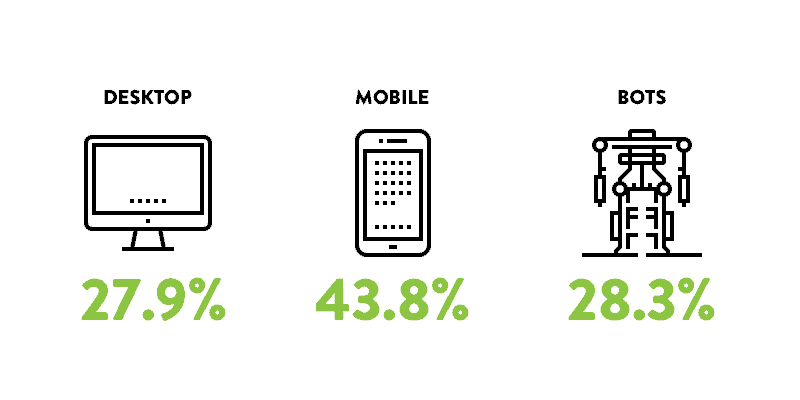
We thought this post would be helpful to showcase a typical month of bot visits and attacks that our security firewall and support team handle on a site that generates only 500 visits per month.
In a typical month this particular client received 27.9% of their traffic from desktop devices, 43.8% from mobile devices, and 28.3% from bot traffic.

Typically around 4% of all website traffic that hits our firewall is malicious, and various sources state that over 30,000 websites are hacked every day.
Hackers understand security and if your site is unprotected, they will see this as an opportunity. The same way a thief will open your car door if it’s left unlocked.
Compared to high traffic websites, low traffic websites usually have fewer if any security measures in place, and the website owners don’t necessarily worry as much about keeping plugins and security patches up to date.
However, most hack attempts are not actually made by people but by automated software or bots. These bots attempt to exploit every website they crawl using a programmed method. The automated tools can crawl a huge volume of websites, and find vulnerabilities and weaknesses with little effort.
If the method has been successful in the past, the bot will follow the same process to attack more websites to achieve the same outcome. Those without adequate security, regardless of traffic, are the ones exploited for countless reasons.
Now let’s look at 8 reasons why your website might be hacked.
Here are the 8 most common reasons behind website attacks, and why none of them require you to be a high-profile target.
Probably the most obvious reason, as data is a business’s greatest asset In fact, data remains one of the most valuable commodities on the internet, and your website may hold more of it than you realise.
Contact form submissions, customer email addresses, order details, account credentials, etc. All of it has value on the black market, whether for targeted phishing campaigns, advertising, or outright fraud. If your site processes payments, the stakes are even higher. Card data intercepted at checkout can be sold almost immediately.
Under UK GDPR any breach involving personal data must be reported to the ICO, and there are numerous other privacy laws around the world, designed to clamp down on companies leaking data like an old tap, as data has become so valuable. The reputational and legal consequences of a data breach extend well beyond the hack itself.
One of the most common and least obvious attacks involves hackers silently injecting spam links or creating hidden pages on your website. The goal is to use your domain’s authority, built up over years of legitimate content, to boost their own rankings for pharmaceutical, gambling, or adult content keywords.
You may not even notice for months. The injected content is often hidden from logged-in users and designed specifically to be visible only to search engine crawlers. By the time Google detects and flags it, you could have lost significant rankings, and cleaning up the damage takes time.
A compromised website can be turned into a delivery mechanism for malware, targeting the very people who trust you most. Malicious code can be injected that silently attempts to exploit visitors’ browsers, steal session cookies, or install software on their devices, and all without any visible sign that anything is wrong.
This type of attack causes Google to blacklist your site, displaying a ‘Deceptive site ahead’ warning to anyone trying to visit. Recovering from a Google blacklisting is a slow and painful process, even after the malware has been removed.
If a hacker gains access to your server, they can use it to send bulk spam emails. We’re talking thousands or even millions of messages, using your server resources and, crucially, your domain’s sending reputation.
Because the emails originate from your server, your domain can quickly end up on email blacklists, meaning legitimate emails from your business, like. invoices, enquiries, customer communications, can stop being delivered. Rebuilding a sending reputation can take a long time.
Ransomware, is where an attacker locks you out of your own systems and demands payment to restore access. It is no longer just an enterprise problem. While headline-grabbing attacks target large organisations, smaller websites are targeted too, often by automated tools that simply encrypt whatever they can access.
The numbers have grown significantly with ransom demands now regularly running into six figures even for small businesses, and the cost of recovery, even if you don’t pay, can be enormous. Established businesses have had to cease trading due to ransomware attacks. Having a clean, tested, off-site backup is the single most important safeguard against this scenario.
DDoS (Distributed Denial of Service) attacks flood your server with traffic from a large number of sources simultaneously, with the aim of making your website unavailable. These attacks can be commercially motivated or entirely opportunistic.
For eCommerce, paid membership websites, or any business where website downtime directly equals lost revenue, even a few hours offline has a tangible cost.
Hackers are not just after your data, but also your website resources such as bandwidth. Bandwidth can be expensive, so being able to utilise multiple website’s bandwidth for torrents and other similar traffic can be a profitable exercise.
Cryptojacking, where a hacker uses your server’s processing power to mine cryptocurrency, is a less visible but very real threat. It doesn’t necessarily take your site offline or steal your data. Instead it quietly consumes your server resources, slowing your website down and running up hosting costs, while the attacker profits at your expense. This type of attack often persists for a long time precisely because it’s hard to notice.
In February 2018, the BBC reported on the accessibility plugin ‘Browsealoud’, that had been exploited by hackers. With its users’ computers having their processing power hijacked, as well as the thousands of websites that used the plugin.
“Some people just want to see the world burn”. Yes we stole this from Batman, but it’s exactly right. Some people will do this just because they can.
Not all hacks are targeted. A significant proportion of website compromises happen simply because automated bots are scanning the entire internet for known vulnerabilities, and your site happened to have one. It is nothing personal.
Bots crawl the web continuously, testing for outdated plugin versions, weak passwords, exposed login pages, and misconfigured servers. If your site hasn’t been updated in six months, there is likely at least one known vulnerability that can be matched to a publicly documented exploit. These bots will find it.
Those hacking for fun or simply to learn, will use your website as a guinea pig in their learning journey. Some of these hacks are to deface or vandalise a website, placing visual messages on the site or changing text and images.
In short, insecure websites are obviously at risk from all of the above, and many of these types of hack are preventable by implementing adequate security measures.
Many compromises go undetected for weeks or months. Here are the signs to watch for:
Often the first sign is a user reporting unexpected redirects, strange popups, or content that doesn’t belong on the site. Sometimes this may not be the quickest way of identifying that you have a breach, and by this point, the compromise may have been in place for some time.
When viewing your brand within search engines, if Google has detected that your website is hacked, it will display a message ‘This site maybe hacked’ or ‘Deceptive site ahead’ warning against your listing, notifying your potential visitors. This is damaging to click-through rates and trust, and can persist even after the issue is resolved, until Google recrawls and clears the flag.
You may be contacted by your host if they’ve noticed some suspicious activity on your server. Hosts monitor for unusual activity such as mass email sending, sudden spikes in resource usage, or outbound traffic to known malicious IPs. An alert from your host is a serious signal that should be acted on immediately.
You may notice certain pages or areas of content that do not appear correctly. Unfamiliar links, text in a foreign language, or entirely new pages appearing in your Google Search Console are all red flags. This could mean that your site has been compromised, a site check will provide an answer.
By opening up a Google search page and entering the following
Site:yourdomain.com (replacing your web address) This will bring up every page indexed in Google.
Depending on the number of pages your website has, you might be able to recognise any pages or content that seem suspicious.
Alternatively you can run a quicker and far easier test using a free tool provided by Sucuri. Check out the link below.
Sucuri’s free SiteCheck tool scans for malware, injected spam, and blacklist status. It’s a useful first check, though it only scans what’s visible at the front end. Deeper server-level issues require more thorough investigation.
The good news is that the most common causes of WordPress compromise are entirely preventable with the right maintenance and security setup.
Keep Everything Updated – The majority of successful attacks exploit known vulnerabilities in plugins and themes for which patches already exist. Keeping WordPress Core, plugins, and themes updated is the single most impactful thing you can do. Remove any plugins or themes you are no longer using, as abandoned code is a liability.
Use a Web Application Firewall (WAF) – A WAF screens incoming traffic and blocks malicious requests before they reach your site. Our WordPress Support & Maintenance plans include industry leading WAF protection as standard. See also our guide to WAFs for WordPress.
Enforce Strong Passwords and Two-Factor Authentication – Brute force attacks, using automated tools that guess username and password combinations, are one of the most common attack vectors. A strong, unique password and 2FA on admin accounts makes this approach virtually impossible.
Take Regular, Tested Backups – Backups should be taken frequently, stored off-server, and, tested. A backup you’ve never tried to restore is a backup you can’t rely on. In the event of a serious compromise, a clean backup is often the fastest recovery route.
Use Managed Hosting – A quality managed WordPress host provides server-level security scanning, firewalls, and proactive monitoring that goes beyond what any plugin can offer. See our guide to managed WordPress hosting.
Limit User Access – Not everyone who needs to edit your website needs administrator access. Apply the principle of least privilege, and give users only the permissions they actually need. Remove old user accounts for staff who have left.
Choose Plugins Carefully – The Patchstack data is clear that not all plugins are equal. Over 1,000 vulnerabilities in 2024 were found in plugins with more than 100,000 active installs. Popularity is no guarantee of security. Check when a plugin was last updated, and how quickly its developers have historically responded to reported vulnerabilities before installing it.
Don’t panic, but do act quickly. The longer a compromise is in place, the more damage it can do to your SEO, your visitors, and your reputation.
Give us a call on 020 3355 8747 and we can provide a site recovery and clean service. Either by restoring backups or removing any of the malicious data. We can also help by providing ongoing security measures to prevent the same thing happening again.
Our WordPress Support & Maintenance plans include industry leading firewall protection, regular updates, proactive monitoring, and off-site backups as standard. They’re designed to take the security and maintenance burden off your hands entirely, so you can focus on running your business.
You can learn more about our WordPress support plans here or call James on 020 3355 8747 to learn more.

If you’d like to learn more about our WordPress & WooCommerce Support & Maintenance plans, drop us an email or give James a call.
Our plans provide a holistic solution to your website’s performance, reliability and security, and are inclusive of premium tools and services.