logo

WordPress Design Agency

020 3355 8747

Message Us
  • Home
  • About Impact®
    Learn More About Impact Media®
    • Meet The Team
       
    • Why WordPress
       
    • Careers
       
    • Giving Back
       
    • 100K Tree Challenge
       
    James Coates
    Schedule a discovery call with UX Specialist James
    Book A Call
  • WordPress Services
    Learn More About Our Services
    • WordPress Web Design
       
    • UX Design
       
    • WordPress Development
       
    • WordPress Support & Maintenance
       
    • WordPress Evolve Retainer
       
    • WordPress Multisite Development
       
    • WooCommerce
       
    • Replatform To WordPress
       
    • WordPress Consultancy
       
    • Integrations & Plugins
       
    • WordPress Managed Hosting
       
    • WordPress Health Check
       
    James Coates
    Schedule a discovery call with UX Specialist James
    Book A Call
  • Our Process
  • Case Studies
  • Insights
  • Contact Us
WordPress Design Agency
020 3355 8747
logo logo
Book A Call
Back
Menu
  • Home
     
  •  
    About Impact Media
    Learn More About The Impacters
    • Meet The Team
       
    • Why WordPress
       
    • Careers
       
    • Giving Back
       
    • 100K Tree Challenge
       
  •  
    Our Services
    Discover How We Can Help
    • WordPress Web Design
       
    • UX Design
       
    • WordPress Development
       
    • WordPress Support & Maintenance
       
    • WordPress Evolve Retainer
       
    • WordPress Multisite Development
       
    • WooCommerce
       
    • Replatform To WordPress
       
    • WordPress Consultancy
       
    • Integrations & Plugins
       
    • WordPress Managed Hosting
       
    • WordPress Health Check
       
  • Our Process
     
  • Case Studies
     
  • Insights
     
  • Contact Us
     
020 3355 8747
Mon - Fri • 9am - 5pm
Close

Oops! We could not locate your form.

Home / Insights / Generate New Leads With Out Of Stock Items
Back

Generate New Leads With Out Of Stock Items

Published 26.08.22
26th August 2022
Last Updated 27.03.26
27th March 2026

Newer
13 Min Read
James Coates
James Coates
Swipe & Deploy
Older
13 Min Read
 
James Coates
James Coates
 
Swipe & Deploy

How should you handle out-of-stock items on your e-commerce website, and can they be used to bring customers back and generate new sales?


Swipe & Deploy 6 blog hero image of Lego box.

Running out of stock is frustrating. For store owners, it feels like lost revenue. For customers, it’s a dead end.

I do hate seeing pages of products that I can’t buy, it’s like someone eating a carrot cake in front of you when you’re on a diet.

But here’s the thing, an out-of-stock product page isn’t necessarily the end of the story. Handled well, it can be the start of a conversation, and that conversation, properly set up, can turn a visitor who couldn’t buy today into a paying customer tomorrow.

A lot of eCommerce stores aren’t doing this. They’re either hiding out-of-stock products entirely, or leaving a bare product page with no way to capture the interest of visitors who arrived ready to buy. Both are missed opportunities.

The Visitor Who Couldn’t Buy Is Still A Lead

Think about what it means when someone lands on an out-of-stock product page. They didn’t stumble there by accident. They searched for the product, clicked through from a campaign, or followed a link because they wanted that specific item. That’s purchase intent, one of the most valuable signals in eCommerce.

The average eCommerce conversion rate in 2025 sits at around 2–5.2%. Most visitors don’t buy on any given visit. But a visitor on an out-of-stock product page has already cleared several of the hurdles that stop most visitors converting. They know what they want, they’ve found your store, and they’re ready to spend. The only thing standing between them and a purchase is availability.

That gap, between clear intent and the ability to fulfil it, is exactly where a smart business can intervene.

Back-In-Stock Notifications – Simple, Underused & Highly Effective

The most straightforward way to capture that intent is a back-in-stock notification. In place of the Add to Basket button, the customer is invited to leave their email address to be notified the moment the product returns to stock.

For example, on Black Friday I was searching Google for a ‘Lego Train Set’ and came across a Google Paid Shopping advert that showed photos of products and a price from various sellers.

After seeing John Lewis promoting the train set that retails at over £100 for only £60, I immediately clicked on the advert. To my disappointment, the product was actually out of stock.

But what they did have was a clear CTA to say email when available – which I signed up for.

This I thought was helpful, whilst also a sneaky way to generate new leads. Further to that remarketing banners would no doubt stalk me thereafter, and John Lewis has my email to begin sending me other products they want to promote.

lego movie emperor palpatine gif

The data on how well this works is striking. Back-in-stock emails achieve open rates of 65%, click rates of 24%, and a 5-15% increase in revenue. These figures dwarf typical promotional email performance. These aren’t cold emails sent to a disengaged list, they’re going to people who have already demonstrated they want the product. The warm-up has already happened.

The mechanic is simple. The customer subscribes, the product comes back into stock, an automated email goes out, and the customer returns to a live product page ready to buy. When set up properly, the entire loop runs without manual intervention.

One important caveat is that this only works if the notification goes out promptly when stock is restored, and if it lands the customer back on a live, purchasable product page. A restock email that arrives three days late, or that takes the customer to a page that’s already sold out again, will erode the trust you built by asking for their email in the first place.

You’re Also Building Your Email List

There’s a secondary benefit that’s easy to overlook is that every customer who subscribes to a back-in-stock notification is opting into direct communication with your store.

That’s a genuinely warm contact with someone who knows your brand, wanted one of your products, and has actively asked to hear from you. Depending on how your email marketing is set up, this can feed directly into your broader retention strategy, with welcome sequences, product recommendations, promotional campaigns.

The ability to capture and retain warm leads through channels you own, rather than paying repeatedly to re-acquire them through paid media, is really valuable.

The key is to being transparent. Customers should know what they’re signing up for, and you should have a clear sense of how you’ll use their information beyond the restock notification.

Using Out-Of-Stock Pages to Understand Demand

Here’s an angle that doesn’t get talked about enough. Out-of-stock notification data is a direct read on product demand.

If ten people sign up to be notified about the same product, that’s a clear signal. If fifty do, that’s an urgent one! Either you need to restock quickly or reconsider how you’re managing inventory for that product. The waitlist is effectively a demand gauge that updates in real time, with zero survey cost.

Some stores have used this insight to validate new product lines before committing to inventory. Running a ‘coming soon’ or pre-order page for a new product, with a notification or pre-order capture gives you a concrete read on appetite before you’ve spent anything on stock.

If interest is low, you’ve saved yourself from a costly mistake. If it’s high, you have a ready-made list of buyers to notify on launch day.

The Paid Advertising Angle

There’s one more opportunity worth flagging, particularly for stores running paid search or social campaigns. Out-of-stock pages can burn significant ad spend if they’re not managed properly.

If a paid campaign is sending traffic to a product that’s out of stock, every click is money spent on a visitor who can’t convert. The back-in-stock notification partially recovers this, because at least you’re capturing the lead rather than losing them entirely, but ideally, campaigns should be paused or redirected when a product goes out of stock, and reactivated once stock is live.

This requires clear communication between whoever manages your inventory and whoever runs your paid campaigns. It sounds obvious, but it’s a gap that quietly costs stores significant amount of money. Making it a standing process, a simple notification when a product hits zero stock, avoids the issue entirely.

I’ve genuinely lost count of the number of times I’ve clicked through from an ad on Instagram to find the item is out of stock. I cringe to think of the money they are losing this way.

Hiding Out Of Stock Items Discussion

There are arguments for both displaying and hiding out-of-stock items. Sometimes users don’t want to see out-of-stock items, and there are other times when they may want to.

For example, if you’d been searching for a specific product like a TV, and it wasn’t displayed on John Lewis’s website, you would shop somewhere else. However, if it was listed as temporarily out of stock, you might wait for it to return, as you know they price match and you’d get a 5 year warranty included.

Getting your brand benefits and why someone should buy from you in your product page copy is critical.

So implementing a tactic for capturing emails is a great way of capturing interest in a product, and potentially checking whether there is enough demand to get an item back in stock.

At the same time, users may not want to trawl through loads of out-of-stock items on your product listing pages. This can damage user experience and how they think about your business “they haven’t got much in stock”.

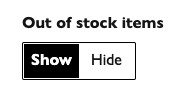
Placing a simple filter on the results pages can remedy this. John Lewis does provide this option (see below).

filter to remove out of stock itens from a product results page

Whether you chose to hide or show by default is an important discussion to have. I’d lean towards a solution that hides them by default or provides a dedicated section at the base of the page ‘items back in stock soon’. So if you were looking for that TV or train set and you were on the main products page, you’d be able to see it.

Another option is to send out-of-stock items to the end of your product listing pages, so they don’t interfere with users browsing.

Either way, if the product is only temporarily out-of-stock, keep the page crawlable and indexable by search engines. DOn’t just draft it.

Tactics For SEO

Leaving out-of-stock product pages active (if you’re likely to restock an item) is also a discussion that SEOs will want to weigh in on.

Keeping the product page live and indexed, with any links and rankings it has gained means that you don’t have to start over again once the product returns to stock.

With the cost and effort of getting the user there whether through paid or organic search, being able to capture an email address is still a great win.

lego movie gif

Simple Product Data Capture

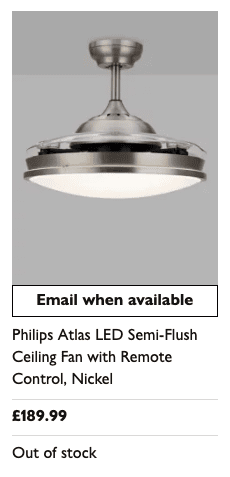
Shown below is an out-of-stock product as shown on a product listings page (PLP) on John Lewis, clearly visible with an email when available CTA.

out of stock light from john lewis website

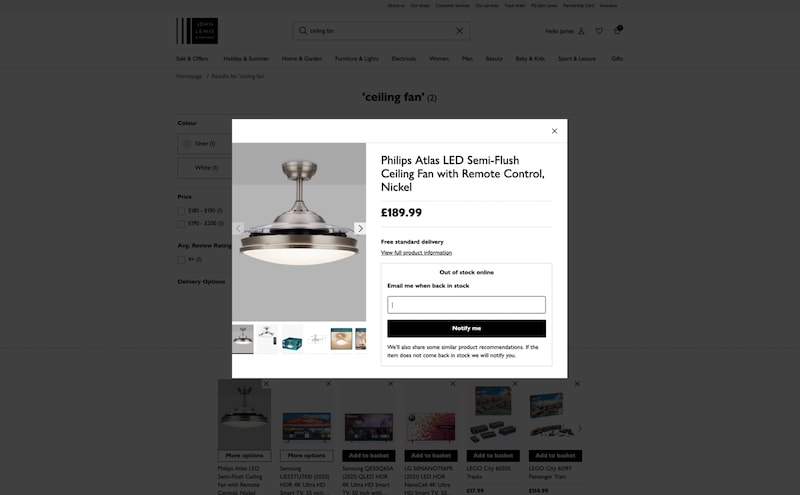
When clicking the ’email when available’ button a modal appears (shown below) that allows you to enter your email address to be notified once the item is back in stock.

modal for out of stock item with call to action

If instead, you click the actual product from the listing page, you are taken through to the product page (which is no doubt indexed in Google) where the same call to action is repeated.

Putting It Into Practice

The practical steps to make this work in WooCommerce are straightforward:

1. Keep out-of-stock product pages live – Removing them loses the SEO value they’ve built up and eliminates any chance of capturing returning visitors. For the technical detail on how to manage out-of-stock pages for SEO, see our post on best practices for handling out-of-stock items.

2. Install a back-in-stock notification plugin – The Back In Stock Notifier for WooCommerce is a free, low-friction starting point. YITH WooCommerce Waitlist offers more customisation if you need it. Or you may need or want a more bespoke solution that doesn’t rely on yet anther plugin.

3. Make the notification CTA prominent – A small, easy-to-miss text link won’t perform. The notification prompt should be visually clear, in the same position and with similar visual weight to where the Add to Basket button normally sits.

4. Set up automated restock emails to fire immediately – Don’t rely on manual follow-up. The email should go out as soon as stock is restored, and it should take the customer directly to the product page.

5. Review your waitlist data regularly – Products accumulating large waitlists should trigger a review of your restock timelines and potentially your paid campaign spend.

6. Notify your paid campaigns team – Whenever a product goes out of stock, campaigns pointing to that product should be paused or redirected until stock is confirmed live.

What’s To Swipe & Deploy?

First off is keeping products you wish to restock live on your website, clearly labelled as out-of-stock. However, you can then implement a data capture sequence like the one John Lewis uses.

Some online sellers are very keen to hide out-of-stock items, but keeping them live and indexable means you can still welcome new traffic from users seeking out these products.

Adding a hide/show filter on product results/listing pages for out-of-stock items can help to improve the user experience. Whilst you can also provide a dedicated area for those items to appear. That way your users won’t get frustrated seeing out-of-stock and in-stock items intermingled.

I’d be keen to see more ways in which eCommerce websites deal with their out-of-stock items. Whether they’re good credible tactics, or on the naughty side.

What’s your shopping experience been like when you’ve encountered out-of-stock items? Drop me a message to share your thoughts.

In the meantime, if you’d like to take a look at some of the eCommerce websites we’ve designed and developed in WooCommerce, visit our case studies page.

That’s a wrap for Swipe & Deploy #6. Join me next week when I’ll share another insight or piece of inspiration from around the web. 

A picture of James Coates.

If you’d like to learn more about our WordPress & WooCommerce Support & Maintenance plans, drop us an email or give James a call.

Our plans provide a holistic solution to your website’s performance, reliability and security, and are inclusive of premium tools and services.

button to visit contact page
Share Socially
James Coates
James Coates
UX & Web Strategist, Coffee Lover & Ex-Flower Arranging Champ
James is a UX specialist and is passionate about delivering better digital experiences. He provides insights on improving conversions, increasing sales and delivering more engaging content.
View Team Profile
See More Articles
James Coates
James Coates
UX & Web Strategist, Coffee Lover & Ex-Flower Arranging Champ
James is a UX specialist and is passionate about delivering better digital experiences. He provides insights on improving conversions, increasing sales and delivering more engaging content.
See More Articles
View Team Profile

If You Liked This, You Might Like These

Swipe & Deploy
August 22nd, 2025
6 min read

Human Checked Articles – When Getting Content Right...

Could adding verification by industry experts help build trust with your users, in a world where so much content is AI slop?

James CoatesJames Coates
 
Swipe & Deploy
August 11th, 2025
5 min read

Could You Create Video Stories On Your Product Category P...

A recent addition to the Oh Polly website went viral, and prompted this week's Swipe & Deploy. Could your brand take inspiration from Oh Polly for your own website?

James CoatesJames Coates
 
Swipe & Deploy
July 25th, 2025
7 min read

Why Saving A Basket Can Save A Sale

A look at how adding functionality for users to save their basket can remove friction and improve your chances of a sale.

James CoatesJames Coates
 
Want more control over
how you manage content in WordPress?
Edit content that was previously restricted and get creative with building pages in WordPress.
Let's Chat
studio@impactmedia.co.uk
020 3355 8747
Impact Media's LinkedIn
Impact Media's Twitter
Impact Media's Facebook
Impact Media's Instagram
Impact Media's Youtube
wordpress.org

About Impact

  • About Impact Media®
  • Meet The Impact Team
  • Why WordPress?
  • Our Web Development Process
  • Careers
  • Awards
  • Partners
  • Giving Back
  • 100K Tree Challenge

WordPress Services

  • WordPress Web Design
  • UX Design
  • WordPress Development
  • WordPress Evolve Retainers
  • WooCommerce Development
  • Multisite WordPress
  • Migrate To WordPress
  • Custom Integrations & Plugins
  • WordPress Consultancy

WordPress Support

  • WordPress Support & Maintenance
  • WordPress Managed Hosting
  • Case Studies
  • Insights
  • Contact Us

Addresses

London Address:

50 Liverpool Street,

London, EC2M 7PY, UK

+44 (0) 20 3355 8747


Registered Address:

Woodland Place, Hurricane Way

Wickford, SS11 8YB, UK

  • Privacy Policy
  • Cookie Policy
Impact Media logo
© Impact Media® 2003 - 2026
Impact Media is a trading name of IMDMS LTD. Company Reg. 05970261
Impact® & Impact Media®
are registered trademarks of IMDMS LTD