

Spam can be a frustrating issue for any business website, especially when it clogs up your inbox or your CRM with irrelevant, unwanted, or malicious submissions.
Whilst email service providers have introduced more rules to limit the amount of spam that hits our inboxes, these don’t prevent spammers from abusing our website contact forms.
Thankfully, there are numerous ways you can limit contact form spam. In this post, I’ll explore the most effective techniques and tools for doing so in WordPress.
I’ll look at both good and bad examples to help you banish excessive spam, without impacting your genuine users and their form submissions.
Why Does Form Spam Happen?
Form spam happens when bots or bad actors, exploit forms on your website to submit irrelevant, harmful, or promotional content.
It can vary from just being a bit of an annoyance, all the way through to being a huge security risk.
Spam can:
- Waste your time sorting through submissions, or cause you to accidentally overlook genuine submissions.
- Increase server load and slow down your site.
- Expose your team to phishing attempts, and malicious links.
- Open your organisation and website to security vulnerabilities, such as injection attacks.
To combat spam, it is best to employ a combination of tools and strategies. These should be in addition to ensuring your website’s security is prioritised, with quality hosting and a robust security solution in place.
Form Spam Prevention Methods For WordPress Websites
1. reCAPTCHA
Google’s reCAPTCHA is a popular anti-spam solution that verifies human users through various tests. There have been a number of versions of reCAPTCHA over the years, improving usability and evolving to handle more advanced bots.
The most recent version is reCAPTCHA v3, but much of the internet still uses v2.
- Good Choice: reCAPTCHA v3 is user-friendly as it works invisibly in the background, analysing behaviour to determine if a user is legitimate. This prevents spam with little to no action required from your visitors.
- Bad Choice: reCAPTCHA v2 (“I’m not a robot” checkbox or image selection) can frustrate users, especially if the verification process is slow or repeated multiple times (I’m sure we’ve all experienced this!)
To implement reCAPTCHA in WordPress, you can use contact form plugins like Gravity Forms, which have built-in reCAPTCHA integrations.
2. Akismet Anti-Spam
Akismet is a very commonly used WordPress plugin that checks form submissions against its global spam database.
Akismet automatically filters out submissions that match known spam patterns, allowing only genuine messages to pass through.
- Pros: Easy to set up and works well with popular form plugins like Gravity Forms and Contact Form 7.
- Cons: Akismet is not free for commercial sites, and very occasionally, legitimate submissions may get flagged as spam.
3. Form Plugins With Built-In Anti-Spam Features
Many WordPress form plugins include native anti-spam tools. For example:
- Gravity Forms: Has a honeypot option, runs frequent security audits, and has integrations with Akismet, reCAPTCHA, and other tools for robust spam protection.
- WPForms: Offers honeypot fields, and smart CAPTCHA options.
- Fluent Forms: Provides various features for advanced validation and restriction, alongside integration with Akismet, Honeypot and reCAPTCHA.
- Ninja Forms: Includes anti-spam features and Honeypot and reCAPTCHA. integrations.
4. Honeypot Technique
I mentioned Honeypot as a built-in feature or integration available for most of the contact form plugins above. But what exactly is it?
A honeypot is a spam prevention method that uses a hidden field added to forms. Legitimate users won’t interact with this field because it’s invisible, but bots will fill it out, triggering the spam filter.
- Pros: Non-intrusive for users and easy to set up.
- Cons: Some advanced bots can bypass honeypots, if they’re specifically targeting your site.
5. Firewalls
A firewall is a must for any website, and particularly a business site. They are not only for preventing form spam, as they have a much broader remit.
Firewalls protect your site by filtering malicious traffic before it reaches your server. Tools like Sucuri and Cloudflare, include options to block known spam IPs, reduce bot traffic, and strengthen overall site security.
- Benefits: Prevents spam submissions as well as broader security threats like DDoS attacks.
- Drawbacks: May require configuration and can sometimes block legitimate traffic, if not implemented correctly by someone that knows what they are doing.
6. Block Spam IPs
Manually or automatically blocking known spam IPs (as mentioned above as a firewall feature) can significantly reduce spam. You can use tools like Cloudflare, Sucuri and Wordfence, or your hosting provider’s tools to block repeat offenders.
- Pros: Targets problematic sources directly.
- Cons: Manually blocking IPs is not scalable if you have high traffic and frequent spam attempts.
7. Block Spammy Email Domains
Nearly every contact form asks for or requires an email address. Another anti-spam option is to limit or block certain email sending domains from use, in mandatory email fields within your forms.
For example, if you are a B2B organisation, you can block submissions from webmail addresses, and require business email addresses.
Alternatively, you can create a block list, to which you can add the email domains that you commonly receive spam form submissions from.
8. Limit Form Submissions
Many contact form plugins and tools like Gravity Forms and Fluent Forms allow you to set rate limits on form submissions, to prevent bots from overwhelming your site with multiple entries. They can restrict the number of submissions per IP address within a set timeframe.
9. Use A CAPTCHA Alternative
If you’re looking for something less intrusive than traditional CAPTCHAs, or want to avoid using Google reCAPTCHA, you can consider these alternatives:
- hCaptcha: Similar to reCAPTCHA but focuses on privacy and user-friendliness.
- Custom CAPTCHA: Plugins like WPForms allow you to create custom CAPTCHA alternatives, such as simple math or logic questions that can verify if a user is human.
While mostly effective, ensure that the questions are clear and easy to answer to avoid frustrating users.
What To Avoid When Implementing Anti-Spam Solutions
1. Overuse Of CAPTCHAs
CAPTCHA tests that are too involved or repetitive can frustrate users, leading to form abandonment. Ensure your CAPTCHA solution balances security with a good user experience, so you don’t drive people away.
I’m sure we’ve all experienced the frustration of having to click through several variations of these in a row, before being able to progress:

2. Inaccessible Or Badly Designed CAPTCHAs
CAPTCHA that are difficult to complete, provide a frustrating user experience and put up barriers to accessibility. They are more likely to deter humans, rather than bots. So take care when implementing a solution.
Some styles of captcha are very difficult, if not impossible for those with visual impairments, so be careful to select a solution that is accessible.
Examples of common CAPTCHA issues:
- Unreadable colour combinations or poor contrast – these can be especially problematic for colourblind users.
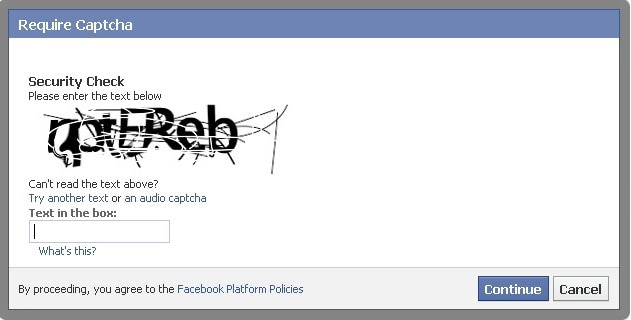
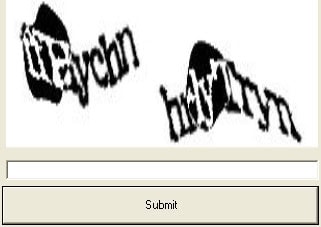
- Heavily distorted or blurry text.r
- Too much visual clutter/background noise.
- Complex mathematical captcha.
- Text-based CAPTCHA without an audio option for visually impaired users.
Many traditional text, object and audio based CAPTCHA are easily solved by machine learning and AI tools. This has meant that over the years, they have become more and more complex to try and outsmart this technology. Unfortunately, this has meant that many have also become an accessibility nightmare, especially for users with visual, auditory or cognitive impairments.
Here are some examples of bad CAPTCHAs:
3. Outdated Plugins
Using outdated or poorly maintained plugins can leave your forms vulnerable to spam and other attacks. Make sure you regularly update your plugins to keep them secure.
4. Lack Of Testing
Failing to test your anti-spam measures can result in legitimate users being blocked or spam still getting through. Always verify that your chosen solution or solutions work as intended.
Make testing your anti-spam solutions a normal part of testing functionality across your site.
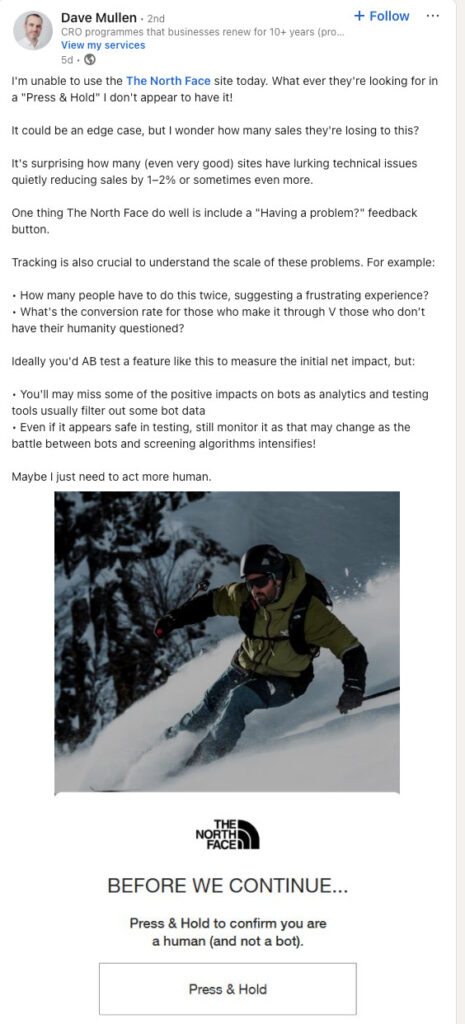
Here is a great example of a spam feature on The North Face website, blocking a legitimate user (from Dave Mullen on LinkedIn.)
Reduce WordPress Form Spam, But Don’t Forget Your Real Users
The best way to prevent form spam in WordPress, is to use a combination of tools and methods that best suit your website and your audience.
First a foremost, make sure that general website security is a priority. Providing a secure website and ensuring the protection of user data is vital for any business, and failing to do so can come at a high cost. Ensure quality hosting and a proper and robust security solution with a firewall.
Secondly, choose your contact form solution carefully, and look for what anti-spam features are included. A free plugin may be tempting, but we recommend a premium solution like Gravity Forms, that is well maintained and regularly updated. The price of a premium plugin is nothing when compared to the interruption excessive spam can cause or the potential cost of a data breach.
Finally, from reCAPTCHA and Akismet to IP blocking and honeypots, there are numerous ways to keep your forms secure and spam free (mostly) while ensuring a smooth user experience. Avoid outdated CAPTCHAs and alternatives that cause frustration for your users.
By implementing these techniques effectively, you can protect your site from spam, improve performance, and focus on what matters most – engaging with your genuine audience.
Need help securing your WordPress site and forms? Contact us today to learn about our managed WordPress Support & Maintenance plans.
FAQs
CAPTCHA is an abbreviation of ‘Completely Automated Public Turing test to tell Computers and Humans Apart’. CAPTCHAs are designed as a spam prevention security measure to differentiate between human and machine inputs.

If you’d like to learn more about our WordPress & WooCommerce Support & Maintenance plans, drop us an email or give James a call.
Our plans provide a holistic solution to your website’s performance, reliability and security, and are inclusive of premium tools and services.