logo

WordPress Design Agency

020 3355 8747

Message Us
  • Home
  • About Impact®
    Learn More About Impact Media®
    • Meet The Team
       
    • Why WordPress
       
    • Careers
       
    • Giving Back
       
    • 100K Tree Challenge
       
    James Coates
    Schedule a discovery call with UX Specialist James
    Book A Call
  • WordPress Services
    Learn More About Our Services
    • WordPress Web Design
       
    • UX Design
       
    • WordPress Development
       
    • WordPress Support & Maintenance
       
    • WordPress Evolve Retainer
       
    • WordPress Multisite Development
       
    • WooCommerce
       
    • Replatform To WordPress
       
    • WordPress Consultancy
       
    • Integrations & Plugins
       
    • WordPress Managed Hosting
       
    • WordPress Health Check
       
    James Coates
    Schedule a discovery call with UX Specialist James
    Book A Call
  • Our Process
  • Case Studies
  • Insights
  • Contact Us
WordPress Design Agency
020 3355 8747
logo logo
Book A Call
Back
Menu
  • Home
     
  •  
    About Impact Media
    Learn More About The Impacters
    • Meet The Team
       
    • Why WordPress
       
    • Careers
       
    • Giving Back
       
    • 100K Tree Challenge
       
  •  
    Our Services
    Discover How We Can Help
    • WordPress Web Design
       
    • UX Design
       
    • WordPress Development
       
    • WordPress Support & Maintenance
       
    • WordPress Evolve Retainer
       
    • WordPress Multisite Development
       
    • WooCommerce
       
    • Replatform To WordPress
       
    • WordPress Consultancy
       
    • Integrations & Plugins
       
    • WordPress Managed Hosting
       
    • WordPress Health Check
       
  • Our Process
     
  • Case Studies
     
  • Insights
     
  • Contact Us
     
020 3355 8747
Mon - Fri • 9am - 5pm
Close

Oops! We could not locate your form.

Home / Insights / The Best Contact Form Plugins For WordPress
Back

The Best Contact Form Plugins For WordPress

Published 11.09.23
11th September 2023
Last Updated 23.04.26
23rd April 2026

Newer
22 Min Read
Richard Ramirez
Richard Ramirez
WordPress
Older
22 Min Read
 
Richard Ramirez
Richard Ramirez
 
WordPress

If you’re looking for the right contact form solution for your WordPress or WooCommerce website, there are certainly no shortage of options on the market.


contact form plugins blog hero image

As WordPress veterans, we have worked with a huge number of them over the years, whether in building websites, or supporting them. Our Developers and Designers have firm favourites based upon this experience.

So let’s dive right in and look at some of the leading Form Creation plugins available for the WordPress CMS, and their strength and weaknesses.

Our Favourite Form Plugin

I’m going to begin with our favourite website form solution. Bear in mind that we build custom WordPress and WooCommerce websites for medium, large and enterprise-sized businesses, and as such, require a certain level of functionality and control from a tool of this kind.

If you are a sole trader, start up, or small business, many of the free options available are likely to more than meet your needs. We’ll be covering some of these further down the page.

This recommendation is in no way sponsored or reciprocal. It’s just the solution that has emerged as our firm favourite over our many years of developing and supporting WordPress and WooCommerce sites.

That solution is Gravity Forms.

Gravity Forms

Gravity Forms has firmly established itself as our go-to form solution for nearly all of the sites we build.

We’ve tried and tested numerous options over the years, and support a multitude of websites that make use of a broad range of form creation tools and plugins.

From simple websites, to complex multi-language, multisite builds, Gravity Forms has proven to be the most reliable, flexible and scalable solution, without being prohibitively expensive.

They offer 3 annual licence options with clear and transparent pricing. A full list of features provided under each licence is provided. They also offer a special plan for Nonprofits.

gravity forms pricing

The Pros

  • A selection of fairly priced annual licence options.
  • Developer friendly, with loads of useful features and add-ons available with the Pro and Elite licence options.
  • Compatible with WordPress Multisite with an Elite licence.
  • A huge number of ready-made integrations with a vast array of tools and platforms. This includes CRMs, email platforms, marketing automation tools, payment solutions and much more.
  • Well supported and well maintained.
  • Hugely flexible and adaptable, with an extensive list of features and options for form creation.
  • You can create custom workflows and automations, and use conditional logic.
  • Forms can include file uploads.
  • The ability to create WCAG 2 AA compliant accessible forms.
  • A regularly audited secure solution.
  • Fast to provide updates to ensure ongoing compatibility with WordPress Core, and PHP.
  • Supports a website’s language settings, including multilingual websites.
  • Field validation, and anti spam.
  • Geolocation.
  • A demo available on their website.
  • A 30-day money-back guarantee is offered if you’re not satisfied with your licence.
  • A roadmap on their site of additional features and integrations that are being considered or developed.
  • Great user friendly website.

The Cons

  • For a small business or someone building their own website, Gravity Forms may be overwhelming due to the number of features available.
  • There is no free plan or trial, though a demo and a 30-day refund policy are available. Although this is often actually a pro in terms of the level of support and maintenance that the plugin receives.

You can take a closer look at their plans and what each includes here.

The Best Of The Rest – Paid

Ninja Forms

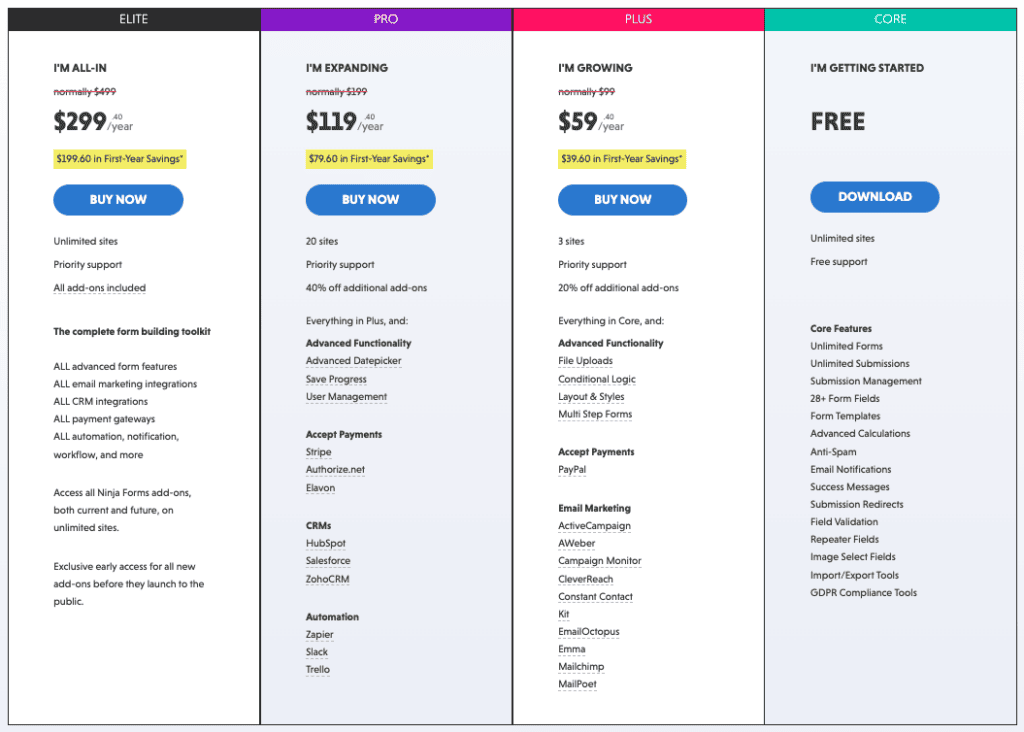
Ninja Forms has evolved significantly since the original version of this article was written and now operates on a freemium model. The core Ninja Forms plugin is free, with premium features available via individual add-ons or bundled membership plans.

They also have a range of single add on features, for anything you might not get in your chosen licence plan, however, these are an additional cost, with a percentage discount depending on which licence you have. This makes Ninja Forms considerably more expensive than Gravity Forms at the higher tiers, particularly given the à-la-carte add-on pricing model. Individual add-ons range from approximately $29 to $129 each, and buying several can quickly increase the total annual cost.

gravity forms pricing

The Pros

  • A free core plugin available for basic forms.
  • A range of plans is available for those with differing requirements.
  • A decent number of ready-made integrations with a number of tools and platforms, including CRMs, email platforms, marketing automation tools and payment solutions.
  • Developer-friendly add-ons such as webhooks are available with the Pro and Elite licence options.
  • Forms can include file uploads(via add-on).
  • You can use conditional logic (via add-on).
  • You can create multi step forms (via add-on).
  • Well supported and well maintained.
  • 14 day money back guarantee.

The Cons

  • Premium pricing is significantly higher than Gravity Forms at comparable feature levels.
  • The à-la-carte add-on model can make total costs unpredictable and expensive.
  • Fewer bundled features compared to Gravity Forms.
  • Their website is less user friendly.
  • Not explicitly confirmed to work with WordPress Multisite.

You can take a closer look at their plans and what each includes here.

WPForms

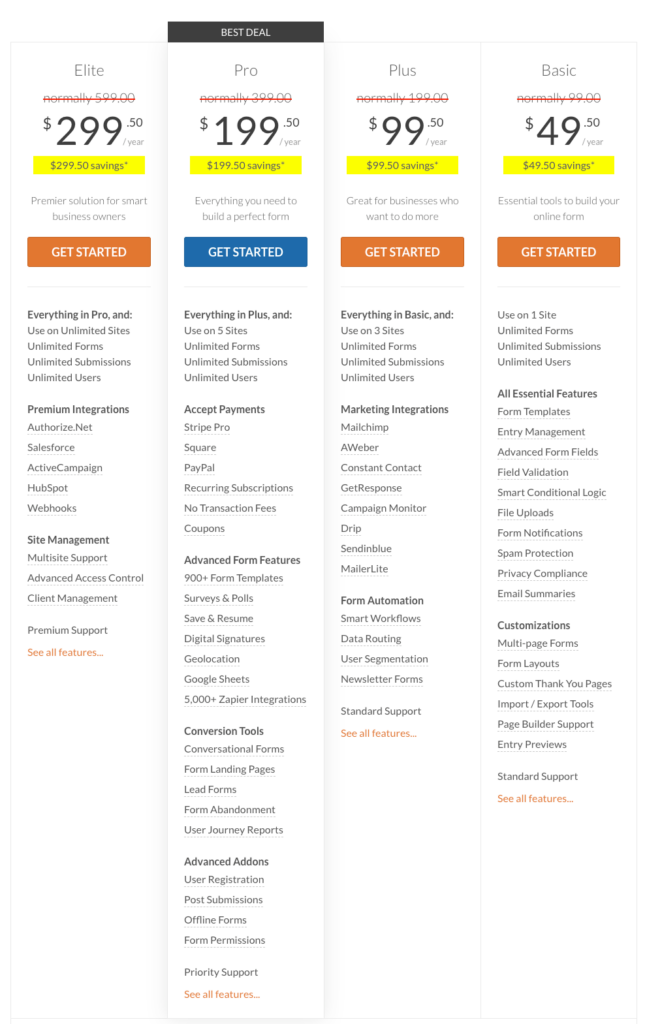
WPForms is another paid contact form solution for WordPress, with what initially appears to be an identical offering to Ninja Forms. They also have 4 annual licence plan options, with identical pricing, including the introductory offer.

WPForm do have a more basic free version of their plugin, that I will cover further down the page.

Their website provides a useful and transparent list of features included in each plan. Based on what information the website provides, WPforms offers a few more features at each level than what Ninja Forms advertises on their website.

wpforms pricing

The Pros

  • A range of plans available for those with differing requirements.
  • A large library of pre-built form templates.
  • A good number of ready-made integrations with a number of tools and platforms, including CRMs, email platforms, marketing automation tools and payment solutions.
  • Developer-friendly add-ons such as webhooks are available with the Pro and Elite licence options.
  • Forms can include file uploads.
  • You can use workflows, segmentation and conditional logic.
  • You can create multi page forms.
  • Well supported and well maintained.
  • Geolocation.
  • Privacy compliance.
  • Spam Protection.
  • Field validation.
  • 14 day money back guarantee.
  • Multisite support confirmed at Elite tier.

The Cons

  • More expensive than Gravity Forms at renewal prices, particularly for higher-tier plans.
  • Fewer features than other options, such as Gravity Forms, but more than Ninja Forms on initial inspection.
  • The introductory pricing significantly undercuts renewal costs. Buyers should budget based on renewal rates.

You can take a closer look at their plans and what each includes here.

Paperform

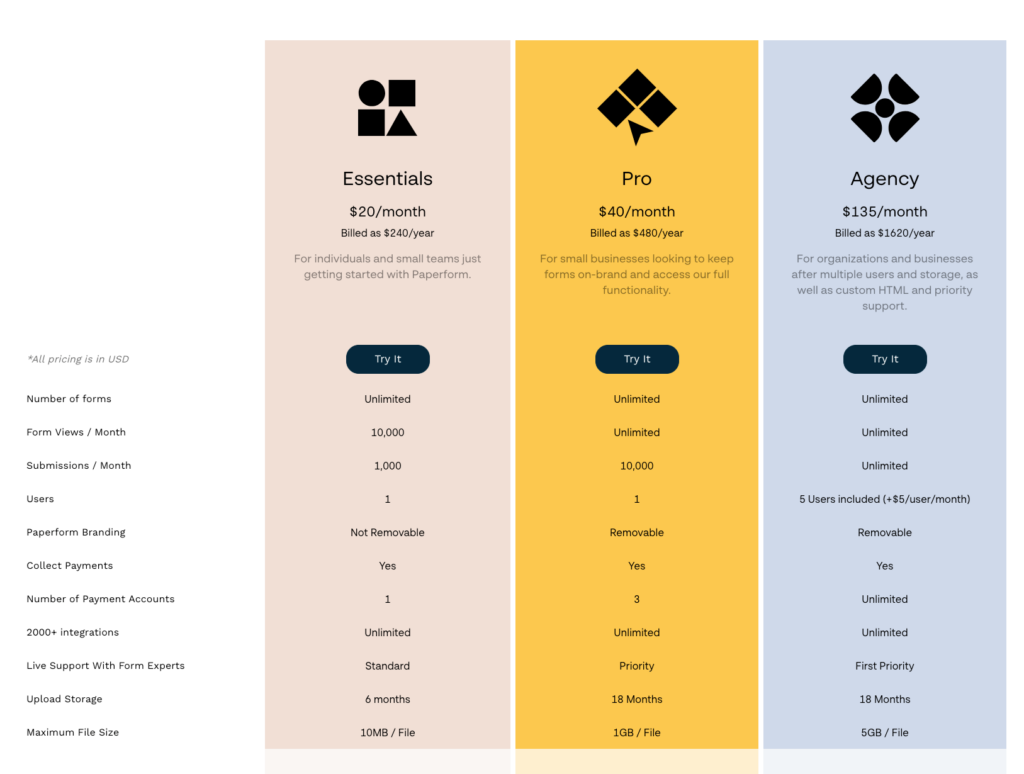
Another paid option for WordPress form creation is Paperform. Unlike the solutions we’ve looked at so far, Paperform have both monthly and annual licence payment options, with monthly being a little more expensive than annual payment.

They offer 3 licence plans, which annually are fairly expensive in comparison to their counterparts from the other providers we’ve looked at so far. They also have an Enterprise solution with pricing available on request.

Their website provides a good overview of all of the features and add ons included in each licence plan.

paperform pricing

The Pros

  • A range of plans available for those with differing requirements.
  • Free trial available.
  • Pay monthly or annually.
  • Live support.
  • A great number of ready-made integrations with a number of tools and platforms, including CRMs, email platforms, marketing automation tools and payment solutions.
  • Privacy compliance.
  • A good range of eCommerce features.
  • Custom PDFs.
  • Supports most languages.
  • Webhooks available on Pro and Agency plans.
  • Can make feature requests.
  • A good user friendly website.

The Cons

  • Cannot remove their branding from forms with the lowest priced licence plan.
  • Expensive in comparison to other solutions.
  • Not explicitly confirmed to work with WordPress Multisite.
  • For a small business or someone building their own website, Paperform may be overwhelming with the number of features available.

You can take a closer look at their plans and what each includes here.

Everest Forms

Next up is the WordPress contact form creation solution Everest Forms.

They offer 4 licence plan options, and differently to the others we’ve looked at, as well as annual plans, they also offer lifetime licences.

Although they have an introductory offer, their plans are a little more expensive annually than Gravity Forms, but the lifetime licence is a great thing to offer, and a relatively uncommon and attractive offering in this market.

Their website provides a solid overview of all of the features and add ons included in each licence plan.

everest forms pricing

The Pros

  • A range of plans available for those with differing requirements.
  • Free trial/test drive available.
  • A demo available on their website.
  • Pay annually or for a lifetime licence.
  • A good number of ready made integrations with a number of tools and platforms, including CRMs, email platforms, marketing automation tools and payment solutions.
  • Privacy compliance.
  • Anti spam features.
  • Geolocation
  • A good user friendly website
  • Forms can include file uploads.
  • You can use conditional logic.
  • You can create multi step forms.
  • Well supported and well maintained.

The Cons

  • Not explicitly confirmed to work with Multisite.
  • Marginally more expensive than Gravity Forms.
  • Fewer features than some other options on initial inspection.

You can take a closer look at their plans and what each includes here.

Fluent Forms

The last paid form creation tool for WordPress that we’ll look at is Fluent Forms, from WP Manage Ninja.

Fluent Forms, from WP Manage Ninja, offers three licence plans with both annual and lifetime options. All plans include the same feature set, with pricing only varying based on the number of domains.

Their website provides a good summary of the features included in their paid plans.

fluent forms pricing

The Pros

  • Demos available on their website.
  • Pay annually or for a lifetime licence.
  • 45+ ready-made integrations with a number of tools and platforms, including CRMs, email platforms, marketing automation tools and payment solutions.
  • Form scheduling.
  • Inventory management.
  • Anti spam features.
  • Forms can include file uploads.
  • You can use conditional logic.
  • You can create multi step forms.
  • Quiz module.
  • User generated content.

The Cons

  • Fewer 3rd party integrations than many of the options we’ve looked at.
  • Not explicitly confirmed to work with Multisite.
  • Fewer features than some other options on initial inspection.

You can take a closer look at their plans and what each includes here.

The Best Of The Rest – Free

Free contact form plugins that are of decent quality and well maintained are much harder to come by, as you would imagine. There are understandably not as feature or integration rich as the paid solutions on the market, but they can be a great option for a sole trader, start up, or a small business.

Most free form plugins are provided by developers who also offer paid, more feature rich versions of their plugins. This makes offering a free option more viable. It may mean that you are met with more advertising within the plugin, to persuade you to upgrade, but this seems like a fair trade for a free product.

Here are some of the free options available that are well rated.

Contact Form 7

Contact Form 7 is one of the most established contact form plugins in the WordPress ecosystem. It now has over 10 million active installations and supports 68 languages.

It doesn’t offer anywhere near the same level of functionality and customisability as premium paid plugins, but it will provide more than enough for those with standard contact form requirements.

It has 4/5 star rating from its users and is maintained pretty well. The developers behind the plugin do a good job of keeping it compatible with successive versions of the WordPress Core and PHP.

It is worth noting that Contact Form 7 is updating its support policy to align with the slowing WordPress major release cycle, meaning future versions will require more up-to-date PHP versions, something to factor in when planning long-term site maintenance.

The Pros

  • It supports spam filtering Captcha and other similar features.
  • It can be used to manage multiple forms on a site.
  • It offers a decent level of customisation.
  • It supports 68 languages.
  • Simple to use and offers enough functionality for a user with standard form implementation needs.
  • Actively maintained.

The Cons

  • As the plugin is free, this does mean that it relies on donations. As the developer is fairly active and maintains their product, it isn’t a huge issue in this case, but does mean that they cannot invest the same level of time and support compared to commercial plugins..
  • For more complex needs, this plugin may not provide the necessary functionality out of the box, requiring additional plugins to achieve that functionality.
  • Dated interface compared to modern alternatives.
  • It does appear that users report a number of unresolved issues and bugs.
  • Email deliverability can be an issue as it sends via PHP mail by default, which may fail SPF/DKIM checks. An SMTP plugin is recommended alongside it.

WPForms Lite

Whilst WPForms is a paid plugin, they do also have a more stripped-down version of their plugin for free, available from the WordPress Plugin repository. This is called WPForms Lite.

As a stripped down version of their premium plugin, WPForms Lite isn’t as feature and integration rich as its paid counterpart and the other premium solutions we’ve covered. However, it still provides a decent amount of functionality for those with more basic form creation needs.

It has 5/5 star rating from its users and is maintained well. The developers behind the plugin do a good job of keeping it compatible with successive versions of the WordPress Core and PHP, and bug fixing. Much of this probably owes to them also having the paid versions, and the upgrade opportunities that come with upselling to their paid plans.

WPForms has 6+ million active installations across both its free and paid versions, placing it in the top 10 most popular WordPress plugins.

The Pros

  • Drag and drop form builder.
  • It can be used to manage multiple forms on a site.
  • It offers a decent level of customisation.
  • Pre-built form templates (2,000+ across the platform).
  • Responsive for performance across devices.
  • Create surveys and polls.
  • Simple to use and offers enough functionality for a user with standard form implementation needs
  • A good level of support.

The Cons

  • WPForms Lite does not store form entries without upgrading to a paid plan.
  • For more complex needs, this plugin may not provide the necessary functionality out of the box, requiring additional plugins to achieve that functionality.
  • Limited 3rd party integrations.

Forminator

Forminator may not have the same install count as some competitors, but it has a strong user rating and a surprisingly rich feature set for a free plugin. They also have a paid pro version, which adds features such as subscription payments and e-signatures.

The Pros

  • Links to useful tutorials on their website.
  • Drag and drop visual builder.
  • It can be used to manage multiple forms on a site.
  • Payment forms with Papal and Stripe integrations.
  • Create quizzes and polls.
  • A decent number of integrations and webhooks.
  • Privacy compliancy.
  • Supports Captcha.
  • Supports file uploads.
  • Their pro version is very affordable and adds more great features.

The Cons

  • For more complex needs, this plugin may not provide the necessary functionality out of the box, requiring additional plugins to achieve that functionality.
  • Limited 3rd party integrations compared to paid version.

Contact Form Plugin by Fluent Forms

Fluent Forms’ free version is a stripped-down version of the full Fluent Forms plugin. It has a strong user rating and includes a solid range of features in the free tier. It has a very on-the-nose name of Contact Form Plugin.

It currently has around 300,000 active installs according to its WordPress Plugin repository page, and boasts a 5/5 user rating.

Much like Forminator, it has a very good range of features and integrations included in the free version, and they offer a paid pro version that unlocks further features. Their paid offering starts at $47 ($59 without the introductory offer) per year.

The Pros

  • Easy drag and drop builder.
  • Conditional logic.
  • Form scheduling.
  • Empty submission blocking.
  • IP based restriction.
  • Honeypot for spam.
  • Compatible with Captcha & reCaptcha.

The Cons

  • No payment options.
  • Limited input fields.
  • Only 2 integrations.
  • No file uploads.
  • For more complex needs, this plugin may not provide the necessary functionality out of the box and may require additional plugins to achieve that functionality.

Ninja Forms Contact Form

Ninja Forms Contact Form is a free and stripped-down version of the paid Ninja Forms plugin we looked at previously.

There are currently 1+ million active users of the free Ninja Forms plugin. As noted in the paid section above, the free core plugin is genuinely functional and includes more fields and submission-handling options than many free alternatives.

The Pros

  • Drag and drop builder.
  • Responsive forms
  • A range of pre-built form templates.
  • GDPR compliance.
  • Entry storage included in the free version (unlike WPForms Lite).
  • A number of 3rd party integrations.

The Cons

  • For more complex needs this plugin may not provide the necessary functionality out of the box, requiring additional plugins to achieve that functionality.
  • Many premium features, including conditional logic, file uploads, and multi-step forms, require paid add-ons.
  • Limited 3rd party integrations.

Calculated Fields Form

Calculated Fields Form is another free form plugin option, that allows you to make forms that include calculations based on various field values. Useful for quote builders, pricing estimators and similar use cases.

The plugin currently has around 60,000 active installations and a 5/5 user rating. It appears to be actively maintained and the developers are up-to-date on all support issues.

As with many of the examples we’ve looked at, they do have a paid professional version of the plugin, which adds a lot more functionality.

The Pros

  • Integrates with various 3rd party WordPress page builders, such as Elementor, Divi and WP Bakery.
  • Visual builder.
  • A QR code reader field option.
  • Dynamic calculations and an advanced formula editor.
  • Multi page forms.
  • Conditional logic.
  • Field validation.
  • Pre-built form templates.

The Cons

  • For more complex needs, this plugin may not provide the necessary functionality out of the box, so additional plugins may be needed to achieve that functionality.
  • Limited 3rd party integrations.

If you have more complex form needs for your WordPress or WooCommerce websites, and you’re looking for an expert team to help you implement a solution, get in touch with our team today.

We’ve been developing websites for over 23 years, and working with WordPress exclusively since 2008. We specialise in supporting medium, large and enterprise level clients with bespoke needs.

A picture of James Coates.

If you’d like to learn more about our WordPress & WooCommerce Support & Maintenance plans, drop us an email or give James a call.

Our plans provide a holistic solution to your website’s performance, reliability and security, and are inclusive of premium tools and services.

button to visit contact page
Share Socially
Richard Ramirez
Richard Ramirez
WordPress Developer
Richard started out in technical support role, but soon discovered a passion for PHP. That passion lead him to WordPress, which in turn lead him to Impact Media.
View Team Profile
See More Articles
Richard Ramirez
Richard Ramirez
WordPress Developer
Richard started out in technical support role, but soon discovered a passion for PHP. That passion lead him to WordPress, which in turn lead him to Impact Media.
See More Articles
View Team Profile

If You Liked This, You Might Like These

WordPress
wordpress logo
August 20th, 2026
7 min read

WordPress 7.1 – What’s New In WordPress Core

WordPress Core version 7.1 was released on August 19th. Here's a quick summary of some of the main changes and updates.

Vikki BakerVikki Baker
 
WordPress
wordpress logo
May 27th, 2026
9 min read

WordPress 7.0 Is Here – Is Your Website Ready?

The biggest update to the world's most popular CMS in years has landed, and it changes more than just the editor.

Martin CoatesMartin Coates
 
WordPress
April 1st, 2026
9 min read

The Benefits Of Choosing A Specialist WordPress Agency Ov...

When your business reaches a certain scale, your website stops being a simple marketing tool and becomes a critical piece of infrastructure.

Rommel PlofinoRommel Plofino
 
Looking For Support For
Your WordPress Website?
Let Us Take The Stress Of Website Maintenance & Support Off Your Plate
Get In Touch
studio@impactmedia.co.uk
020 3355 8747
Impact Media's LinkedIn
Impact Media's Twitter
Impact Media's Facebook
Impact Media's Instagram
Impact Media's Youtube
wordpress.org

About Impact

  • About Impact Media®
  • Meet The Impact Team
  • Why WordPress?
  • Our Web Development Process
  • Careers
  • Awards
  • Partners
  • Giving Back
  • 100K Tree Challenge

WordPress Services

  • WordPress Web Design
  • UX Design
  • WordPress Development
  • WordPress Evolve Retainers
  • WooCommerce Development
  • Multisite WordPress
  • Migrate To WordPress
  • Custom Integrations & Plugins
  • WordPress Consultancy

WordPress Support

  • WordPress Support & Maintenance
  • WordPress Managed Hosting
  • Case Studies
  • Insights
  • Contact Us

Addresses

London Address:

50 Liverpool Street,

London, EC2M 7PY, UK

+44 (0) 20 3355 8747


Registered Address:

Woodland Place, Hurricane Way

Wickford, SS11 8YB, UK

  • Privacy Policy
  • Cookie Policy
Impact Media logo
© Impact Media® 2003 - 2026
Impact Media is a trading name of IMDMS LTD. Company Reg. 05970261
Impact® & Impact Media®
are registered trademarks of IMDMS LTD