logo

WordPress Design Agency

020 3355 8747

Message Us
  • Home
  • About Impact®
    Learn More About Impact Media®
    • Meet The Team
       
    • Why WordPress
       
    • Careers
       
    • Giving Back
       
    • 100K Tree Challenge
       
    James Coates
    Schedule a discovery call with UX Specialist James
    Book A Call
  • WordPress Services
    Learn More About Our Services
    • WordPress Web Design
       
    • UX Design
       
    • WordPress Development
       
    • WordPress Support & Maintenance
       
    • WordPress Evolve Retainer
       
    • WordPress Multisite Development
       
    • WooCommerce
       
    • Replatform To WordPress
       
    • WordPress Consultancy
       
    • Integrations & Plugins
       
    • WordPress Managed Hosting
       
    • WordPress Health Check
       
    James Coates
    Schedule a discovery call with UX Specialist James
    Book A Call
  • Our Process
  • Case Studies
  • Insights
  • Contact Us
WordPress Design Agency
020 3355 8747
logo logo
Book A Call
Back
Menu
  • Home
     
  •  
    About Impact Media
    Learn More About The Impacters
    • Meet The Team
       
    • Why WordPress
       
    • Careers
       
    • Giving Back
       
    • 100K Tree Challenge
       
  •  
    Our Services
    Discover How We Can Help
    • WordPress Web Design
       
    • UX Design
       
    • WordPress Development
       
    • WordPress Support & Maintenance
       
    • WordPress Evolve Retainer
       
    • WordPress Multisite Development
       
    • WooCommerce
       
    • Replatform To WordPress
       
    • WordPress Consultancy
       
    • Integrations & Plugins
       
    • WordPress Managed Hosting
       
    • WordPress Health Check
       
  • Our Process
     
  • Case Studies
     
  • Insights
     
  • Contact Us
     
020 3355 8747
Mon - Fri • 9am - 5pm
Close

Oops! We could not locate your form.

Home / Insights / Photoshop’s ‘Generative Fill’ Can Fill In The Gaps On Website Header Images
Back

Photoshop’s ‘Generative Fill’ Can Fill In The Gaps On Website Header Images

Published 24.11.23
24th November 2023
Last Updated 22.05.25
22nd May 2025

Newer
8 Min Read
James Coates
James Coates
Swipe & Deploy
Older
8 Min Read
 
James Coates
James Coates
 
Swipe & Deploy

With so much talk about AI, articles around the subject have simply become noise, but a piece of AI that most marketers will no doubt already have their hands on is actually built into the latest version of Adobe Photoshop.
Swipe and Deploy 57 blog hero image of a rabbit in a top hat.

First, The Familiar Issue

So before sharing the awesome solution, let’s first highlight the problem.

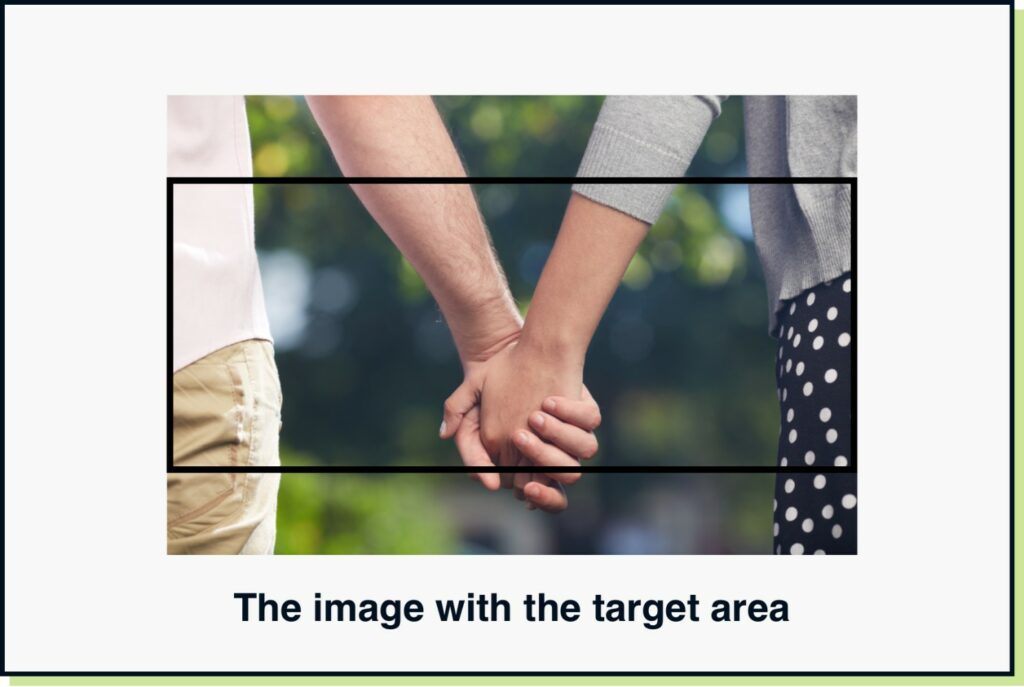
On many websites, banner or hero/header images will sit poorly or the focal point will be covered by text, as a standard image has been uploaded at a 4:3 ratio and left like that. It can really damage the visual impact and overall polish of a page.

Images that are stretched or cropped poorly, look amateurish, without changing the image focus points.

If you are creating digital display banners like leaderboards etc, you will no doubt find yourself placing an image and needing to fill the background with a colour, add a feathered gradient or just stretch the image and whack in a colour overlay.

This pain is real and shared by designers and marketers worldwide.

The image original size with the frame or target area size

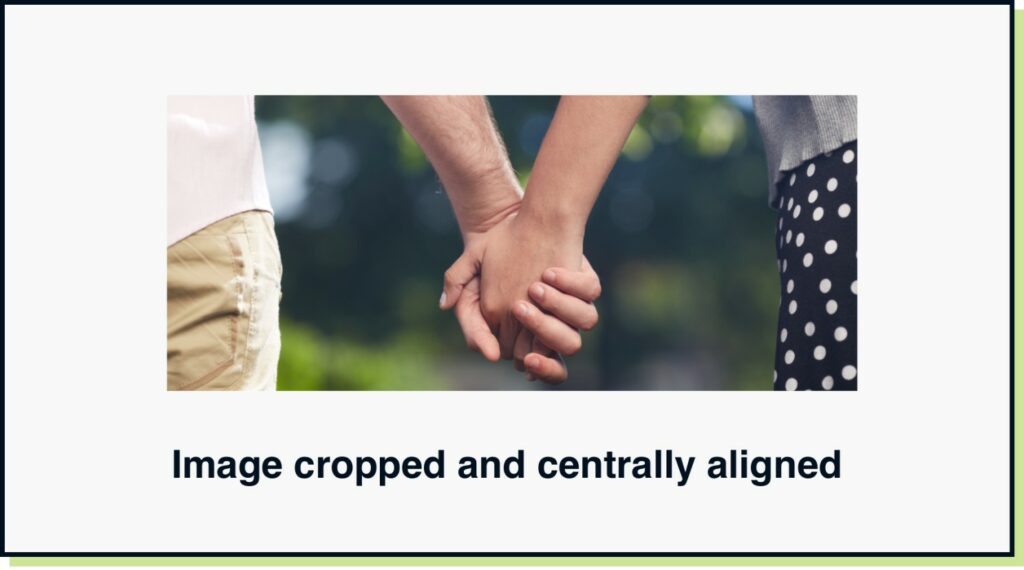
Image cropped inside the container and centrally aligned the focus point

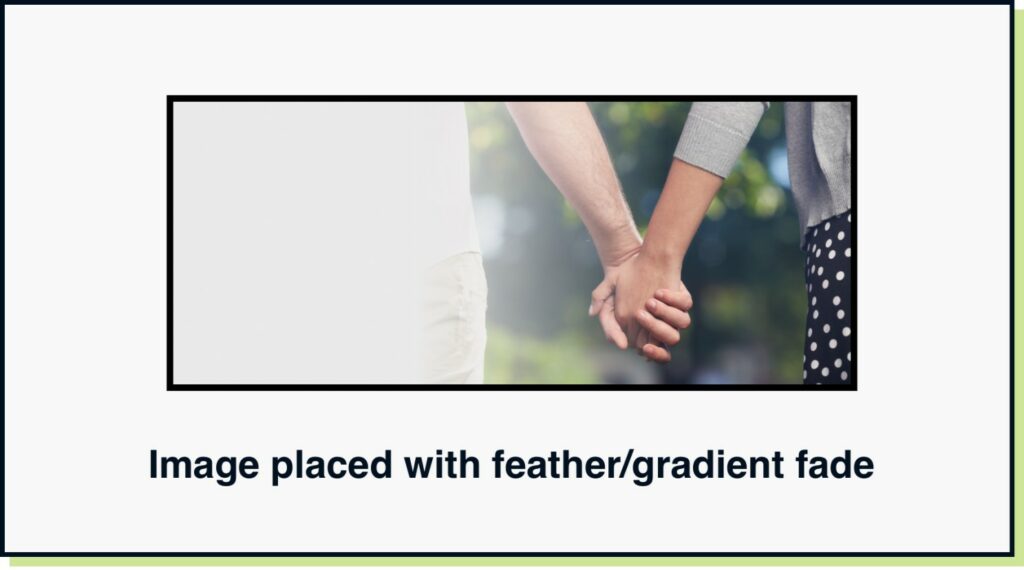
Image placed at its original aspect ratio with a gradient or feather edge to fill the space

So, What Is This Magic Solution?

On a project this week we needed to create some banners for desktop, and the focus point was slightly off centre. When uploading a regular sized photo, it was centralising and being covered with the content box.

Usually, in Photoshop we would create the banner size, place the image and manually create the background using some of the methods above.

Each image could take 15 minutes or longer, depending on what was included in the image.

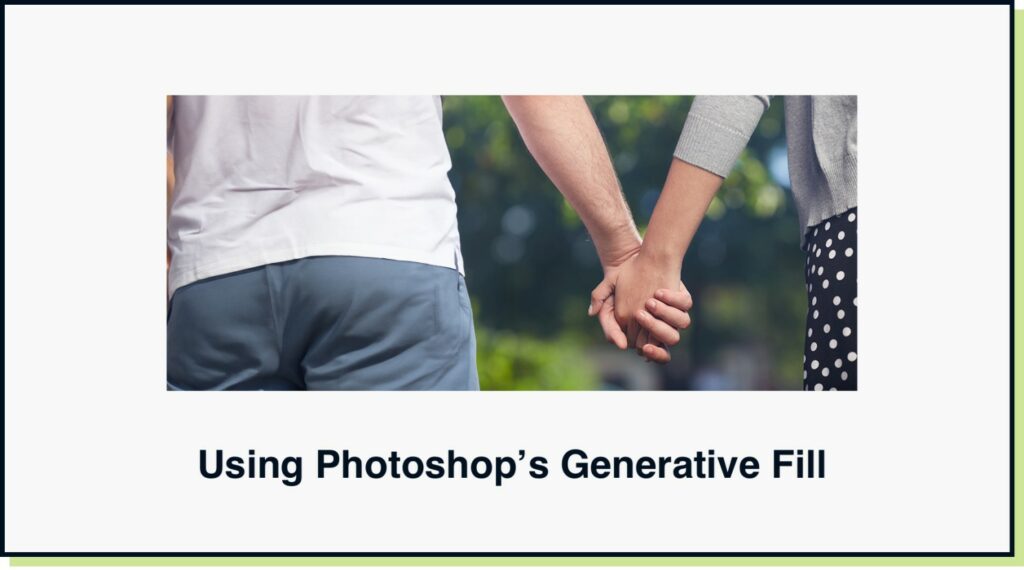
However, this time I set up my art board, dropped the image into the focal point, and explored using Generative Fill.

This created extensions to the images that were realistic and although not 100% in some cases, saved hours in a large batch of images. These images could be created in seconds, meaning that the time we’d usually spend in art working, could be used towards uploading and placing the images directly on the website.

Apply AI To Save Time

The term AI is being thrown round so much and it’s hard to actually determine what is actual intelligence and what is fluff. We got a brief sent to us recently that says ‘we want to use AI to do X Y Z’ and the expectation is that AI will magically just happen and there’s little work involved from us.

The reality is, there are some really powerful tools out-there which use AI (or more accurately, machine learning). But understanding how to use them, what will actually work and how to get the best of out those tools is the key.

With the rise of AI, this will doubtless save time on some of the lighter or time intensive tasks that we’d rather not do (clipping masks is another, Photoshop now does that fairly well, but still not as well as Remove.bg). Just as Photoshop saved the manual processing of graphic design in yesteryears (luckily before my time) the AI in Photoshop will no doubt be the next stage in evolution for design and marketing.

The AI used in Adobe Photoshop makes the software more relevant once again, where it was becoming a tool that was used less and less.

Photoshop drew the rest of the man using the prompt, 'draw the rest of the man'
Photoshop drew the rest of the man using the prompt, ‘draw the rest of the man’

So What’s To Swipe & Deploy?

Today’s key takeaway is to have a play with Generative Fill in Adobe Photoshop 2024, it can perform wonders in some cases and will save you time if you are struggling to make a certain image fit a certain shape or space.

You can use it for far more than just filling gaps, but I will let you do your own exploration. For me today it’s a tool that is perfect for extending photos and images for website banners and images. Tomorrow, who knows?

That’s a wrap for Swipe & Deploy 057 this week. Join me next time where I will share another insight or inspiration piece from around the web. 

A picture of James Coates.

If you’d like to learn more about our WordPress & WooCommerce Support & Maintenance plans, drop us an email or give James a call.

Our plans provide a holistic solution to your website’s performance, reliability and security, and are inclusive of premium tools and services.

button to visit contact page
Share Socially
James Coates
James Coates
UX & Web Strategist, Coffee Lover & Ex-Flower Arranging Champ
James is a UX specialist and is passionate about delivering better digital experiences. He provides insights on improving conversions, increasing sales and delivering more engaging content.
View Team Profile
See More Articles
James Coates
James Coates
UX & Web Strategist, Coffee Lover & Ex-Flower Arranging Champ
James is a UX specialist and is passionate about delivering better digital experiences. He provides insights on improving conversions, increasing sales and delivering more engaging content.
See More Articles
View Team Profile

If You Liked This, You Might Like These

Swipe & Deploy
August 22nd, 2025
6 min read

Human Checked Articles – When Getting Content Right...

Could adding verification by industry experts help build trust with your users, in a world where so much content is AI slop?

James CoatesJames Coates
 
Swipe & Deploy
August 11th, 2025
5 min read

Could You Create Video Stories On Your Product Category P...

A recent addition to the Oh Polly website went viral, and prompted this week's Swipe & Deploy. Could your brand take inspiration from Oh Polly for your own website?

James CoatesJames Coates
 
Swipe & Deploy
July 25th, 2025
7 min read

Why Saving A Basket Can Save A Sale

A look at how adding functionality for users to save their basket can remove friction and improve your chances of a sale.

James CoatesJames Coates
 
Want more control over
how you manage content in WordPress?
Edit content that was previously restricted and get creative with building pages in WordPress.
Let's Chat
studio@impactmedia.co.uk
020 3355 8747
Impact Media's LinkedIn
Impact Media's Twitter
Impact Media's Facebook
Impact Media's Instagram
Impact Media's Youtube
wordpress.org

About Impact

  • About Impact Media®
  • Meet The Impact Team
  • Why WordPress?
  • Our Web Development Process
  • Careers
  • Awards
  • Partners
  • Giving Back
  • 100K Tree Challenge

WordPress Services

  • WordPress Web Design
  • UX Design
  • WordPress Development
  • WordPress Evolve Retainers
  • WooCommerce Development
  • Multisite WordPress
  • Migrate To WordPress
  • Custom Integrations & Plugins
  • WordPress Consultancy

WordPress Support

  • WordPress Support & Maintenance
  • WordPress Managed Hosting
  • Case Studies
  • Insights
  • Contact Us

Addresses

London Address:

50 Liverpool Street,

London, EC2M 7PY, UK

+44 (0) 20 3355 8747


Registered Address:

Woodland Place, Hurricane Way

Wickford, SS11 8YB, UK

  • Privacy Policy
  • Cookie Policy
Impact Media logo
© Impact Media® 2003 - 2026
Impact Media is a trading name of IMDMS LTD. Company Reg. 05970261
Impact® & Impact Media®
are registered trademarks of IMDMS LTD