logo

WordPress Design Agency

020 3355 8747

Message Us
  • Home
  • About Impact®
    Learn More About Impact Media®
    • Meet The Team
       
    • Why WordPress
       
    • Careers
       
    • Giving Back
       
    • 100K Tree Challenge
       
    James Coates
    Schedule a discovery call with UX Specialist James
    Book A Call
  • WordPress Services
    Learn More About Our Services
    • WordPress Web Design
       
    • UX Design
       
    • WordPress Development
       
    • WordPress Support & Maintenance
       
    • WordPress Evolve Retainer
       
    • WordPress Multisite Development
       
    • WooCommerce
       
    • Replatform To WordPress
       
    • WordPress Consultancy
       
    • Integrations & Plugins
       
    • WordPress Managed Hosting
       
    • WordPress Health Check
       
    James Coates
    Schedule a discovery call with UX Specialist James
    Book A Call
  • Our Process
  • Case Studies
  • Insights
  • Contact Us
WordPress Design Agency
020 3355 8747
logo logo
Book A Call
Back
Menu
  • Home
     
  •  
    About Impact Media
    Learn More About The Impacters
    • Meet The Team
       
    • Why WordPress
       
    • Careers
       
    • Giving Back
       
    • 100K Tree Challenge
       
  •  
    Our Services
    Discover How We Can Help
    • WordPress Web Design
       
    • UX Design
       
    • WordPress Development
       
    • WordPress Support & Maintenance
       
    • WordPress Evolve Retainer
       
    • WordPress Multisite Development
       
    • WooCommerce
       
    • Replatform To WordPress
       
    • WordPress Consultancy
       
    • Integrations & Plugins
       
    • WordPress Managed Hosting
       
    • WordPress Health Check
       
  • Our Process
     
  • Case Studies
     
  • Insights
     
  • Contact Us
     
020 3355 8747
Mon - Fri • 9am - 5pm
Close

Oops! We could not locate your form.

Home / Insights / 2 Brands Getting The Online Checkout Process Right
Back

2 Brands Getting The Online Checkout Process Right

Published 18.05.21
18th May 2021
Last Updated 24.03.26
24th March 2026

Newer
7 Min Read
Vikki Baker
Vikki Baker
WooCommerce
Older
7 Min Read
 
Vikki Baker
Vikki Baker
 
WooCommerce

Let’s dive into the checkout processes for 2 online retailers, and find out what makes them so good for users.
image of website product page on laptop screen

In recent posts, I’ve spoken about the good, the bad and the ugly of online checkouts. So now let’s take a look at some businesses doing things right.

A good experience, especially the checkout process will win me over, and likely convert me into a returning customer.

Here are a couple of examples of eCommerce businesses that have impressed me with their buying experience, from the product page, through to the basket page and checkout.

Etsy

Not the typical online store, Etsy provides a platform for craft sellers to have a shop front for their small businesses. Taking a fee from sales.

Part of their success has been down to their excellent usability, strong checkout process, and informative product pages.

Let’s start with their product pages.

Obviously the quality of information is driven by store owner input, but the means to add that information easily is in place.

etsy product page
Etsy Product Page Example

  1. A big clear item photograph section, with space for multiple quality images. A potential buyer can get a good look at what they are considering buying, and the various versions of that item available.
  2. Price clearly listed, with a simple stock notification. A straightforward dropdown for picking customisable options, and a big CTA button to add to basket. They’ve also created a sense of urgency and exclusivity with the notification of how many people have the item in their basket. Even more effective for items with a limited stock.
  3. Prominent use of reviews with item and seller ratings.
  4. Item description, with pullout highlights for easy scanning.
  5. User reviews with user generated item photography. Really effective at showing the item unedited and in use or situ.
  6. Easy to read delivery information, including cost, returns policy and an estimated timeline.
  7. Meet the seller with a ‘message the seller’ button – creates a direct line with the seller and easy contact for questions or custom orders.

Now let’s look at the basket.

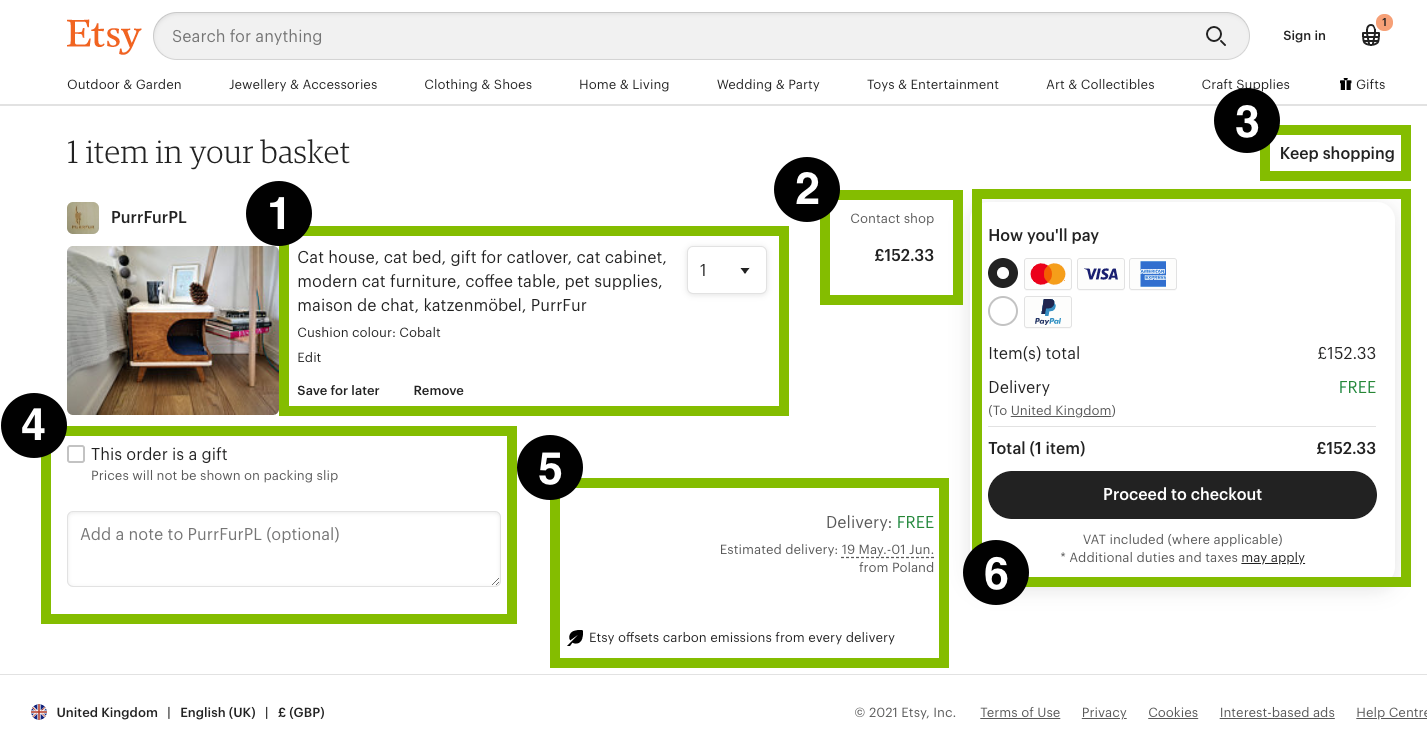
etsy basket page
Etsy Basket Example

  1. Easily remove the item, save it for later or change the quantity.
  2. The price and another link to contact the seller.
  3. A keep shopping button if you’ve navigated to the basket before you’ve finished browsing.
  4. Note to the seller, and ‘mark as gift’ so the invoice will be removed.
  5. Reconfirming the delivery cost and estimated date. A nice touch is the Etsy promise to offset carbon for every delivery. A very nice touch as sustainability becomes a bigger issue.
  6. A summary of the complete cost and ways to pay, with a blog clear CTA button to proceed to checkout. 

 Now let’s look at the checkout process.

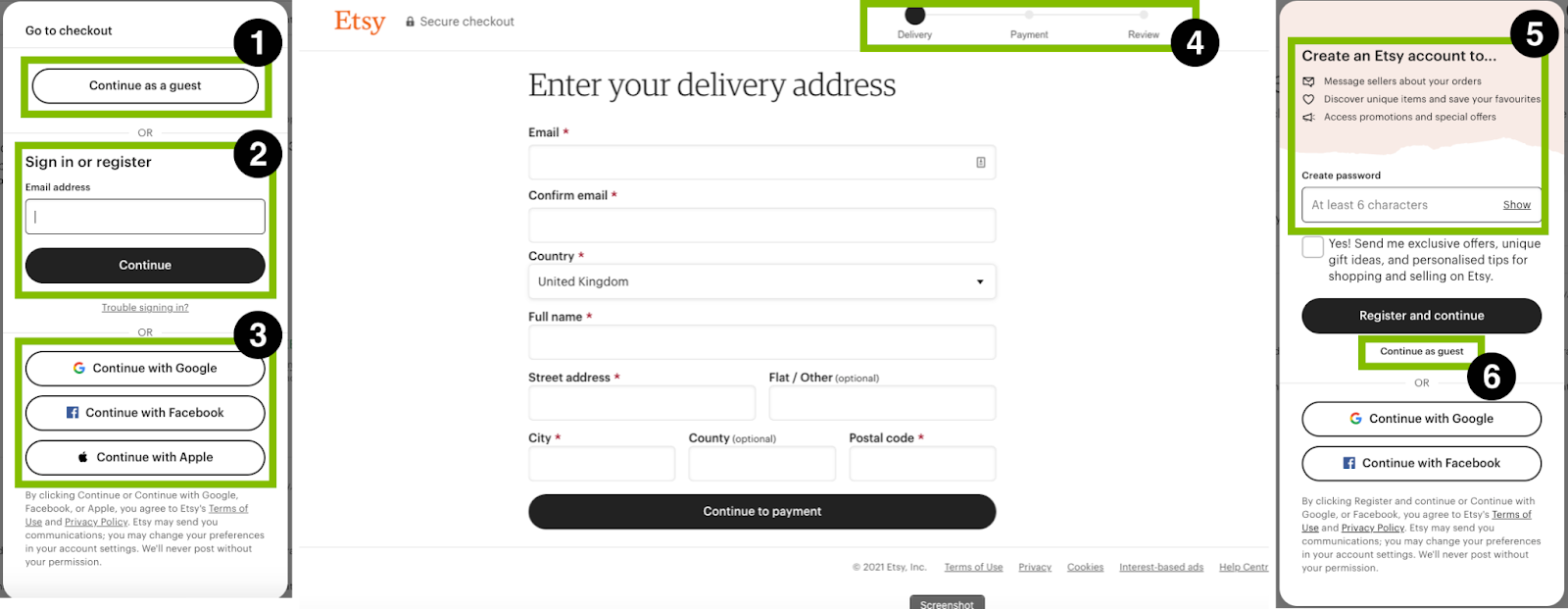
etsy checkout process 1
Etsy Checkout Example

  1. Checkout as guest option.
  2. Simple combined sign in or register.
  3. Alternative account creation options.
  4. Process bar.
  5. Secondary prompt to create account with just a password, with perks clearly outlined.
  6. Continue as guest.
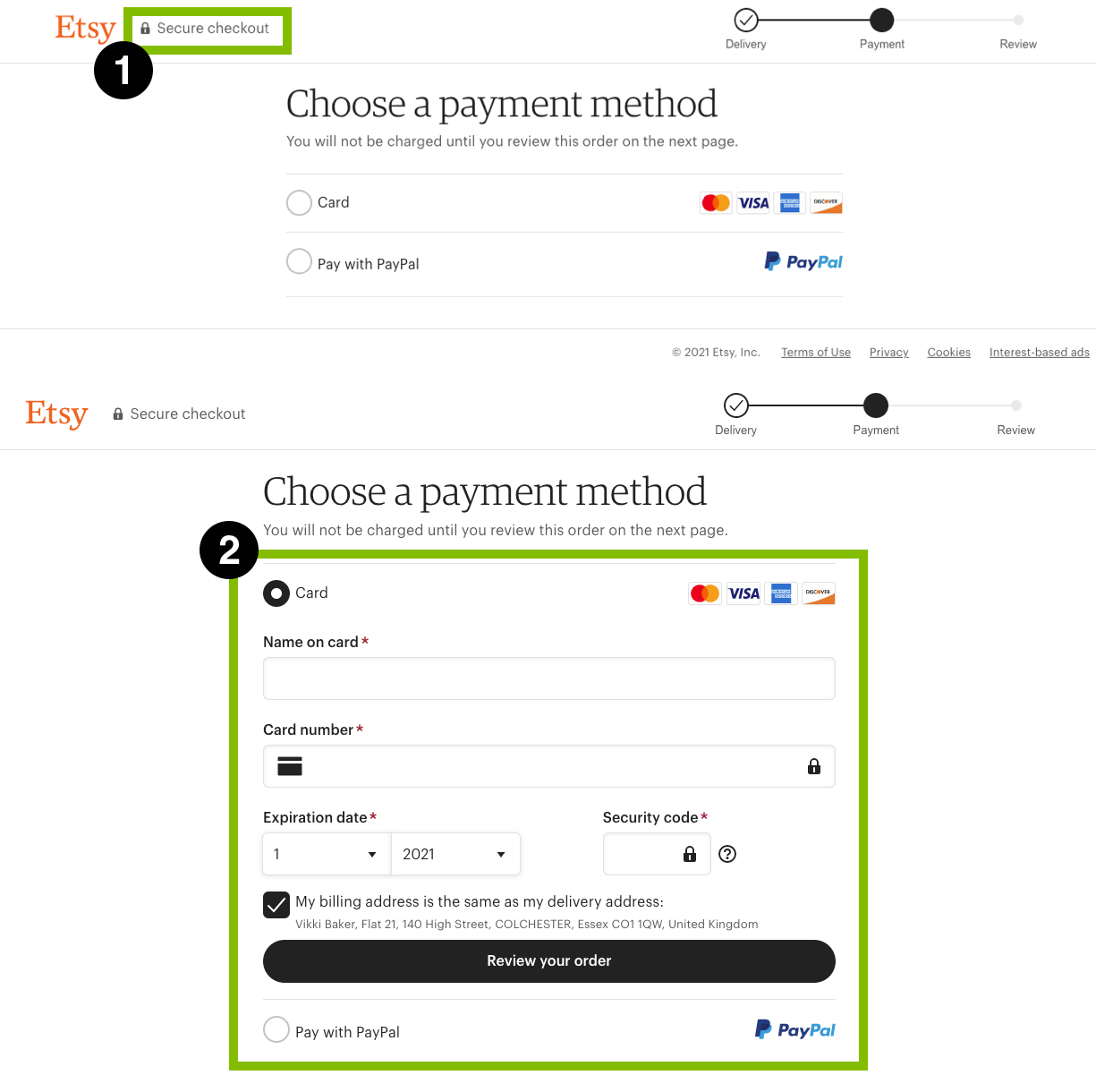
etsy checkout process 2
Etsy Payment Options Example

  1. Security badge for reassurance.
  2. On selection of payment option, input fields roll out below, so the user is not redirected to an additional page.

Paypal is one of the easiest ways of checking out, and many prefer it to directly entering their card details. Having it as an option for card payments can be great for your users. If they’re a Paypal user, they pop their login in and checkout is friction free.

Etsy does a really great job of product pages and their checkout process. They include nearly all of the points I raised in my last post. The user is presented with all of the relevant information in a clear and easily digestible way.

ASOS

ASOS have grown significantly since their early days of As Seen On Screen. Part of their success has been down to their approach to their product pages and their online checkout process

Let’s start with their product pages.

ASOS product page
ASOS Product Page Example

  1. High quality photography with multiple views. Although for this product, there are no photos of the item being worn which I would mark them down on. However, most of their products are shown on models.
  2. Clear pricing, information on delivery (although slightly misleading as you require a premium delivery subscription, or to spend over £35 for free delivery), and a big clear add to basket button.
  3.  Product information and care is listed below, including whether the item is true to size.

Next let’s look at their basket.

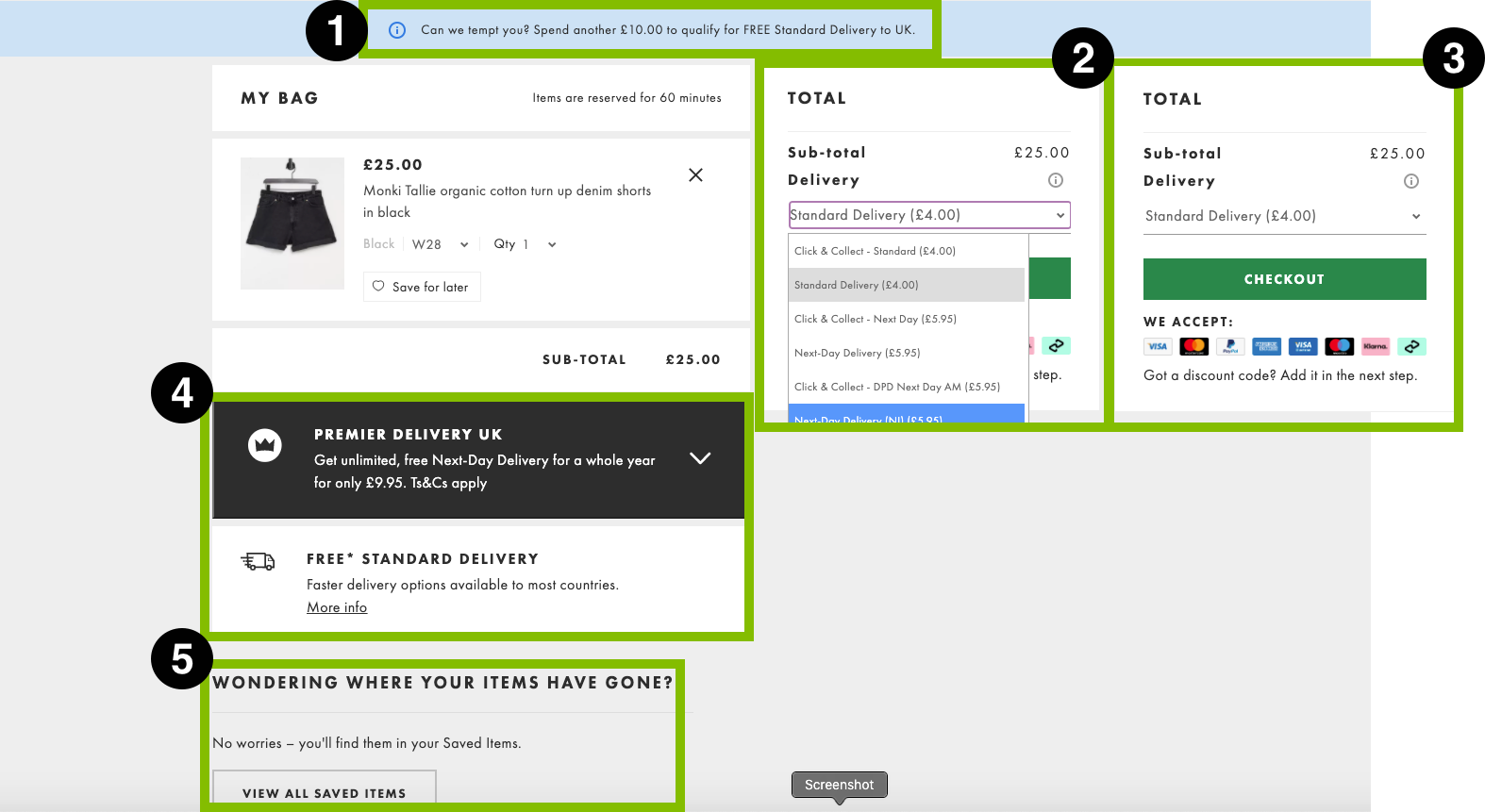
ASOS basket
ASOS Basket Example

  1. A tempting prompt that with only another few pounds, you can get free delivery.
  2. A selection of delivery options and costs.
  3. A total, big checkout button and demonstration of the many payment options available.
  4. Promotion of their Premium delivery subscription, which is easy to add to the basket from here.
  5. Easy access to saved items, in case you want to pop some additional items in your basket.

Now for their checkout process.

ASOS checkout process 1
ASOS Checkout Example

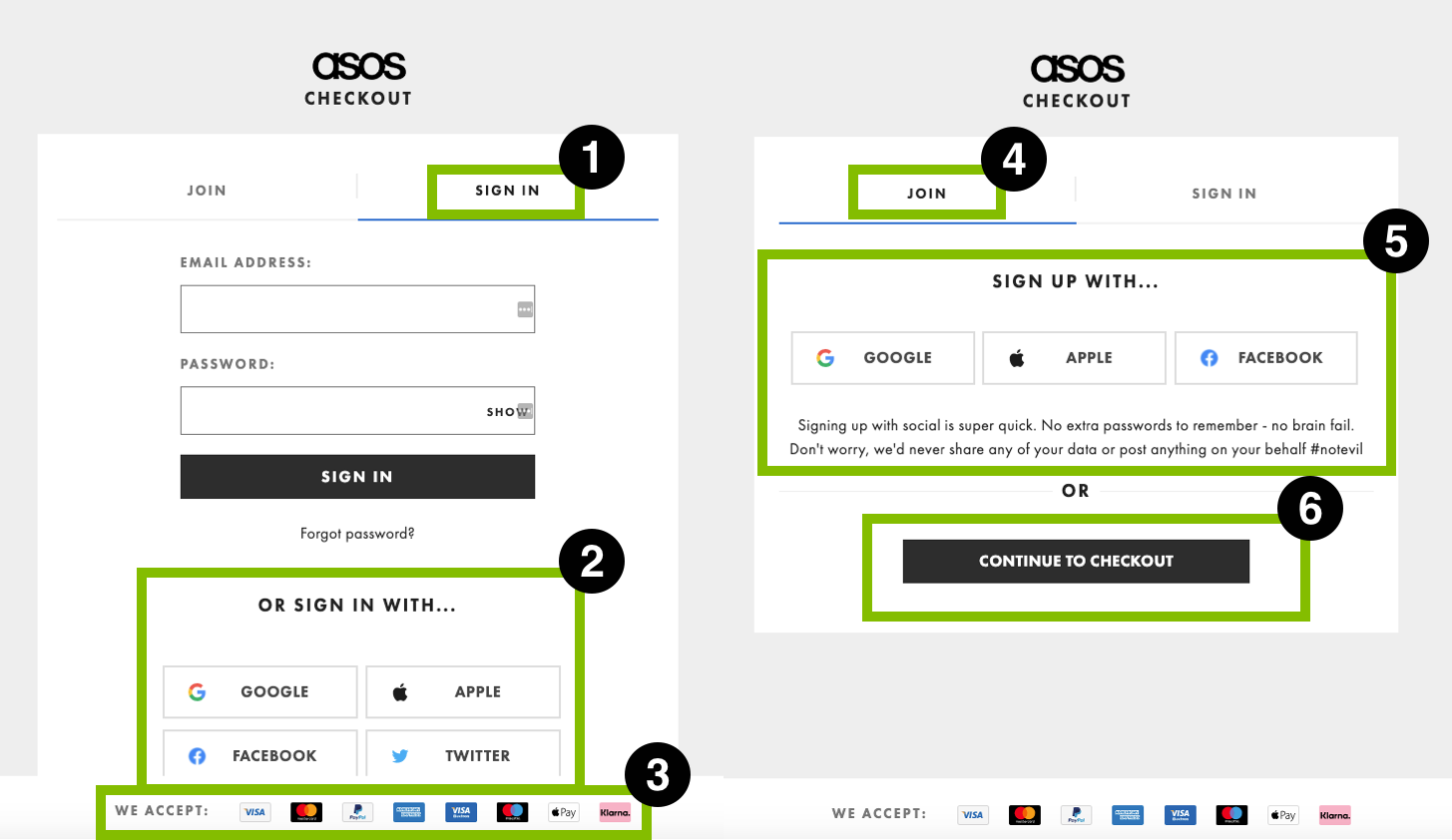
  1. For those whom already have an account, the tab you arrive on has a login in area.
  2. They give the option with logging in with alternative accounts.
  3. A reminder of the various payment options available to users.
  4. There is a second tab for new shoppers.
  5. Here you can create an account using alternative accounts.
  6. A guest checkout option!
ASOS checkout process 2
ASOS Payment Options Example

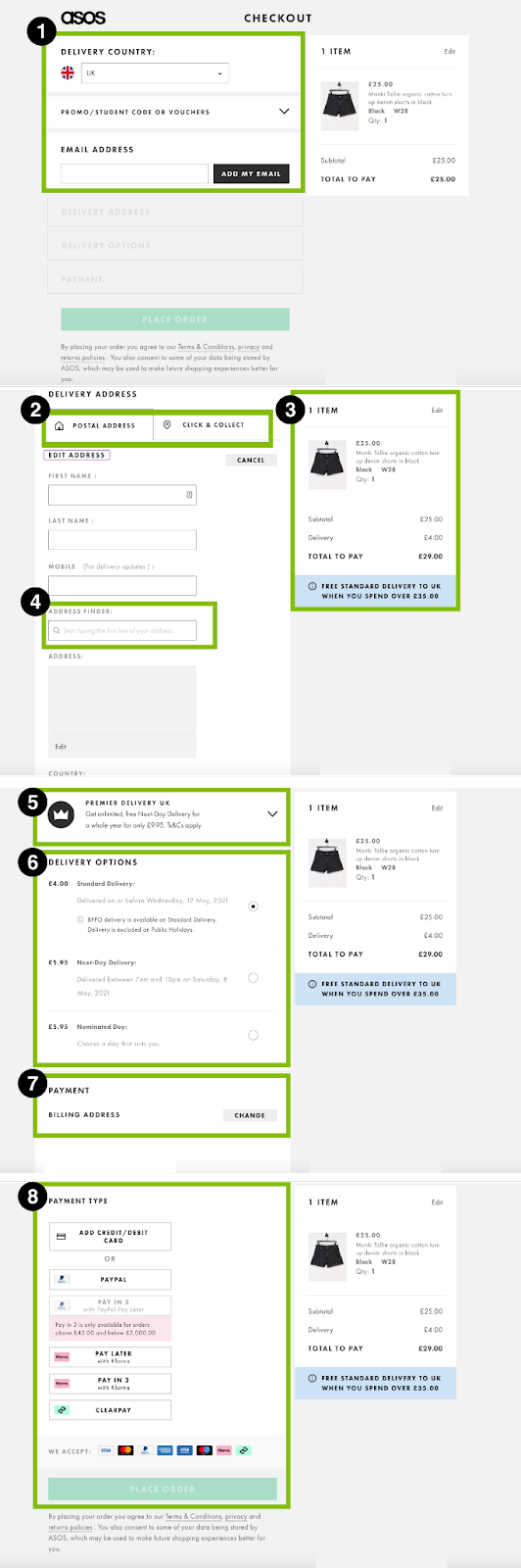
  1. Continuing with the guest checkout option, you have a country selector, easy input for voucher codes, and email address entry.
  2. You can select delivery, but also click & collect. Great to have this option for those not home to receive deliveries safely.
  3. A reminder of your basket with standard delivery added.
  4. Address lookup, hugely speeding up input (but not it can be manually edited for those with new builds which often aren’t available for a while through lookups).
  5. Another chance to add their premium delivery service to your order.
  6. Your delivery options should you wish something faster than standard.
  7. Billing address pulls through your delivery address, but can be easily edited.
  8. There are numerous payment options to suit almost anyone. 

This is a really nice example of a more typical (albeit large) eCommerce business having a well optimised checkout process. It is designed to be a simple experience for their users, but also allows for upsell of their additional services, and reminders of their free delivery limit, to encourage a little extra spending.

What Can We Learn?

Now you may think, well these are both giant companies with huge budgets, and you’d be right. But it is possible to learn a lot from these websites, and ensure we are implementing UX best practice when designing or optimising our own eCommerce websites, and checkout process. Although it is important to remember that this is talking about online retailers in a very generalised way. User research, CRO and testing are all important in identifying and optimising the checkout process for your unique audience.

If you’d like to see some of the eCommerce websites we’ve built, powered by WooCommerce, head over to our case study page. See how we transformed the purchasing and checkout experience for Don’t Buy Her Flowers, which placed as a finalist alongside some of the UK’s largest brands in the 2022 UK Dev Awards.

*screenshots used under fair dealing/fair usage for review purposes.

Share Socially
Vikki Baker
Vikki Baker
Digital Marketing Manager, Cat Lady & Former Female Indiana Jones
Vikki has over 15 years of experience in Digital Marketing for WordPress specialist agencies. She loves WordPress for its simplicity of use, huge flexibility, and how great it is for SEO.
View Team Profile
See More Articles
Vikki Baker
Vikki Baker
Digital Marketing Manager, Cat Lady & Former Female Indiana Jones
Vikki has over 15 years of experience in Digital Marketing for WordPress specialist agencies. She loves WordPress for its simplicity of use, huge flexibility, and how great it is for SEO.
See More Articles
View Team Profile
Want more control over
how you manage content in WordPress?
Edit content that was previously restricted and get creative with building pages in WordPress.
Let's Chat
studio@impactmedia.co.uk
020 3355 8747
Impact Media's LinkedIn
Impact Media's Twitter
Impact Media's Facebook
Impact Media's Instagram
Impact Media's Youtube
wordpress.org

About Impact

  • About Impact Media®
  • Meet The Impact Team
  • Why WordPress?
  • Our Web Development Process
  • Careers
  • Awards
  • Partners
  • Giving Back
  • 100K Tree Challenge

WordPress Services

  • WordPress Web Design
  • UX Design
  • WordPress Development
  • WordPress Evolve Retainers
  • WooCommerce Development
  • Multisite WordPress
  • Migrate To WordPress
  • Custom Integrations & Plugins
  • WordPress Consultancy

WordPress Support

  • WordPress Support & Maintenance
  • WordPress Managed Hosting
  • Case Studies
  • Insights
  • Contact Us

Addresses

London Address:

50 Liverpool Street,

London, EC2M 7PY, UK

+44 (0) 20 3355 8747


Registered Address:

Woodland Place, Hurricane Way

Wickford, SS11 8YB, UK

  • Privacy Policy
  • Cookie Policy
Impact Media logo
© Impact Media® 2003 - 2026
Impact Media is a trading name of IMDMS LTD. Company Reg. 05970261
Impact® & Impact Media®
are registered trademarks of IMDMS LTD