logo

WordPress Design Agency

020 3355 8747

Message Us
  • Home
  • About Impact®
    Learn More About Impact Media®
    • Meet The Team
       
    • Why WordPress
       
    • Careers
       
    • Giving Back
       
    • 100K Tree Challenge
       
    James Coates
    Schedule a discovery call with UX Specialist James
    Book A Call
  • WordPress Services
    Learn More About Our Services
    • WordPress Web Design
       
    • UX Design
       
    • WordPress Development
       
    • WordPress Support & Maintenance
       
    • WordPress Evolve Retainer
       
    • WordPress Multisite Development
       
    • WooCommerce
       
    • Replatform To WordPress
       
    • WordPress Consultancy
       
    • Integrations & Plugins
       
    • WordPress Managed Hosting
       
    • WordPress Health Check
       
    James Coates
    Schedule a discovery call with UX Specialist James
    Book A Call
  • Our Process
  • Case Studies
  • Insights
  • Contact Us
WordPress Design Agency
020 3355 8747
logo logo
Book A Call
Back
Menu
  • Home
     
  •  
    About Impact Media
    Learn More About The Impacters
    • Meet The Team
       
    • Why WordPress
       
    • Careers
       
    • Giving Back
       
    • 100K Tree Challenge
       
  •  
    Our Services
    Discover How We Can Help
    • WordPress Web Design
       
    • UX Design
       
    • WordPress Development
       
    • WordPress Support & Maintenance
       
    • WordPress Evolve Retainer
       
    • WordPress Multisite Development
       
    • WooCommerce
       
    • Replatform To WordPress
       
    • WordPress Consultancy
       
    • Integrations & Plugins
       
    • WordPress Managed Hosting
       
    • WordPress Health Check
       
  • Our Process
     
  • Case Studies
     
  • Insights
     
  • Contact Us
     
020 3355 8747
Mon - Fri • 9am - 5pm
Close

Oops! We could not locate your form.

Home / Insights / Yoast: Social Page Sharing Done Right
Back

Yoast: Social Page Sharing Done Right

Published 21.06.21
21st June 2021
Last Updated 19.07.23
19th July 2023

Newer
5 Min Read
James Coates
James Coates
WordPress
Older
5 Min Read
 
James Coates
James Coates
 
WordPress

Take control of your preview images when sharing your WordPress pages and posts on social media. A 4 minute video can teach you how to change the image within the Yoast SEO plugin for WordPress.

social media

Originally posted in July 2018. Updated in June 2021 to add new features, and update stats.

Scrolling through LinkedIn recently I witnessed a recruitment agency who are pretty frequent with posting their job roles, not capitalising on customising the open graph or preview image that appears when their page was shared on social media.

What Image Am I Talking About?

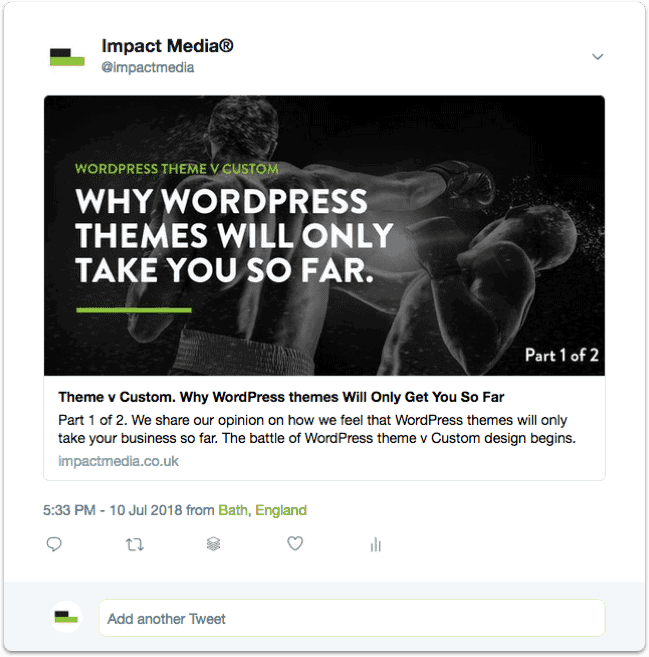
yoast social image
Example Of Preview Image

The image is pulled from the website and unless selected by the website owner, the social channel will automatically choose an image to use from the website – this maybe the hero image or in the example case I have been discussing; the company logo.

Now what’s the problem with sharing the company logo you ask? Well nothing, as it is great brand awareness, however in a sea of images a repetition of several posts in a row will just become noise.

With nothing to fight for your attention, the image actually becomes fairly redundant. There is also a strong chance that it won’t fit the image size requirements for the social platform in question, and appear stretched or skewed.

With this WordPress tip, we want to show how you can make more of an impact on your social channels, when sharing pages from your WordPress website.

Before watching the video, please note we are recommending using Yoast SEO plugin, you can achieve the same results with the Free version, you don’t necessarily need to upgrade to the pro.

What Is Yoast?

Chances are if you have a WordPress website, you have this plugin installed. Yoast has been downloaded more than 330 million times. If you have ever wondered what it was, then this is only a snippet of how it can help your website.

If you’re not familiar with it at all – then it is a SEO plugin for WordPress that allows you to customise individual page titles, meta descriptions and more.

What you need to know is that SEO and digital marketing agencies love using it, as it makes their job quicker and easier. So if you haven’t got it yet feel free to get in touch we can help install it, if you cannot or would rather not do this yourself.

How To Customise Video

Customising Video

5 Benefits Of Customising The Image?

1. Capture The Reader’s Attention

Although you no doubt always customise the wording in your social post, images actually gain more attention. Scroll through your newsfeed, what grabs your attention first? The copy or the image?

2. Add Text To The Image

Provide a reinforcement of your message by including some of the messaging within the image. Bear in mind that Facebook’s 20% text rule still applies, so if you’re sharing on Facebook keep the text within a safe 20% zone.

3. Make Your Images Clickable

When you share an image directly, on click Facebook, Twitter and Linkedin all enlarge the image, if you were to embed the image within the link, when the user clicks the image, they are directed to your website.

4. Add A Visual Call To Action

By customising the image, you can design a call to action or button within the image, increasing the chances of users clicking the image to visit your page.

5. Provide Visual Variety

By changing your image for every page you share, you can break free of the constant noise, and like the recruitment agency mentioned above, provide your followers with fresh and relevant messaging related to the page that are trying to direct them to.

New Premium Social Features

As of June 2021, with the release of version 16.5 of Yoast, even more great features for social sharing have been added to the Premium version.

Not only do you now have control over how your images, titles and descriptions for blog posts and pages appear when shared on social media (available in the standard version) and Social Previews (Premium).

Yoast have now provided you with added Social Appearance Templates (Premium), so you can control the appearance for author, archive, and post type pages, when shared on social platforms.

You will now be able to create a default social template for every page, taxonomy, archive and custom post type, saving lots of time for those with large sites, as creating them individually would take an age. T

hanks to these Social Appearance Templates, it’ll be a great deal simpler and you’ll finally have control over the appearance of everything on your site when shared on social media. Say goodbye to unattractive images when you or someone else shares any of your non-standard pages or posts.

Summary

Yoast is a fantastic plugin and one we always install within every new WordPress build. It is well-supported and regularly updated, making it a superb choice for your WordPress SEO. You can read more about Yoast and its features here.

Share Socially
James Coates
James Coates
UX & Web Strategist, Coffee Lover & Ex-Flower Arranging Champ
James is a UX specialist and is passionate about delivering better digital experiences. He provides insights on improving conversions, increasing sales and delivering more engaging content.
View Team Profile
See More Articles
James Coates
James Coates
UX & Web Strategist, Coffee Lover & Ex-Flower Arranging Champ
James is a UX specialist and is passionate about delivering better digital experiences. He provides insights on improving conversions, increasing sales and delivering more engaging content.
See More Articles
View Team Profile

If You Liked This, You Might Like These

WordPress
wordpress logo
August 20th, 2026
7 min read

WordPress 7.1 – What’s New In WordPress Core

WordPress Core version 7.1 was released on August 19th. Here's a quick summary of some of the main changes and updates.

Vikki BakerVikki Baker
 
WordPress
wordpress logo
May 27th, 2026
9 min read

WordPress 7.0 Is Here – Is Your Website Ready?

The biggest update to the world's most popular CMS in years has landed, and it changes more than just the editor.

Martin CoatesMartin Coates
 
WordPress
April 1st, 2026
9 min read

The Benefits Of Choosing A Specialist WordPress Agency Ov...

When your business reaches a certain scale, your website stops being a simple marketing tool and becomes a critical piece of infrastructure.

Rommel PlofinoRommel Plofino
 
Want more control over
how you manage content in WordPress?
Edit content that was previously restricted and get creative with building pages in WordPress.
Let's Chat
studio@impactmedia.co.uk
020 3355 8747
Impact Media's LinkedIn
Impact Media's Twitter
Impact Media's Facebook
Impact Media's Instagram
Impact Media's Youtube
wordpress.org

About Impact

  • About Impact Media®
  • Meet The Impact Team
  • Why WordPress?
  • Our Web Development Process
  • Careers
  • Awards
  • Partners
  • Giving Back
  • 100K Tree Challenge

WordPress Services

  • WordPress Web Design
  • UX Design
  • WordPress Development
  • WordPress Evolve Retainers
  • WooCommerce Development
  • Multisite WordPress
  • Migrate To WordPress
  • Custom Integrations & Plugins
  • WordPress Consultancy

WordPress Support

  • WordPress Support & Maintenance
  • WordPress Managed Hosting
  • Case Studies
  • Insights
  • Contact Us

Addresses

London Address:

50 Liverpool Street,

London, EC2M 7PY, UK

+44 (0) 20 3355 8747


Registered Address:

Woodland Place, Hurricane Way

Wickford, SS11 8YB, UK

  • Privacy Policy
  • Cookie Policy
Impact Media logo
© Impact Media® 2003 - 2026
Impact Media is a trading name of IMDMS LTD. Company Reg. 05970261
Impact® & Impact Media®
are registered trademarks of IMDMS LTD