logo

WordPress Design Agency

020 3355 8747

Message Us
  • Home
  • About Impact®
    Learn More About Impact Media®
    • Meet The Team
       
    • Why WordPress
       
    • Careers
       
    • Giving Back
       
    • 100K Tree Challenge
       
    James Coates
    Schedule a discovery call with UX Specialist James
    Book A Call
  • WordPress Services
    Learn More About Our Services
    • WordPress Web Design
       
    • UX Design
       
    • WordPress Development
       
    • WordPress Support & Maintenance
       
    • WordPress Evolve Retainer
       
    • WordPress Multisite Development
       
    • WooCommerce
       
    • Replatform To WordPress
       
    • WordPress Consultancy
       
    • Integrations & Plugins
       
    • WordPress Managed Hosting
       
    • WordPress Health Check
       
    James Coates
    Schedule a discovery call with UX Specialist James
    Book A Call
  • Our Process
  • Case Studies
  • Insights
  • Contact Us
WordPress Design Agency
020 3355 8747
logo logo
Book A Call
Back
Menu
  • Home
     
  •  
    About Impact Media
    Learn More About The Impacters
    • Meet The Team
       
    • Why WordPress
       
    • Careers
       
    • Giving Back
       
    • 100K Tree Challenge
       
  •  
    Our Services
    Discover How We Can Help
    • WordPress Web Design
       
    • UX Design
       
    • WordPress Development
       
    • WordPress Support & Maintenance
       
    • WordPress Evolve Retainer
       
    • WordPress Multisite Development
       
    • WooCommerce
       
    • Replatform To WordPress
       
    • WordPress Consultancy
       
    • Integrations & Plugins
       
    • WordPress Managed Hosting
       
    • WordPress Health Check
       
  • Our Process
     
  • Case Studies
     
  • Insights
     
  • Contact Us
     
020 3355 8747
Mon - Fri • 9am - 5pm
Close

Oops! We could not locate your form.

Home / Insights / What’s A WordPress Plugin, Why Are They Used And Should You Use One?
Back

What’s A WordPress Plugin, Why Are They Used And Should You Use One?

Published 16.08.24
16th August 2024
Last Updated 14.07.26
14th July 2026

Newer
16 Min Read
James Coates
James Coates
WordPress
Older
16 Min Read
 
James Coates
James Coates
 
WordPress

This article will deliver a crash course in WordPress plugins and fill in the knowledge gaps for marketers. We hope to help you make confident decisions in saying yes or no to your developer or agency when discussing plugins.


You may be viewing this page because you’ve been told that a WordPress plugin is out of date or your agency/developer are going to be using a plugin to deliver some type of functionality on your website.

You may be curious to understand what a plugin even is and why and when they are used. If that’s the case then this article is certainly for you.

We’ll explain exactly that, whilst also delivering our philosophy of when they should be used and when they should be avoided.

What Is A WordPress Plugin?

First and foremost, what is a plugin?

In simple terms, a plugin is a piece of code that you, your developer or agency can install (or plug) into your website. This is to deliver a level of functionality without investing the time and budget for developing the code from scratch.

Many websites and tools allow for plugins or add-ons to be included, whether created by the CMS, tool provider, or even independent third parties. By allowing for plugins to be used, a marketplace can be launched and a community can thrive regardless of framework. 

These developers or companies can create extensions that can be be shared freely or for commercial purposes, and in doing so save larger up front costs and reduce time to get a feature to market.

Tools such as Google Workspace, Google Chrome and HubSpot allow for add ons or extensions to be installed which allow the user to customise their personal experience. With websites it’s no different.

WordPress is just another one of these tools that is known for being extended in this way, and ultimately the word plugin is usually associated with WordPress. Although other content management systems will also use plugins or add ons to extend functionality.

How Does A WordPress Plugin Work?

Plugins are snippets of code that operate in a silo or independently to the main website code, that when added to the website allow for a certain action or functionality to happen. They are usually installed by admin users within the main dashboard of WordPress, and don’t usually require a code push or FTP access to the website files. Meaning non developers can install and configure plugins.

“Marketers and non developers when they install a plugin”

The advantages of plugins operating in this way is they can be deactivated or activated rapidly. However, for the plugin to work effectively and function correctly, it needs to be compatible with other plugins installed and the current version of WordPress site in using, as well as the baseline theme code.

There’s a few caveats though.

Many people searching for quick wins for certain actions may choose a plugin. But each plugin, if you imagine, may be created by a different agency or team with different development standards.

Each plugin’s code is the responsibility of the plugin developer or agency. They will (should) be performing maintenance and security updates, which depending on whether the plugin is paid or free, your website will want to take advantage of.

All these snippets of code, potentially written in different ways or in older versions of code, can cause compatibility issues. This is not always the case, and I am giving you a worst case scenario.

Is A Plugin ‘Plug & Play’ Or Will They Require Further Development To Function?

In many cases a plugin is unfortunately not plug and play. Some require some deep configuration to ensure they function as needed. Styling the plugin to coordinate with the website’s branding is one aspect that may need to be configured, and some plugins have a settings area that will allow you to do this.

Some plugins like Elementor, Divi, and Visual Composer can allow you to radically change your entire website, all from the dashboard area. So potentially no development required after installation, however this would be the configuration setup that will be required to be completed. This could be achieved without developer experience if you’re tech savvy and patient enough.

But there are a number of plug and play plugins available, many of which deliver very simplistic features. But a large majority of plugins would require some level of configuration, even if it’s adding an API key or login credentials with the plugin provider to activate, for example a plugin like Hubspot.

Are All Plugins Free Or Paid?

There are currently 59,000 plugins available for free on the WordPress repository, meaning that anyone with admin level privileges can install a plugin onto their website from the official WordPress library.

Many of them are free, but with limited options that can be fully activated with a premium paid licence, whether monthly or annually. Ultimately the plugin library or marketplace becomes an opportunity for plugin developers to advertise their product (the plugin) to their ideal customers, WordPress users.

Plugins are not just available from the WordPress repository alone. Popular online market places such as Envato exist, where you will come across many premium or paid for plugins.

Should We Only Use Plugins To Build Website Functionality? Seems A Faster And Cheaper Way.

Many developers use this methodology to achieve the desired website functionality, however, the more pieces of code you have loading on your website, the longer it will likely take to load. Also, the greater chance of complications occurring that may be caused by incompatibility issues.

We’ve taken on the maintenance of some websites with 70+ plugins in the past, and they can still be fully functional. So don’t panic thinking your website might have too many. It’s not simply how many you have, it’s how they all work together.

We do advise though, that plugins are not used when a feature or level of functionality can be coded relatively easily. I’ve encountered websites that use a plugin to add a phone number to a header or add social media links, which is plain lazy if a real developer has implemented it. That or they’ve been given zero budget to carry out any work.

Is It Safe And Secure To Use A Plugin?

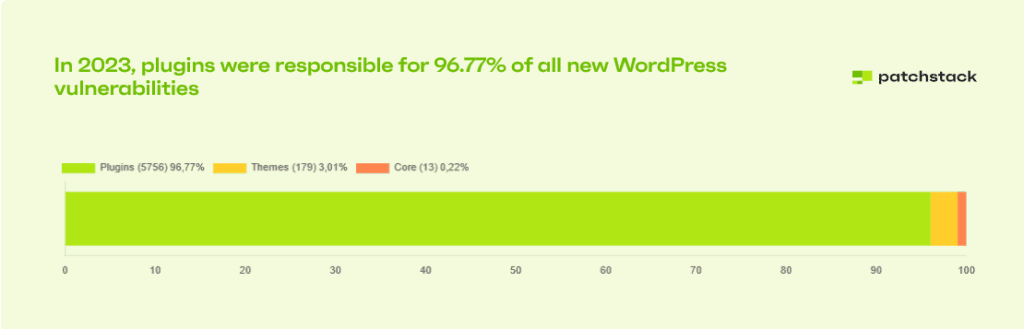
In Patchstack’s 2023 State Of WordPress Security whitepaper, it’s reported that for 96.77% of all new WordPress vulnerabilities, plugins were responsible. Now this doesn’t necessarily build confidence, but what it actually demonstrates is the importance of using quality plugins and updating and maintaining them, which is the key to security.

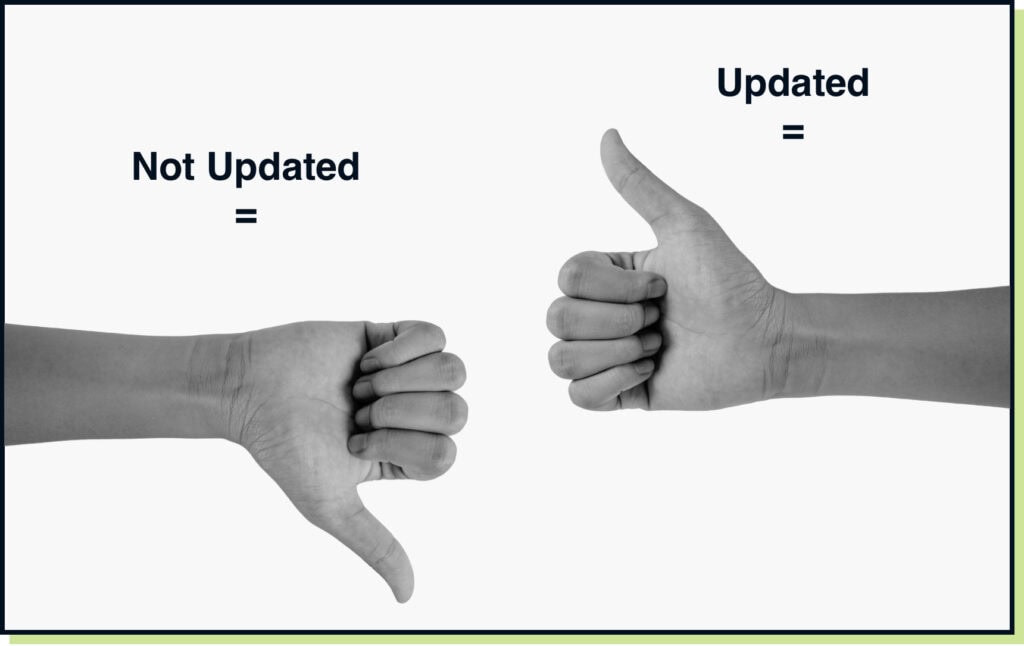
Golden rule is Updating Plugins = Good, Not updating plugins = Bad

Reputable developers providing plugins will be pushing constant updates and resolving bugs as part of their subscription fee.

So whether it’s yourself, your developer or your agency, plugins will need to be kept up to date if you want to retain website security and performance.

With plugins and extensions, regardless of platform or ecosystem, those kept up to date are the most secure. Those that are not up to date become the most vulnerable.

Do WordPress Plugins Require Updating And Maintaining And How Often?

Consider Microsoft Windows and all the security updates or version upgrades your system has had over the years. Code, whether software or web, will require updates and WordPress and its plugin ecosystem is no different.

As I write this, Yoast, a popular WordPress plugin has been updated 17 times in the past 8 months (see their changelog). Not all plugins are this active, but there’s little chance you could ever set one up and forget about it.

Like any independent piece of code or software, updates happen and improvements are made. Bugs are ironed out and these updates are generally made available whether that is free or paid.

Depending on whether the plugin provider is pushing new features or a security release, all depends on how responsive to issues and feedback the provider is. My example, Yoast, is one of the top 4 Plugins downloaded from WordPress with over 10 million installations, so their team are constantly iterating.

Other plugin providers, might push an update solely when enough people have reported an issue, or when a vulnerability is discovered and a security update is required.

As a rule, as soon as an update for a plugin is released, you should ideally look to update it. But depending on how your website has been built and what other connected systems and services are included, testing the update first before rolling it out on your live website is important.

Not all plugins will be compatible, so simply pressing ‘update all’ might put you in a tight spot. As a marketer, giving responsibility of updates to your agency or developer is better, as they will be the ones fixing the issue if anything breaks. Rather than it happening to you!

How Are Plugins Updated?

Depending on how your website is setup and how your agency or developer performs updates, updates can be carried out in a few different ways.

  1. Directly in the plugin directory on your website. For many independent developers this would be their go to. As they can simply press the update button a viola, the plugin speaks to the repository to fetch the update and the magic has happened. This process would usually be the used for many of the free plugins from the WordPress repository.
  2. Using a third party WordPress Management Tool. Most agencies will manage multiple websites, and to make plugin management and updates faster and easier, a tool that has access to each of their websites can be used to make direct updates from the tool. Rather than having to log into each of the websites individually. This is the approach used by many agencies and even some independent developers.
  3. Code pushing plugin updates. Done if the setup of the website doesn’t allow for the management tools mentioned above, or the plugins are premium or extended and require a code push to carry out these updates. This is less common, but a scenario that can take longer and no doubt cost more in maintenance time with your developer or agency.

I cannot end here without quickly discussing automatic updates, which is a feature rolled out in WordPress several years ago. We personally are not fans of auto updates due to the type of enterprise websites we manage having many moving parts. Automatically updating tools without vigorous testing has the risk of downtime or broken functionality, which for many of our clients would be devastating.

However, if your site is relatively simple and you’re managing it yourself, then turning on auto updates is better than forgetting to login and update them. We’d only recommend this approach on simple websites or for lower traffic websites.

The critical thing here again is keeping plugins up to date. So if you are happy to risk auto updates, then this is far better than not updating at all. But if you have a developer or agency performing updates for you, then allowing them to run autoupdates on a staging environment before allowing them to be updated on the live production could be the solution here.

How Do We Know Plugins Need Updating?

WordPress is very good at informing you in the dashboard or plugin directory that an update is ready. It lets you know what the latest version is, and allows you to see which version you are on, highlighting how many updates you are behind by.

This is the case for most plugins, especially those downloaded directly form the WordPress repository, as this is constantly communicating with the repository on new updates.

What it may not tell you is if updates are available on premium plugins or custom made plugins. For these you will mostly likely need to visit the plugin providers website or you may receive email updates from providers with change log information, telling you what the update is for and whether it’s a security update or general maintenance or bug fix.

Another benefit of having an agency or developer carrying out these updates on your behalf is that you don’t need to worry, it’s their responsibility to handle this for you.

How Do We Know If A Plugin Is Vulnerable And What Can We Do?

We use a platform called Patchstack which sends us notifications on any websites we manage with vulnerable plugins. With this being monitored we can immediately patch a vulnerability even if the plugin provider hasn’t released an update yet.

A security plugin like Wordfence may also notify you, as well as the website management tools I mentioned that agencies often use. They all tend to utilise the WPSCAN plugin vulnerability table, which can be seen here. But you will need to pay for the solution if you want updates on specific plugins you use, without having to crawl through pages of data.

Once again, if you’re using an agency like Impact, they will do this for you and you will not have to worry.

Aside from these, we would also recommend using a cloud-based Web Application Firewall like Cloudflare or Sucuri to screen all traffic coming to the website. Any bad actor trying to exploit a vulnerability will be caught at the firewall level and not allowed on the website.

What Happens If They Are Not Updated Or Maintained?

This is where plugins can fall down. Your site could be well maintained but an important plugin that is unloved and no longer supported could begin to affect the website, whether through security vulnerabilities or visual or functional issues.

If the plugin cannot be replaced with a like for like solution (bare in mind some configuration will be required even if you can) then you will either need to develop the code required to deliver the functionality direct in the website, or extend the plugin beyond of it’s original intention. I’ve covered some more about this below.

Can We Use A Plugin As A Starting Point And Extend To What We Want?

It is possible extend a plugin and add and amend your own features, however, we wouldn’t necessarily recommend it. The only times we have encountered this situation are when a plugin became incompatible with other plugins or other integrations, and the provider was AWOL or didn’t want to make the suggested changes.

We had a website that was using a membership plugin and that membership plugin couldn’t handle the high number of active members or controls that the client and our team were demanding. In short, the support of the plugin or the team developing it weren’t equipped to make agile changes or growth changes, to ultimately improve their product. So we developed this outside of their original plugin environment and extended it to implement the required features.

In doing so, the plugin was no longer part of the WordPress repository, or actively getting updates from the plugin provider. Our team now takes responsibility for the code and pushing updates along with general theme or code updates when our team deploys them.

The downside to this is, the plugin will no longer receive any further updates, and so we are responsible to ensure that the plugin is kept vulnerability free and secure. If it were to have continued receiving updates, they would have overwritten any changes to the plugin we have made.

Long story short, you can amend a plugin if you really need to, but using one as potentially as a starting point should be avoided. If you’re going to further develop something, having a clean slate will give you more potential for scaling in the future.

When To Choose A Plugin And When To Avoid Them.

Depending on how your website is or is going to be built, this can come down to time required and budget. Is there budget to build the feature you want directly into the website theme? Is there time to build the feature by the time you need to have it by? Is there both?

In many cases the answer might be no. With the agile world we live in everything was needed yesterday and there’s no budget. So they are the two key deciders as to why you should choose a plugin. No time or no budget.

We object to installing plugins for the sake of being lazy, if there’s time and budget to create relatively simple features. In these cases you should avoiding installing a plugin for delivering this action.

However, if the functionality you want is going to take far too long to develop or cost far too much to create, then a plugin is certainly the answer.

We recommend only installing plugins that you simply wouldn’t dream of investing the time or budget in creating. Where an established market leader is already active and has already done the work for us and is selling the service/tool for a fraction of what it would cost to develop from the ground up.

Key examples here are Yoast, the popular SEO plugin, and Gravity Forms, a form creation tool. These are 2 plugins that we always use in nearly every website we build. The teams that create them are well established, large and constantly evolving their tools and providing security and maintenance updates.

For someone to replicate what they have created, they would be years behind and need very deep pockets.

If you are still unsure on whether a plugin is worth exploring, our 8 tips guide ‘Are you sure you want to install this plugin?’ which can be downloaded here will provide some guidance to help you make your decision easier.

Summary

So this is our 2 cents on WordPress plugins. We’ve used many over the years and there aren’t many we haven’t come across in our WordPress Health Checks. If you are new to WordPress plugins and reading this has made you fear them, don’t panic.

If you want us to take a look under the hood of your WordPress website and perform a plugin audit for reassurance, and to make sure there are no scary monsters in there that you need to rid yourself of, book a discovery call with me (James) and let us understand more about your plugin fears.

If however, you are reading this because an agency or developer has mentioned plugins and you got spooked, then download the quick guide below. Just ensure that the plugin mentioned follows the 8 rules to try and keep your website as safe and secure as it can be.

Share Socially
James Coates
James Coates
UX & Web Strategist, Coffee Lover & Ex-Flower Arranging Champ
James is a UX specialist and is passionate about delivering better digital experiences. He provides insights on improving conversions, increasing sales and delivering more engaging content.
View Team Profile
See More Articles
James Coates
James Coates
UX & Web Strategist, Coffee Lover & Ex-Flower Arranging Champ
James is a UX specialist and is passionate about delivering better digital experiences. He provides insights on improving conversions, increasing sales and delivering more engaging content.
See More Articles
View Team Profile

If You Liked This, You Might Like These

WordPress
wordpress logo
August 20th, 2026
7 min read

WordPress 7.1 – What’s New In WordPress Core

WordPress Core version 7.1 was released on August 19th. Here's a quick summary of some of the main changes and updates.

Vikki BakerVikki Baker
 
WordPress
wordpress logo
May 27th, 2026
9 min read

WordPress 7.0 Is Here – Is Your Website Ready?

The biggest update to the world's most popular CMS in years has landed, and it changes more than just the editor.

Martin CoatesMartin Coates
 
WordPress
April 1st, 2026
9 min read

The Benefits Of Choosing A Specialist WordPress Agency Ov...

When your business reaches a certain scale, your website stops being a simple marketing tool and becomes a critical piece of infrastructure.

Rommel PlofinoRommel Plofino
 
Looking For Support For
Your WordPress Website?
Let Us Take The Stress Of Website Maintenance & Support Off Your Plate
Let's Chat
studio@impactmedia.co.uk
020 3355 8747
Impact Media's LinkedIn
Impact Media's Twitter
Impact Media's Facebook
Impact Media's Instagram
Impact Media's Youtube
wordpress.org

About Impact

  • About Impact Media®
  • Meet The Impact Team
  • Why WordPress?
  • Our Web Development Process
  • Careers
  • Awards
  • Partners
  • Giving Back
  • 100K Tree Challenge

WordPress Services

  • WordPress Web Design
  • UX Design
  • WordPress Development
  • WordPress Evolve Retainers
  • WooCommerce Development
  • Multisite WordPress
  • Migrate To WordPress
  • Custom Integrations & Plugins
  • WordPress Consultancy

WordPress Support

  • WordPress Support & Maintenance
  • WordPress Managed Hosting
  • Case Studies
  • Insights
  • Contact Us

Addresses

London Address:

50 Liverpool Street,

London, EC2M 7PY, UK

+44 (0) 20 3355 8747


Registered Address:

Woodland Place, Hurricane Way

Wickford, SS11 8YB, UK

  • Privacy Policy
  • Cookie Policy
Impact Media logo
© Impact Media® 2003 - 2026
Impact Media is a trading name of IMDMS LTD. Company Reg. 05970261
Impact® & Impact Media®
are registered trademarks of IMDMS LTD