logo

WordPress Design Agency

020 3355 8747

Message Us
  • Home
  • About Impact®
    Learn More About Impact Media®
    • Meet The Team
       
    • Why WordPress
       
    • Careers
       
    • Giving Back
       
    • 100K Tree Challenge
       
    James Coates
    Schedule a discovery call with UX Specialist James
    Book A Call
  • WordPress Services
    Learn More About Our Services
    • WordPress Web Design
       
    • UX Design
       
    • WordPress Development
       
    • WordPress Support & Maintenance
       
    • WordPress Evolve Retainer
       
    • WordPress Multisite Development
       
    • WooCommerce
       
    • Replatform To WordPress
       
    • WordPress Consultancy
       
    • Integrations & Plugins
       
    • WordPress Managed Hosting
       
    • WordPress Health Check
       
    James Coates
    Schedule a discovery call with UX Specialist James
    Book A Call
  • Our Process
  • Case Studies
  • Insights
  • Contact Us
WordPress Design Agency
020 3355 8747
logo logo
Book A Call
Back
Menu
  • Home
     
  •  
    About Impact Media
    Learn More About The Impacters
    • Meet The Team
       
    • Why WordPress
       
    • Careers
       
    • Giving Back
       
    • 100K Tree Challenge
       
  •  
    Our Services
    Discover How We Can Help
    • WordPress Web Design
       
    • UX Design
       
    • WordPress Development
       
    • WordPress Support & Maintenance
       
    • WordPress Evolve Retainer
       
    • WordPress Multisite Development
       
    • WooCommerce
       
    • Replatform To WordPress
       
    • WordPress Consultancy
       
    • Integrations & Plugins
       
    • WordPress Managed Hosting
       
    • WordPress Health Check
       
  • Our Process
     
  • Case Studies
     
  • Insights
     
  • Contact Us
     
020 3355 8747
Mon - Fri • 9am - 5pm
Close

Oops! We could not locate your form.

Home / Insights / The Key Features Of Successful SaaS Websites
Back

The Key Features Of Successful SaaS Websites

Published 24.04.24
24th April 2024
Last Updated 10.09.25
10th September 2025

Newer
23 Min Read
Rommel Plofino
Rommel Plofino
Web Design
Older
23 Min Read
 
Rommel Plofino
Rommel Plofino
 
Web Design

Looking at what successful SaaS company websites have in common, and what you can learn from them.

The Software as a Service industry is highly competitive. So a well-designed and user-friendly website can make all the difference in converting visitors into paying customers.

In this post we take a look at what successful SaaS company websites have in common, how they stand out from the crowd, and what you can learn from them.
A Clear and Concise Value Proposition

Your value proposition is what sets your product apart from competitors and convinces potential customers to choose your product over others. It’s important to have a clear and concise value proposition that is prominently displayed on your website.

This can be in the form of a tagline, headline, or a short paragraph that clearly communicates the benefits of your product and why it’s the best solution for your target audience. It may be accompanied by visuals or a video that help to clearly illustrate the point.

Real World Examples:

Loom

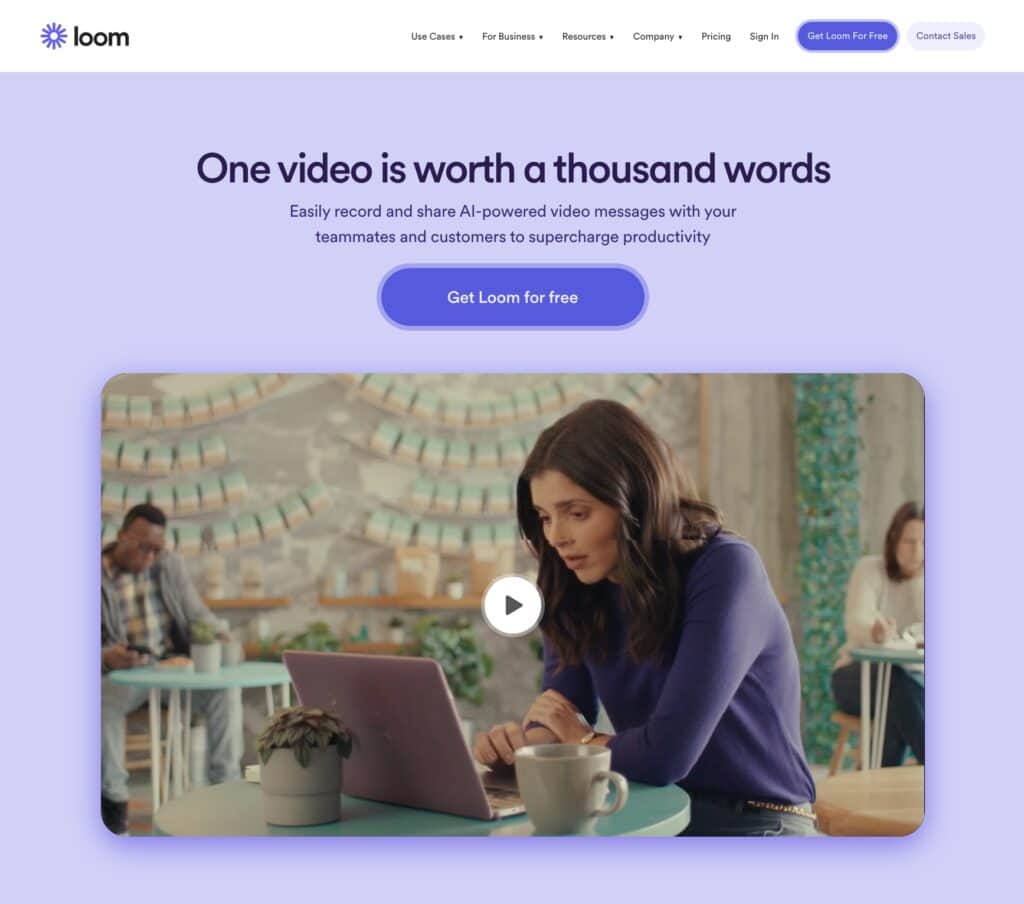
Loom delivers their value proposition very succinctly on their homepage, with a strong headline, explainer paragraph, and below the CTA, they provide a high-quality explainer video.

Loom homepage value proposition

Zapier

Zapier has many applications. It can be difficult to condense these down into a short and snappy value proposition. However, Zapier has cleverly achieved this using a scrolling animation to cycle through the various use cases for their product within their headline. This is followed up with a short explainer paragraph, and after the CTAs, there is a simple animation to illustrate what the product is for.

Clear Pricing

Transparency is key when it comes to pricing for SaaS companies. Potential customers want to know how much your product costs before they commit to a free trial or demo.

Make sure to clearly display your pricing information on your website, including any different pricing tiers or plans that you offer. This will help potential customers make an informed decision and avoid any surprises down the line.

It is also important to be upfront about how payments are billed and if pricing differs depending on billing schedule (for example, if paying monthly is more expensive than paying per annum.)

Nearly all successful SaaS websites have a pricing page that can be accessed from the main navigation, which clearly displays product pricing, alongside key features.

Where tiered pricing exists, these pages almost always clearly illustrate how the tiers differ in an easy to digest manner.

Real World Examples:

Ghost

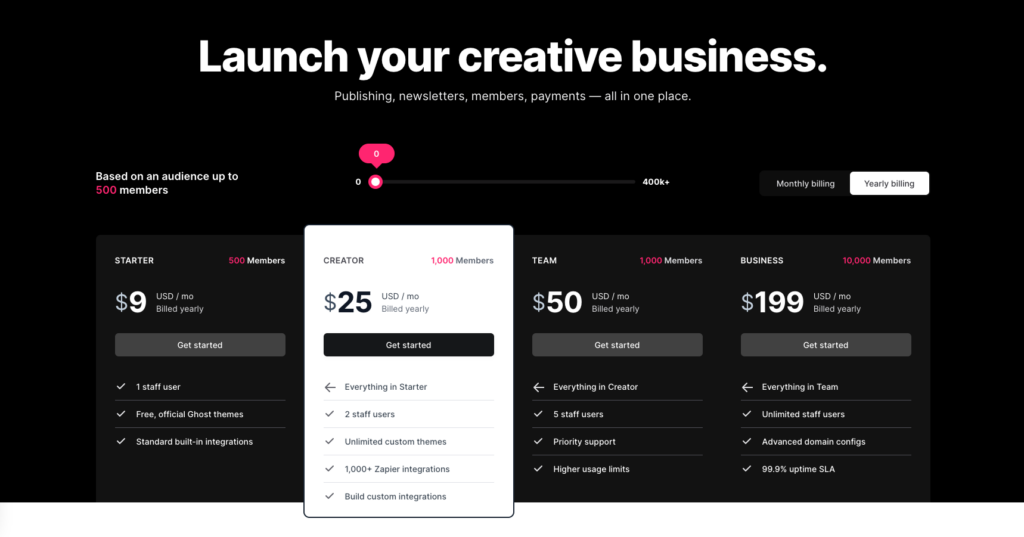
Ghost’s pricing page does an excellent job of communicating their pricing in a clear, succinct and user friendly way.

  • Tiered pricing is shown as is common across the industry.
  • The pricing adjusts with the slider for entering audience numbers.
  • There is a toggle for switching between pricing for monthly and annual billing.
  • Key features of each tier are listed below the pricing.
  • More detailed information on features is provided further down the page.
Ghost pricing page

Mailchimp

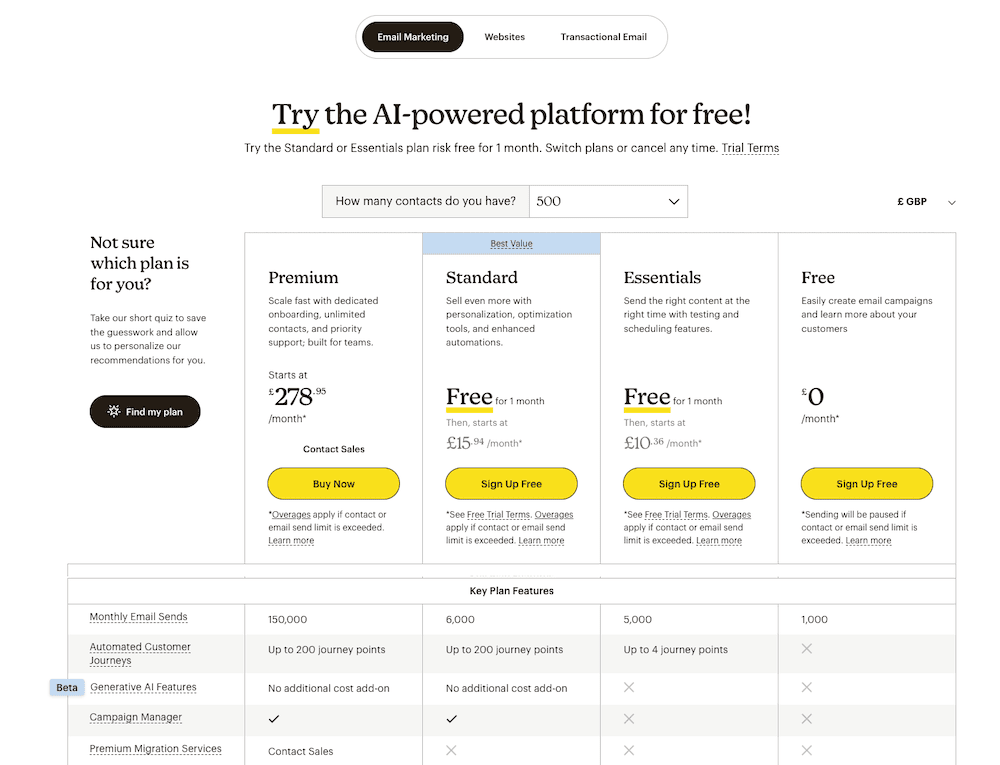
Mailchimp also manage to communicate a lot of information concisely on their pricing page. Unlike the previous example, they do so for multiple products.

  • There is a toggle to select the product.
  • For their core email marketing product, there is a drop down selector for number of contacts.
  • There is a currency selector so users can see localised prices from wherever they are reading.
  • They provide a quiz to help users select the right plan.
  • Key features are listed in a table below.
  • They provide the option of a free trial for certain plans, but also show what standard pricing will be.
Mailchimp pricing page

A Free Trial or Demo

Offering a free trial or demo is a great way to showcase the value of your product and allow potential customers to experience it for themselves. This can help build trust and confidence in your product and make it easier for potential customers to make a purchasing decision.

Make sure to prominently display your free trial or demo offer on your website and provide clear instructions on how to sign up.

Real World Examples:

Workday

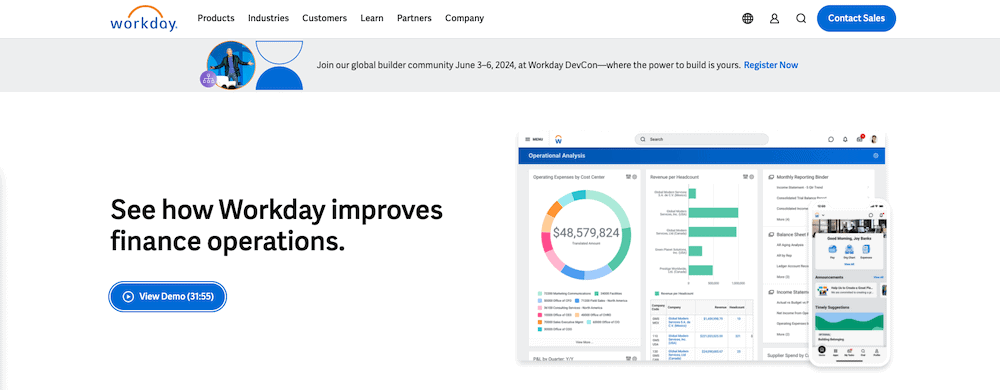
Workday lead with their demo, with a CTA in the main hero section of their website homepage.

Workday home page demo cta

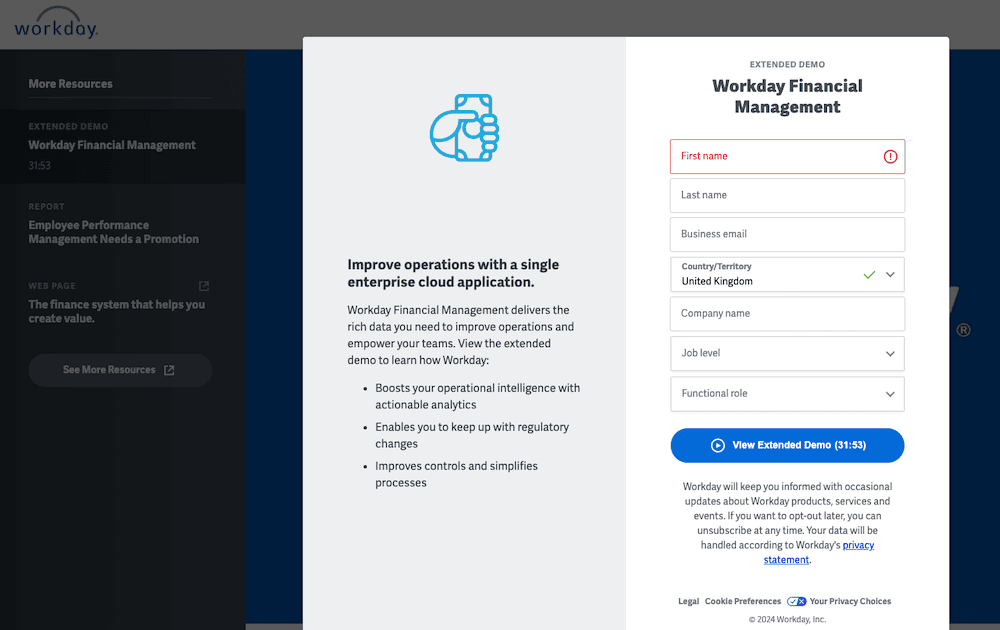
This leads to their demo page, with a form for data collection before providing access to the demo. This means that they can follow up with marketing communications, knowing that the user has demonstrated real interest in their product.

Workday free trial page

Zendesk

Zendesk make their demo and free trial very prominent.

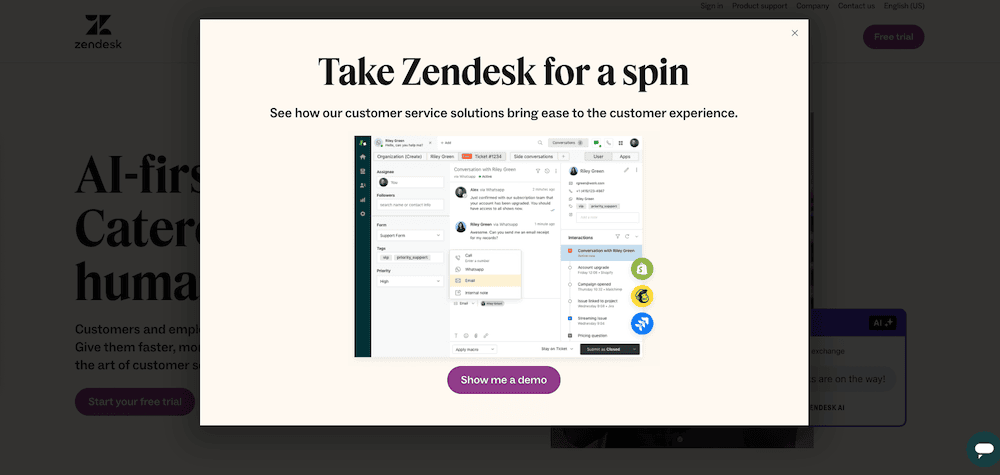
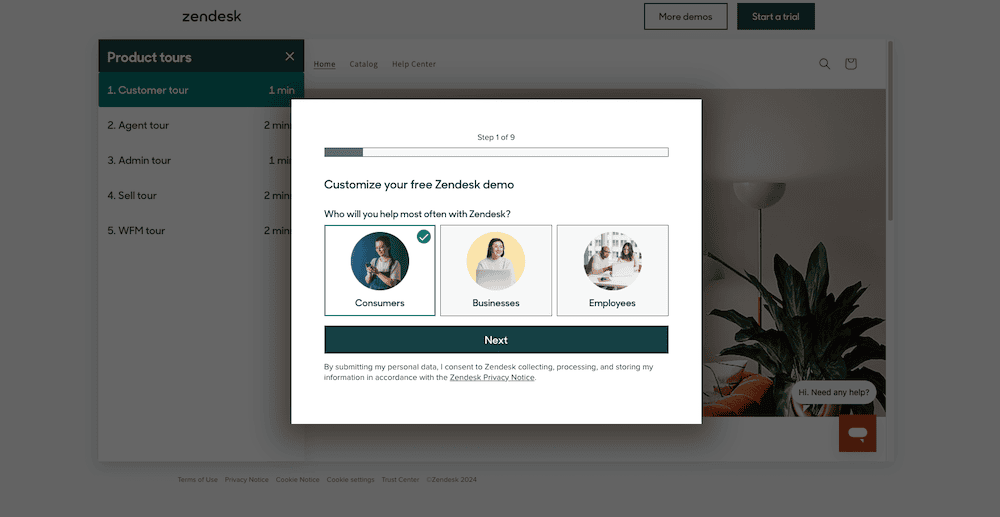
Upon first visiting the website, you are met with an immediate entrance popup, directing users to their demo.

Zendesk entrance popup

This leads to their demo page, where users can customise the free demo, to be more relevant for their requirements from the product.

Zendesk demo

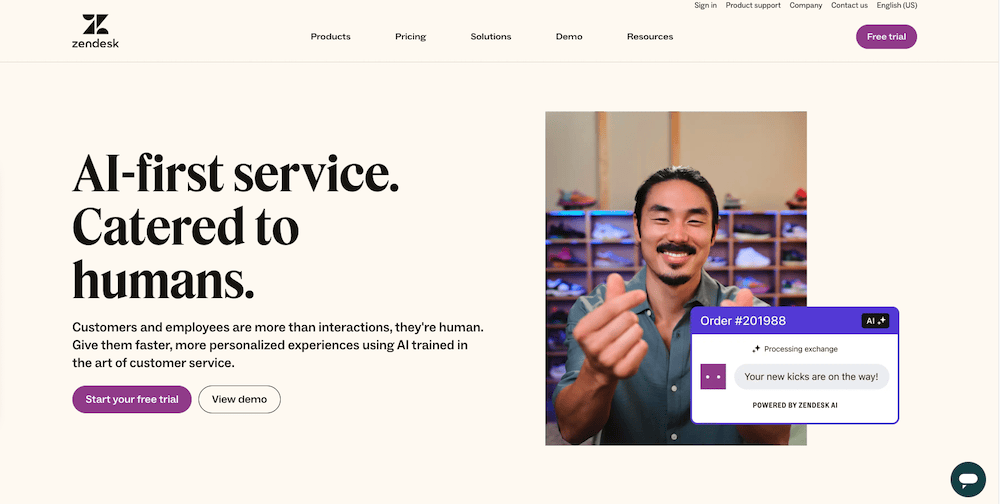
For those who close the popup, Zendesk have a free trial CTA in the main navigation, and in the main hero area of the website (alongside another CTA for their demo).

Zendesk home

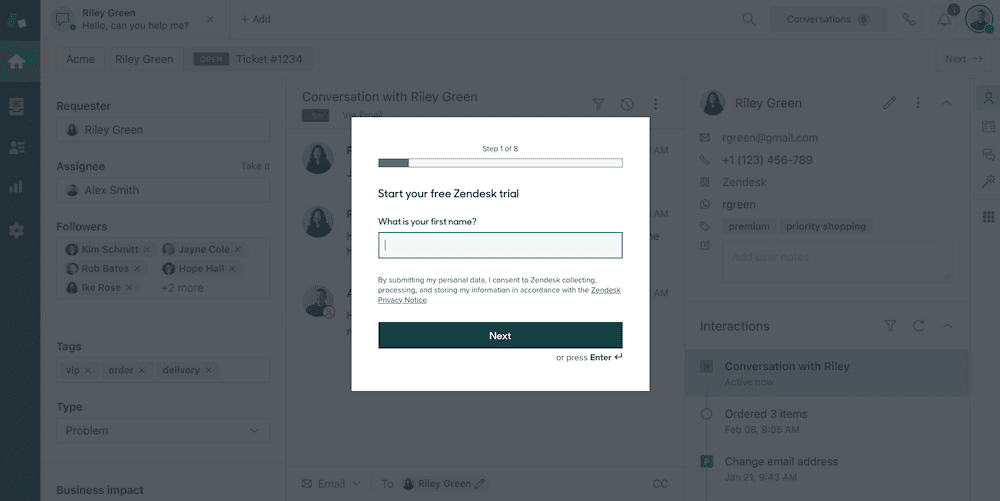
The CTA for the free trial take users through to the signup page for the trial. Signing up is done through a simple multipart form.

Zendesk free trial page

Social Proof

In today’s digital landscape, social proof is a powerful tool for building trust and credibility with potential customers. This can include customer testimonials, client logos, case studies, and reviews from satisfied customers.

Including social proof on your website can help alleviate any doubts or concerns potential customers may have and encourage them to take the next step in their buyer’s journey. Make sure to regularly collect and showcase positive feedback from your customers to build a strong social proof for your SaaS website.

Real World Examples:

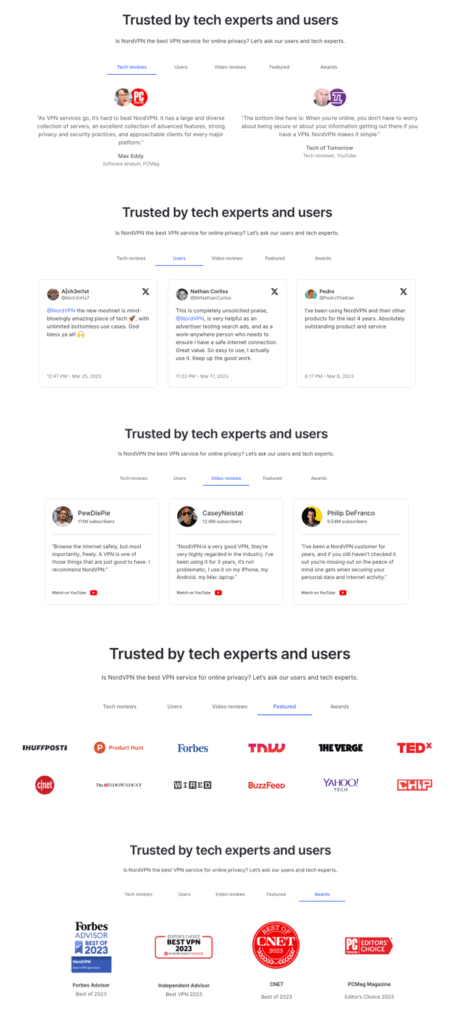
NordVPN

Nord VPN social proof

Typeform

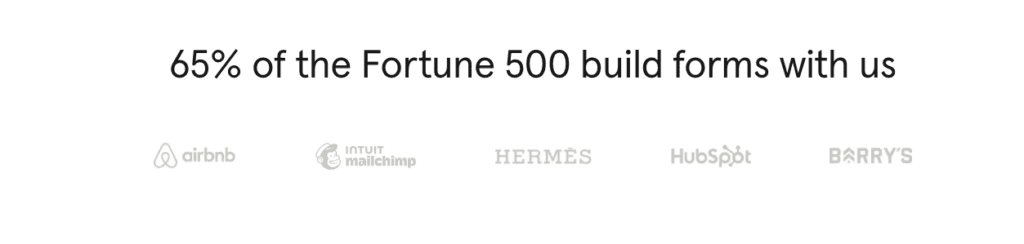
Where some businesses choose to feature a large number of client logos, Typeform feature only 5 of their strongest on their homepage. However, these logos are accompanied by a very persuasive statistic to help build trust and authority.

Typeform social proof in the form of client logos.
“65% of the Fortune 500 build forms with us” from Typeform website.

Content For All Stages Of The Customer Journey

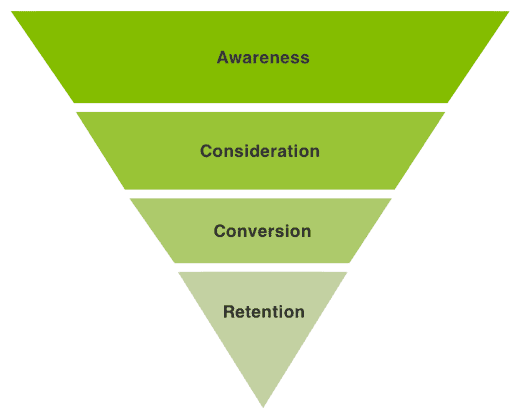
Successful SaaS companies understand the importance of providing useful content for all stages of the marketing funnel. For example:

  • Awareness – Blog posts and other content designed for those with a problem they are looking to solve.
  • Consideration – Solutions and features oriented content, alongside demos and free trials, for those in the process of weighing up the various solutions available.
  • Conversion – Strong CTAs and clear pricing information for those selecting the right product and plan for their needs.
  • Retention – Resources and content to help existing customers get the most out of a product, to keep them coming back.

Marketing funnel diagram.

Solutions

Solutions based content is a great way to show those in the early to mid stages of the customer journey, how your product can work to solve their particular problems.

It can form very useful content for organic search and for campaigns that target particular verticals or segments, such as:

  • Industry – how a product may serve a particular industry.
  • Job Role – how a product may assist those in particular job functions.
  • Use Case -the various use cases a product might provide a solution for.
  • Integrations – what other software and tools the product can integrate with.
  • Business Size – if the product provides solutions for businesses of various sizes.

Real World Examples:

Litmus

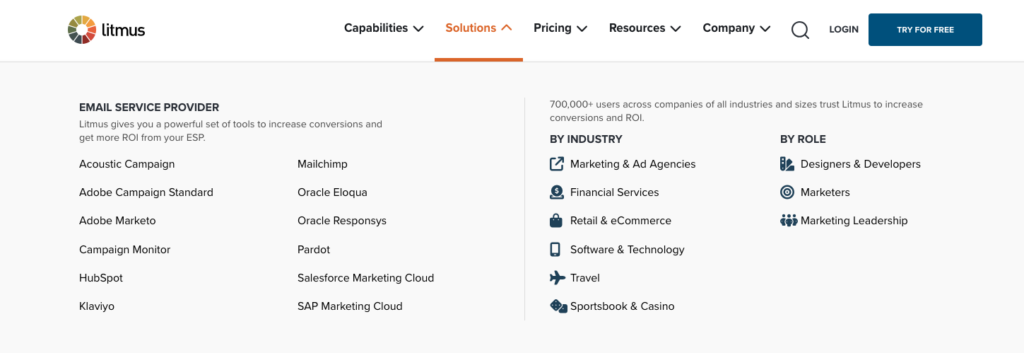
As you can see from the Solutions drop down menu below (a common feature on most successful SaaS websites), Litmus provide solutions based content based on Email Service Provider used, industry, and job role.

Litmus solutions menu

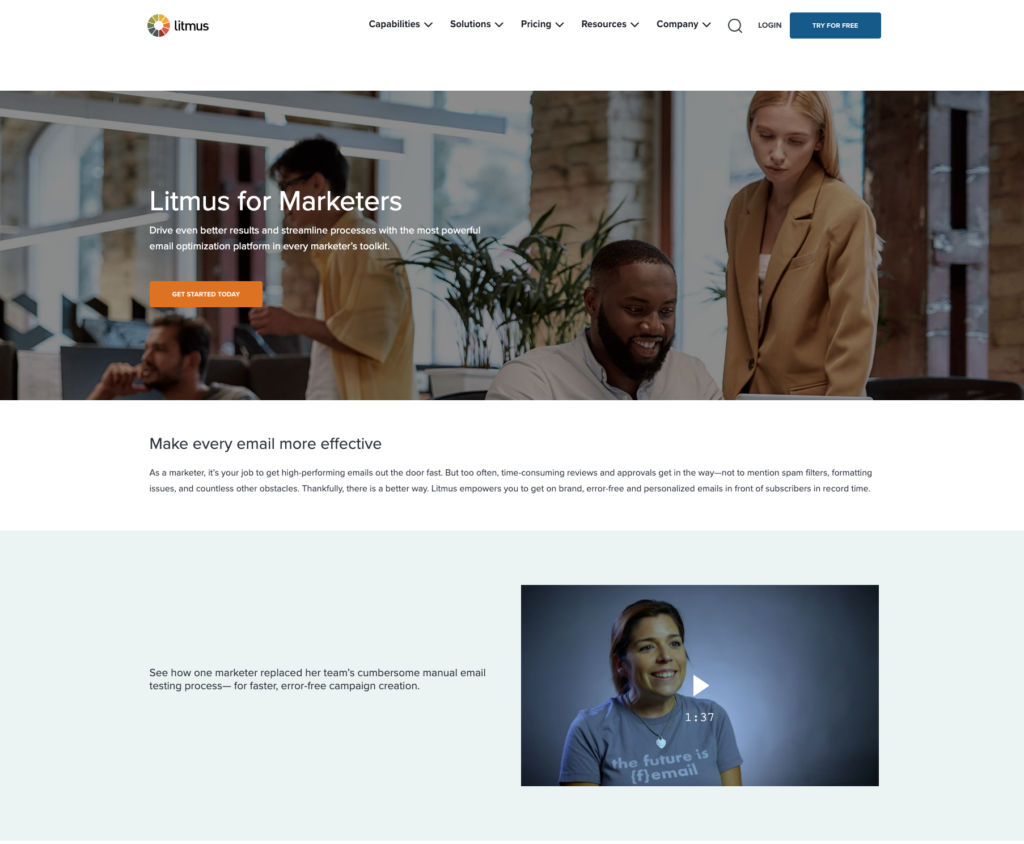
These pages provide content that is written to demonstrate how their product can bring value to each chosen segment, and offer a more personalised and relevant overview.

Litmus include a relevant video case study or a testimonial from a client in that segment, in this case, Marketers, providing social proof to build trust.

Job role solution page from Litmus

Stripe

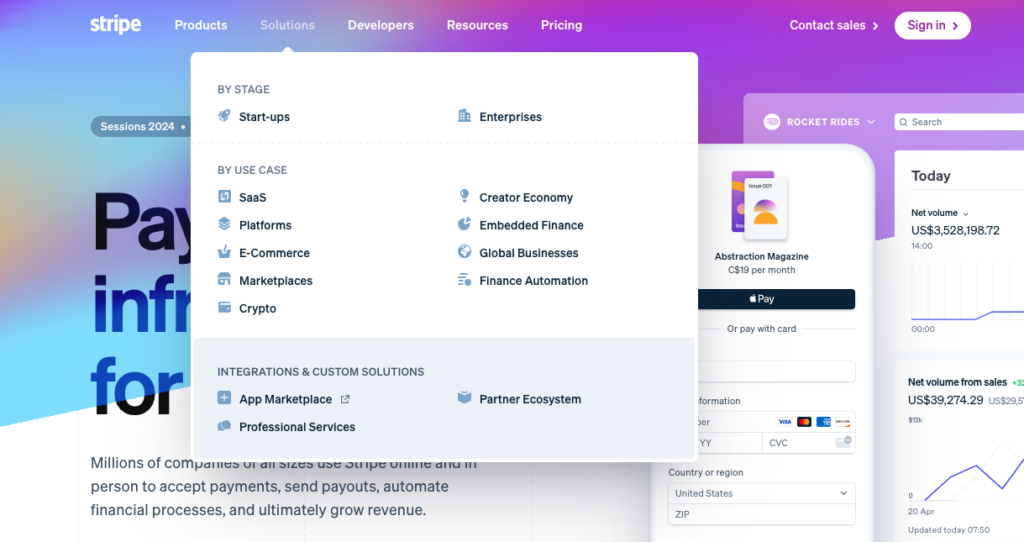
Payment solutions provider Stripe, also have the familiar Solutions drop down menu. They have solutions based content content tailored to specific target user segments. In this case, business stage and use case, and they also provide information on integrations.

Stripe Solutions menu

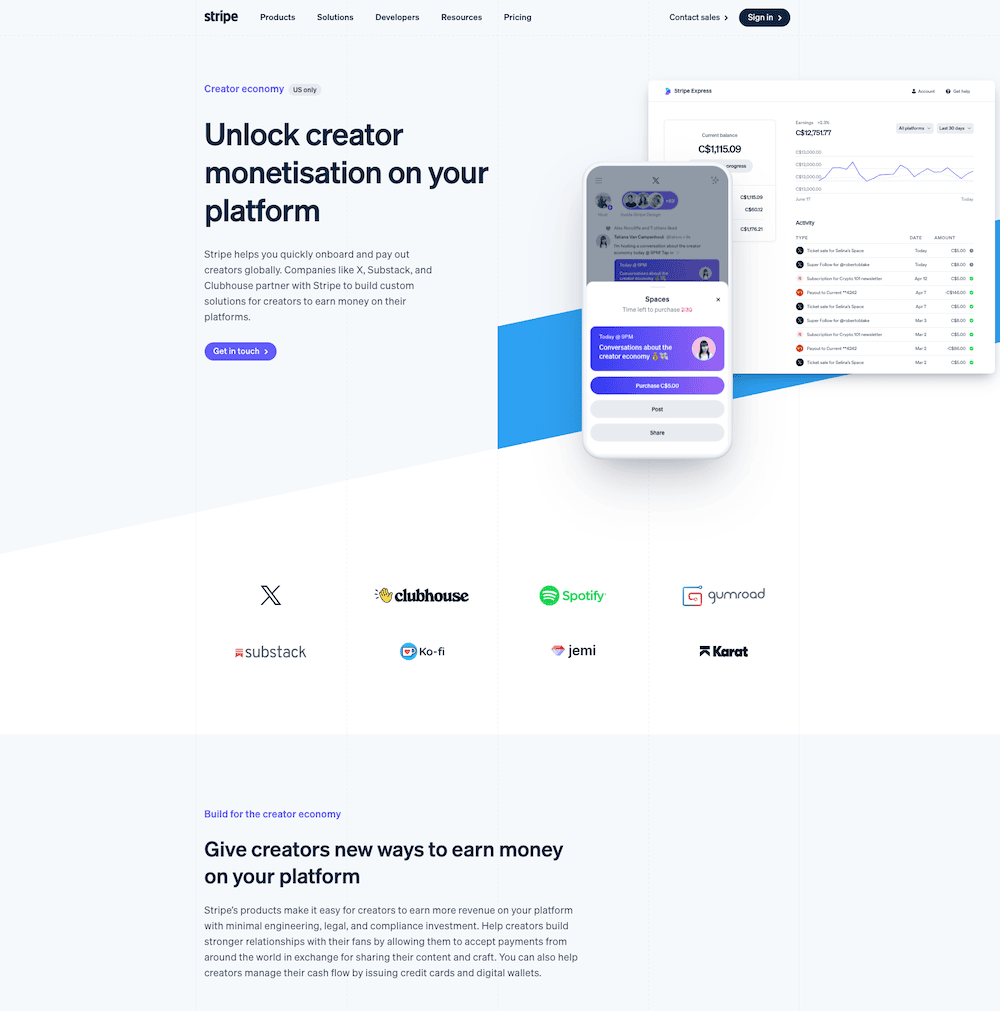
These pages are tailored to show users in each target audience how the product can provide a solution for their particular needs.

As with the Litmus example, relevant social proof is provided in the form of client logos representative of the particular vertical the content is written to target.

Stripe creator economy solutions page.

User-Friendly Navigation

One of the most important elements of a successful SaaS website is user-friendly navigation. Your website should be easy to navigate and provide a seamless experience for visitors. This means having a clear and organised menu, with all the necessary pages easily accessible. It’s also important to have a search bar for users to quickly find what they are looking for. A cluttered and confusing navigation can lead to frustration and a high bounce rate, so it’s crucial to prioritise user-friendly navigation in your web design.

Real World Examples:

You may notice that the examples below all share a lot in common.

  • A clean simple navigation.
  • For the multi product sellers there is a product page linked from the main navigation.
  • For the single product sellers there is a features page linked from the main navigation.
  • All 4 examples have a pricing page linked from the main navigation.
  • All 4 examples have a solutions page linked from the main navigation.
  • All 4 examples have a resources page linked from the main navigation.
  • All 4 examples have a CTA button in the header/main navigation.
  • All 4 examples have a customer login in the header/main navigation.

Slack

Slack Navigation

Zendesk

Zendesk Navigation

Typeform

Typeform Navigation

Trello

Trello Navigation

Responsive Design

This should be a given by now, but it is still easy to come across recently built websites that do not provide a seamless user experience across devices.

According to Statista, there are now 6.47 billion active mobile users worldwide, and mobile traffic constitutes 59.45% of global internet traffic.

Responsive design ensures that your website looks and functions well on all devices, including desktops, laptops, tablets, and smartphones. This is crucial for providing a positive user experience.

Real World Examples:

Canva

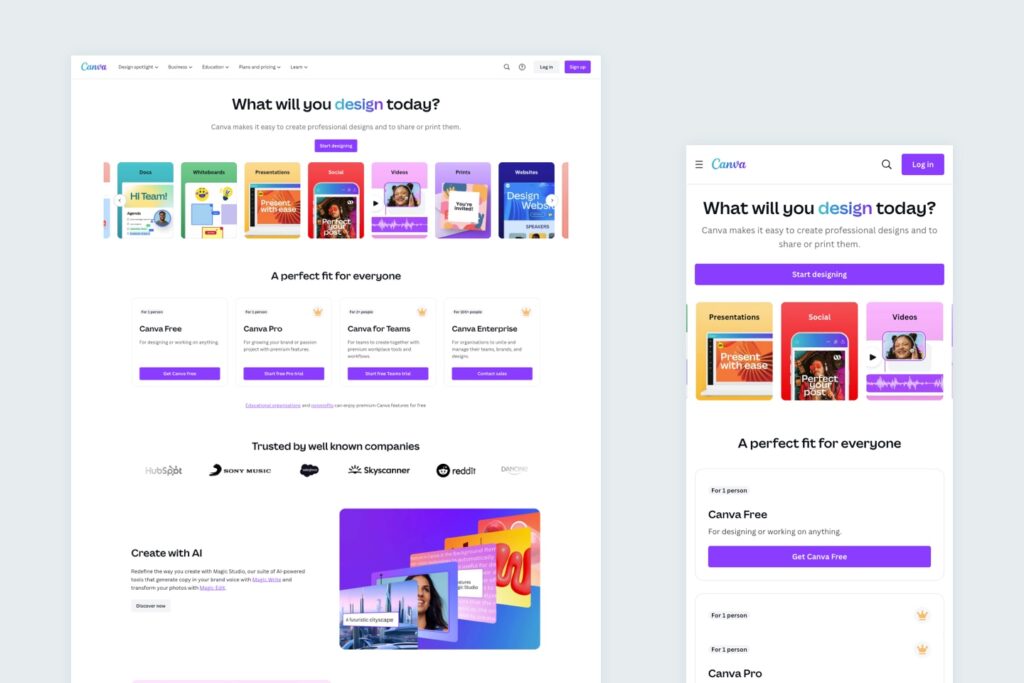
On both desktop and mobile devices, the clean, bold design of the Canva website looks great. The simplicity of the design lends itself perfectly to a responsive website that offers a seamless user experience across devices.

It provides the viewer with all the important information that they need, and ease of navigation, even on the smaller screen of a mobile device.

Features stack neatly, buttons change to full width, and the number of items shown in carousels is reduced, to not only look good, but to also function well with the way users interact with websites on mobile screens (tapping, swiping etc).

Canva Home Page

Other Important Areas To Consider

Features and Benefits

Your website should clearly outline the features and benefits of your product. This can be in the form of a features page, a product tour, or a comparison chart with competitors.

Make sure to highlight the key features that make your product stand out and how they can benefit your target audience. This will help potential customers understand the value of your product and how it can help them solve their pain points.

Clear and Compelling Messaging

Your website’s messaging is what will ultimately convince visitors to become customers. It’s important to have clear and compelling messaging that clearly communicates your value proposition and differentiates your product from competitors.

Use concise and persuasive language to highlight the benefits of your product and how it can solve your target audience’s pain points. Your messaging should be consistent throughout your website and align with your brand’s tone of voice.

High-Quality Visuals

In addition to compelling messaging, high-quality visuals are also crucial for a successful SaaS website. This includes images, videos, and graphics that are visually appealing and help tell your brand’s story.

Visuals can also be used to showcase your product’s features and benefits, making it easier for potential customers to understand and visualise how your product can help them.

Make sure to use high-resolution images and videos that are optimised for web use to ensure a professional and visually appealing website. Avoid relying on stock imagery, AI generated images and generic icons.

Strong Call to Action (CTA)

A strong call to action (CTA) is crucial for converting website visitors into paying customers. Your CTA should be clear, compelling, and prominently displayed on your website.

It should also align with your overall messaging and encourage visitors to take the next step, whether it’s signing up for a free trial, scheduling a demo, or making a purchase.

Make sure to test different CTAs to see which ones are most effective in driving conversions.

Conclusion

A successful website is crucial for the growth and success of your SaaS business. By incorporating the key elements we’ve discussed, such as user-friendly navigation, clear messaging, and a strong call to action, you can create a website that not only attracts potential customers but also converts them into paying customers.

Make sure to regularly review and update your website to ensure it aligns with your overall business goals and continues to drive growth for your SaaS company.

FAQs

What does SaaS mean?

SaaS stands for Software as a Service. It usually refers to software products that are cloud-based and accessed through a web browser.

Impact team at UK Dev Awards

Is It Time For A Website Redesign?

If you’d like to learn more about our website redesign approach and if it could be a good fit for your business, drop us an email or give us a call.

Share Socially
Rommel Plofino
Rommel Plofino
WordPress Developer
Rommel has many years of experience as a full-stack web developer and is very passionate about WordPress.
View Team Profile
See More Articles
Rommel Plofino
Rommel Plofino
WordPress Developer
Rommel has many years of experience as a full-stack web developer and is very passionate about WordPress.
See More Articles
View Team Profile
Want more control over
how you manage content in WordPress?
Edit content that was previously restricted and get creative with building pages in WordPress.
Let's Chat
studio@impactmedia.co.uk
020 3355 8747
Impact Media's LinkedIn
Impact Media's Twitter
Impact Media's Facebook
Impact Media's Instagram
Impact Media's Youtube
wordpress.org

About Impact

  • About Impact Media®
  • Meet The Impact Team
  • Why WordPress?
  • Our Web Development Process
  • Careers
  • Awards
  • Partners
  • Giving Back
  • 100K Tree Challenge

WordPress Services

  • WordPress Web Design
  • UX Design
  • WordPress Development
  • WordPress Evolve Retainers
  • WooCommerce Development
  • Multisite WordPress
  • Migrate To WordPress
  • Custom Integrations & Plugins
  • WordPress Consultancy

WordPress Support

  • WordPress Support & Maintenance
  • WordPress Managed Hosting
  • Case Studies
  • Insights
  • Contact Us

Addresses

London Address:

50 Liverpool Street,

London, EC2M 7PY, UK

+44 (0) 20 3355 8747


Registered Address:

Woodland Place, Hurricane Way

Wickford, SS11 8YB, UK

  • Privacy Policy
  • Cookie Policy
Impact Media logo
© Impact Media® 2003 - 2026
Impact Media is a trading name of IMDMS LTD. Company Reg. 05970261
Impact® & Impact Media®
are registered trademarks of IMDMS LTD