

The Bots Have Taken Over! What You Need To Know
Published 22.06.26
22nd June 2026
Last Updated 03.07.26
3rd July 2026

And what you should actually do about it.


Oops! We could not locate your form.
And what you should actually do about it.
Don’t worry, you don’t need to pledge allegiance to our robot overlords yet, but here’s something you might find surprising (or not if you’ve been paying attention to industry news in recent months).
The majority of traffic hitting your website right now probably isn’t human.
According to Cloudflare’s latest data, bots generate 57.4% of all web traffic, overtaking human visitors for the first time in history. Cloudflare’s own CEO had predicted this moment, but expected it to arrive in late 2027.
Welp, that happened faster than I predicted. Thought it would be end of 2027, then early 2027, but agentic traffic growing so fast that bots have now passed human traffic online for the first time in the Internet's history. https://t.co/2zX5bHdhsa
— Matthew Prince 🌥 (@eastdakota) June 3, 2026
Imperva’s 2026 Bad Bot Report tells a comparable story. Automated traffic accounted for 53% of all web traffic in 2025, up from 51% the year before. Human activity has fallen to 47% and continues to fall.
Welcome to the internet in 2026. The question isn’t whether bots are visiting your site, it’s whether you’re managing them well.
For years, ‘bot traffic’ meant one of two things. Either malicious attackers trying to exploit your site, or search engines and tools doing their job. You blocked the bad ones and let the good ones in. Simple enough.
Unfortunately, it’s not quite so simple anymore.
The explosion of AI, large language models, training crawlers, retrieval-augmented generation systems, and now autonomous AI agents, has created an entirely new category of traffic. These bots aren’t trying to hack you and they’re not serving your SEO either. They’re ingesting your content at scale, often inefficiently, and the side effects land squarely on your server.
AI bot traffic grew 187% in 2025, while human traffic grew just 3.1%. GPTBot alone grew 305% between May 2024 and May 2025. Agentic AI traffic (bots that take actions, not just read pages) grew 7,851% year-on-year according to HUMAN Security’s 2026 State of AI Traffic report.
This is now an infrastructure story as much as a security one.
Traditional search crawlers are reasonably well-behaved. They follow rules, generally respect directives like those in your robots.txt file, and index your pages in a somewhat predictable pattern. AI crawlers, particularly newer ones, often aren’t.
This is well illustrated by the recent widely reported spikes in traffic many websites have been experiencing, originating from China.
Kinsta’s analysis of over 10 billion requests identified a problem that’s become widespread, which is query string loops.
Modern websites, particularly eCommerce sites, generate slightly different URLs for what is essentially the same page. A product page with a colour filter applied, a sort order added, then pagination on top, and a stock filter on top of that, looks like one page to a human. To a bot following links, each combination is a brand new URL to crawl.
The bot follows the first link, that page generates a variation, the bot follows that, another variation, and so on. It has no way to recognise it’s travelling in circles, and some of these loops ran undetected for days before infrastructure rules caught them.
The practical result of this is that Kinsta recorded 7.67 million requests hitting add-to-cart URLs from bots in a single 24-hour period. ClaudeBot alone accounted for 3.75 million of those, which equates to roughly one request every 23 milliseconds, around the clock.
Here’s the critical detail that makes this so much worse. Add-to-cart and checkout pages can’t be served from cache. Every request forces PHP execution, a database query, and session handling overhead. If the server doesn’t know it’s talking to a bot, it just does the work.
Before you reach for the ‘block everything’ switch and shoot yourself in the foot, it’s worth understanding what you’d be blocking. Bot traffic breaks down roughly into three categories:
Googlebot, Bingbot, and other search engine crawlers are how people find your site. Googlebot alone accounts for 4.5% of global HTML requests and remains the single largest individual crawler on the web. Blocking it to ease server load would be the most self-defeating thing a site owner could do.
AI search bots, like OAI-SearchBot (used for ChatGPT search results) can generate referral traffic back to your site. These are worth distinguishing from pure training crawlers.
The majority of AI crawling (around 80% by Cloudflare’s analysis) is purely for model training. It generates no referral traffic. Meta’s crawler (meta-externalagent) is the second-highest volume AI crawler on the web, yet it sends zero referral traffic, and is among the most frequently blocked. OpenAI actually runs two separate bots. GPTBot for training, and OAI-SearchBot for live search queries. Many site owners now block GPTBot while allowing OAI-SearchBot. It’s a reasonable starting point, although as we’ll cover below, the relationship between training data and AI-generated answers is less clear-cut than it might appear.
But regardless, the goal isn’t to block everything. As Cloudflare’s Head of Data Insights David Belson puts it:
“You need to take the first step and put a bouncer outside the door to decide who gets in and who doesn’t.”
The skill is in knowing which guests to turn away.
CrawlerCheck provide a fairly extensive list of known bots, which is a useful resource if you don’t know what a particular bot is, and what it’s used for.
The signs that bot traffic is causing you real problems aren’t always obvious, and they often masquerade as other issues:
If you’re running WooCommerce, your most expensive endpoints (/cart, /checkout, ?add-to-cart=) are the ones bots hammer hardest. These bypass caching entirely and represent your highest cost-per-request pages.
There’s no single rule that works for every site. A WooCommerce store, a brochure site, a blog, and a staging environment all have different exposures. Here’s how to think through it.
Before making changes, understand what’s actually hitting your site. Look for patterns like repeated requests to the same URL types, especially ones that shouldn’t interest a crawler, such as cart endpoints, search query URLs, parameter-heavy pages. Your hosting dashboard, firewall analytics, or server logs will show enough to identify problem patterns.
For dynamic or eCommerce sites, restrict bot access to the endpoints that cost you the most server resources. At minimum:
/cart, /checkout, and ?add-to-cart= paths in your robots.txt, but be aware this may well be ignored by some crawlers.Your website’s robots.txt communicates your preferences to well-behaved crawlers. It is a directive but not enforcement. Some crawlers will just ignore it entirely, whilst others rotate identities or mimic browser behaviour. Real enforcement has to happen at the server level, via your WAF, hosting platform‘s bot protection features, or Cloudflare rules.
One of the most effective things you can do is give bots fewer unique URLs to chase. Audit your CMS and eCommerce settings for parameter-heavy URL patterns. Things like session tokens, quantity suffixes, sort orders appended to product URLs. Canonicalisation and sensible permalink settings reduce the surface area for loop-prone crawling.
Restrict Googlebot from specific dynamic endpoints (cart, checkout, filtered parameter pages) rather than limiting it wholesale. This may be (hopefully) something you already do via your robots.txt file.
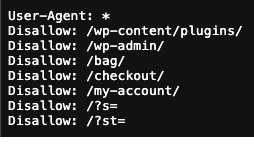
Googlebot needs access to your product pages, category pages, and content to keep you ranking, so don’t accidentally block these from being crawled. Protecting expensive endpoints ≠ blocking search visibility.
Not all AI crawlers serve the same purpose, and the distinction matters for how you manage them. OpenAI, for example, runs two separate bots. GPTBot collects training data, while OAI-SearchBot handles live queries for ChatGPT search, and only the latter can actively send referral traffic back to your site. Many site owners now block GPTBot while allowing OAI-SearchBot, which is a reasonable approach, but could potentially impact your presence in AI-generated answers in the longterm.
The relationship between training data and AI-generated answers isn’t fully transparent. There are likely two mechanisms at work here. One being live retrieval (where crawlers like OAI-SearchBot fetch your content in real time to answer a query), and the other being trained knowledge (where the model surfaces your content from what it learned during training, without doing a live search at all). Blocking a training crawler keeps your content out of future training runs, but doesn’t erase what’s already been learned, and for newer or smaller sites not yet in any training data, it may limit how much AI models know about your brand over time.
The decision on whether to block training crawlers is less about search visibility and more about resource cost, content rights, and how you feel about your work being used to train commercial AI models, which are all legitimate considerations, but separate ones.
Many bot issues run for hours or days undetected. Set up basic alerting for unusual spikes in request volume, particularly on non-cacheable endpoints. Catching a problem early is far cheaper than dealing with the hosting costs and performance impact after the fact.
Up until now, site owners only had two real choices. One to block all AI bots, or two, to let them all through. That’s changing.
On July 1, 2026, Cloudflare announced a significant shift in how it will be handling AI bot traffic, which will come into effect on September 15, 2026. Rather than a single on/off switch which they currently provide, Cloudflare is introducing three distinct bot classifications that customers can manage independently:
The logic behind the ad-page default is deliberate. If a page carries advertising, the site owner built it for human attention. Sending a training bot there generates no value for the publisher and undermines the economics that make the content viable in the first place.
These new defaults will apply automatically to new Cloudflare customers, new sites set up by existing customers, and all existing free-tier users. Paid customers on existing plans can adjust settings manually before September 15 if they want different behaviour.
There’s also a notable side note on Google. Cloudflare specifically called out the fact that Google’s main crawler, Googlebot, is a ‘mixed-use’ bot that bundles search indexing and AI training together (Applebot, and BingBot are also mixed use), meaning site owners can’t currently opt out of AI training without also leaving Google Search. Under the new defaults, mixed-use crawlers will be blocked from ad-supported pages. Cloudflare estimates this gives Google access to roughly twice as much web content as other AI companies, precisely because it’s harder for publishers to say no without losing search visibility.
Pay Per Use is also evolving. Cloudflare’s original Pay Per Crawl model (charging AI companies per page fetched) is being updated to a Pay Per Use approach, so publishers can potentially earn revenue when their content actually generates value in an AI-generated answer, not just when it gets crawled. Early partners include Ceramic.ai and You.com.
This is the first meaningful infrastructure-level shift in how the web handles AI bot traffic. It won’t solve everything overnight, but it signals that the somewhat heavy-handed ‘block everything or allow everything’ era is ending (this was a major criticism of Cloudflare’s announcement last year), and a more nuanced, commercially aware approach is beginning.
The crawling wave is already here. What follows it will be more complex.
Agentic AI, automated systems that don’t just read pages but take actions (fill in forms, trigger workflows, and interact with your site as if they were users) is already showing up in infrastructure data. Google has announced a dedicated user-agent for its AI agents. The more responsible and scrutinised platforms will identify themselves and behave moderately politely, but others won’t.
As Cloudflare’s CEO noted when the bot/human traffic crossover arrived ahead of schedule, this happened faster than anyone predicted. The same will likely be true for agentic traffic.
The sites that handle this well won’t be the ones that blocked the most. They’ll be the ones whose owners understood what they were protecting, and made deliberate decisions about it based on that understanding.
One more thing worth flagging is that if bots account for more than half of web traffic globally, your analytics are lying to you, at least a little.
GA4s bot filters don’t catch everything, and as bots don’t interact with websites in the same way humans do, they can bypass things like CMPs and still register in your analytics data.
Page views and session counts almost certainly overcount real human visitors. The metrics that still tell the truth are the correlated ones, like branded search volume, engagement depth, and revenue tied to real visitor behaviour. If those are healthy and moving in the right direction, you’re visible where it counts.
Bot-inflated traffic numbers that don’t convert aren’t a success story. As always, traffic is not the metric you (or your SEO agency) should be concerned with. Focus on conversions, revenue, and other core performance metrics that cannot be skewed by bots. Don’t even get me started on bot clicks on paid ads, as click fraud is a whole other frustrating topic for another day!
As a web design agency that also hosts the majority of the sites we build, managing bot traffic is something we handle across every site we’re responsible for, and not just as a technical checkbox, but as part of our ongoing commitment to site performance and stability.
If you’re concerned about bot traffic on your site, or you’re seeing unexplained performance issues, slow load times, or rising hosting costs, it’s worth a conversation. The right approach for your site depends on what you’re running and what you’re trying to protect. That’s exactly the kind of problem we’re set up to solve.


