logo

WordPress Design Agency

020 3355 8747

Message Us
  • Home
  • About Impact®
    Learn More About Impact Media®
    • Meet The Team
       
    • Why WordPress
       
    • Careers
       
    • Giving Back
       
    • 100K Tree Challenge
       
    James Coates
    Schedule a discovery call with UX Specialist James
    Book A Call
  • WordPress Services
    Learn More About Our Services
    • WordPress Web Design
       
    • UX Design
       
    • WordPress Development
       
    • WordPress Support & Maintenance
       
    • WordPress Evolve Retainer
       
    • WordPress Multisite Development
       
    • WooCommerce
       
    • Replatform To WordPress
       
    • WordPress Consultancy
       
    • Integrations & Plugins
       
    • WordPress Managed Hosting
       
    • WordPress Health Check
       
    James Coates
    Schedule a discovery call with UX Specialist James
    Book A Call
  • Our Process
  • Case Studies
  • Insights
  • Contact Us
WordPress Design Agency
020 3355 8747
logo logo
Book A Call
Back
Menu
  • Home
     
  •  
    About Impact Media
    Learn More About The Impacters
    • Meet The Team
       
    • Why WordPress
       
    • Careers
       
    • Giving Back
       
    • 100K Tree Challenge
       
  •  
    Our Services
    Discover How We Can Help
    • WordPress Web Design
       
    • UX Design
       
    • WordPress Development
       
    • WordPress Support & Maintenance
       
    • WordPress Evolve Retainer
       
    • WordPress Multisite Development
       
    • WooCommerce
       
    • Replatform To WordPress
       
    • WordPress Consultancy
       
    • Integrations & Plugins
       
    • WordPress Managed Hosting
       
    • WordPress Health Check
       
  • Our Process
     
  • Case Studies
     
  • Insights
     
  • Contact Us
     
020 3355 8747
Mon - Fri • 9am - 5pm
Close

Oops! We could not locate your form.

Home / Insights / A Guide To The Page Indexing Report In Google Search Console For Non-SEOs
Back

A Guide To The Page Indexing Report In Google Search Console For Non-SEOs

Published 29.05.26
29th May 2026
Last Updated 07.07.26
7th July 2026

Newer
13 Min Read
Vikki Baker
Vikki Baker
Marketing
Older
13 Min Read
 
Vikki Baker
Vikki Baker
 
Marketing

This post is designed to help marketing teams and professionals without an SEO background, who have access to their company’s Search Console account, and are daunted by the Page Indexing report.

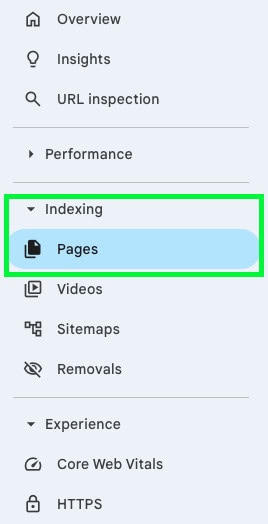
This post is designed to help marketing teams and professionals without an SEO background, who have access to their company’s Search Console account (specifically the Page Indexing report).

I wanted to provide a high-level overview of the Google Search Console Indexing Report, as it can be confusing and daunting to look at without a bit of understanding and context.

It can also sometimes be used by unscrupulous marketing firms to strike fear into in-house teams, by flagging the ‘Not indexed’ number as a major issue, and charging for unnecessary work to ‘fix’ these.

Don’t get me wrong, sometimes the report can reveal genuine issues (of varying priority), but sometimes ‘Not indexed’ pages can actually be the sign of a healthy and well managed site. Some pages aren’t meant to be indexed.

Having a little knowledge and context here is important, so you know what is a real issue, how to priorities issues, and what can be safely ignored.

What Is The Indexing Report?

The page indexing report is there to let you know what pages are indexed, and those that aren’t, and more importantly why they aren’t. We don’t want every single URL to be indexed. A clean index means that Google’s crawl budget’ focuses on your most valuable, revenue generating pages).

Crawl Budget, Huh?

Crawl budget is a term you’ll hear SEOs use, and it can sometimes be overstated in importance. In simple terms, Google doesn’t crawl every page on every site every day. It has a limited allocation of time and resource for each website, and you want it spending that time on your most important, commercially valuable pages, not on duplicate archive pages, tracking-code URL variants, or outdated content.

By intentionally excluding certain types of pages from Google’s index, we help direct that crawl budget towards the content that actually matters for your business.

But crawl budget (unless it is being chewed up by some major error creating infinite pages) is only really an issue for big sites – we’re talking millions of URLs. The average B2B site, or standard eCommerce site doesn’t really have to worry about this concept.

Navigating The Indexing Report

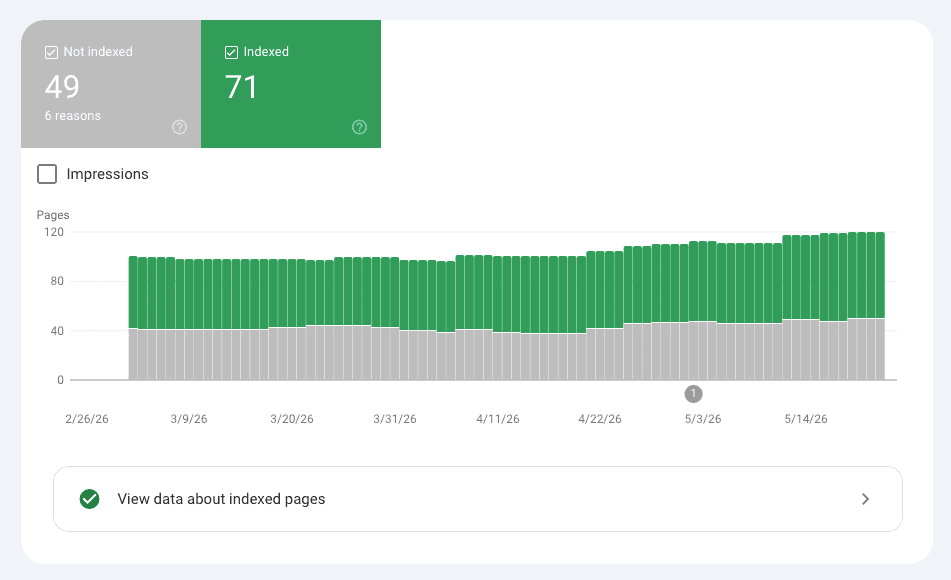
When you open the Indexing report in Google Search Console, you’ll see two tabs: ‘Indexed’ and ‘Not indexed’. The ‘Not indexed’ tab is usually the one that causes alarm, but the ‘Indexed’ tab is equally important. This is where you want to check that your key commercial pages (services, products, core landing pages) are actually appearing.

Within the ‘Not indexed’ tab, the reasons are grouped in a table. You can click on each reason to see the individual URLs flagging under it. This is where context becomes important, as the same ‘not indexed’ status can mean very different things depending on which specific URLs are appearing there.

an example of a page indexing report
An example of a Page Indexing Report in Search Console

What Is A Normal Number Of Not-Indexed Pages?

It’s impossible to give an exact figure, as every site is different, but Google’s own John Mueller has confirmed that having a portion of your site unindexed is completely normal. In a Google Search Central session, Mueller said:

“if you have a hundred pages and 80 of them are being indexed, then I wouldn’t see that as being a problem.”

That puts ~20% non-indexed within the bounds of healthy for a typical site, and on a well-managed WordPress site, that figure can comfortably be much, much, higher.

This is because WordPress generates a significant number of URLs beyond the pages you actively create: author archive pages, image attachment pages, tag and category archives, paginated archives (/page/2/, /page/3/ and so on), search results pages, and on eCommerce sites, filtered product listing pages. Many of these are deliberately excluded from the index because they don’t offer unique value to a searcher. The volume can look alarming if you’re not aware of it.

The key question is never the raw number of not-indexed pages, it’s whether the right pages are indexed. A high exclusion count, in the right context, is a sign of good housekeeping. It only becomes a concern if the URLs appearing in the ‘Not indexed’ tab are pages you actively want Google to find and rank.

‘Not Indexed’ Reasons And What They Mean

Alternate page with proper canonical tag

This status confirms that Google is correctly identifying the main version of a page. For example, if a user clicks a link that includes a tracking parameter, Google technically ‘sees’ a new URL. This status shows that Google is ignoring that duplicate URL and giving all the ranking and SEO credit to the original version of the page. This is working as intended.

Page with redirect

This report is a list of URLs that have been successfully pointed to new ones. This includes maintenance redirects (like URLs without a trailing slash being redirected to ones with a trailing slash), or structural updates (like moving the ‘About Us’ page to a new address). While we SEOs will prune internal redirects to point to the final destination to save a millisecond of load time here and there, seeing a high number here is standard for any site. However it is worth reviewing the URLs here in case they have internal links on site still pointing to them (you can go and fix the link, pointing it to the new page, usually causing old URLs to drop out of this report).

This report will also capture old or legacy URLs being linked to by third-party websites. You generally have no control over those external links, but having redirects in place ensures you don’t lose the traffic or authority they bring.

Excluded by ‘noindex’ tag

We intentionally tell Google not to index certain pages (like tags, category pages, or parameter based URLs), because they do not provide any unique value to a searcher. These pages are still available on site, and still discoverable by navigating around the site by a user, but they do not appear in Google’s index.

By noindexing these, we are ensuring that Google doesn’t see duplicate pages or thin content that could dilute or cannibalise rankings.. This list confirms our settings are working as intended.

Not found (404)

404s aren’t inherently a bad thing. A 400 error just tells Google that a page is gone. We advise monitoring this to ensure that no high-traffic pages have accidentally broken, but for old, irrelevant content that no longer has a purpose, or a page that no longer exists, a 404 is a perfectly acceptable signal for Google.

Soft 404

This is where a page returns a 200 “success” status code to Google, but the content is so thin or empty that Google treats it as if the page doesn’t really exist.

Common culprits are empty search results pages (/search/?q=something), empty tag or category archives with no posts, or filtered product pages with no results. It can also occasionally occur with non-HTML files such as SVGs.

This one is worth flagging as occasionally needing attention. They can indicate either intentional and benign behaviour, or a genuine content gap worth addressing.

Discovered – currently not indexed

These are pages that Google has found, and they may even have been indexed at some point, but they are pages that Google doesn’t currently deem worthy of indexing. They’re usually older blog posts, expired event pages, or short pages Google doesn’t consider high-value enough to surface in search results.

Rather than rushing to fix these, we’d advise monitoring them. If a page appearing here is important to the business, it is worth reviewing the content and improving it to encourage indexing (as well as making sure it is linked to in the sitemap and other pages). If it is a page like an old expired event, it is actually better for the sites health that it remains unindexed.

Whether to prune content that no longer receives visits is a marketing strategy and business-level decision, and it should be data-backed before culling any pages.

Crawled – currently not indexed

These are pages Google has crawled but chosen not to include in the search index. Some will be pages that are now intentionally excluded (such as tag pages that may have been indexed in the past), while others are pages Google has assessed as low utility or no longer valuable to a searcher (among other reasons). 

If a page appears in this report that we want to rank, treat it as a signal that the content needs to be improved, or that the page needs stronger internal linking from the rest of the site.

Duplicate, Google chose different canonical than user

This occurs when Google disagrees with the canonical tag that has been set, and picks what it considers to be the definitive version of a page itself. This usually happens when two very similar pages exist and Google forms its own view on which one to favour.

It’s generally a minor algorithmic preference and doesn’t harm site performance, but it’s worth flagging to your team so they can review whether the two pages in question are too similar in content.

Duplicate without user-selected canonical

Similar to the above, but in this case no canonical has been specified at all, and Google has had to make its own call. You might see this crop up with paginated archives (/page/2/, /page/3/ etc.) and similar. This is usually low priority, but worth flagging to your web team if it appears against pages that matter.

Blocked by robots.txt

A robots.txt file exists on a website to tell web crawlers and bots what pages they can, and shouldn’t crawl. This report shows pages Google has encountered when crawling your site, that are blocked via your robots.txt file.

WordPress sites almost always have a robots.txt file (often via a plugin like Yoast) that blocks Google from crawling certain areas (wp-admin, wp-includes, certain plugin-generated paths). An eCommerce site robots.txt file will like disallow the crawling of the checkout, account pages, etc. Seeing these in the report is completely expected and intentional.

You only need to be concerned if pages that shouldn’t be blocked are appearing here, for example, if a key service page or product page is showing up in this list.

Server error (5xx)

Unlike most of the other statuses in this report, a 5xx is one that warrants prompt attention. It means that when Google tried to crawl a page, the server returned an error. Either because something on the page has broken, or because there was a temporary server issue at the time of the crawl.

If your website experiences any downtime, make a note of when it happened, as 5xx errors may appear in the report if Google was attempting to crawl during that window. Temporary occurrences on a small number of URLs are usually not cause for alarm, but persistent 5xx errors on important pages should be investigated promptly.

Blocked by page removal tool

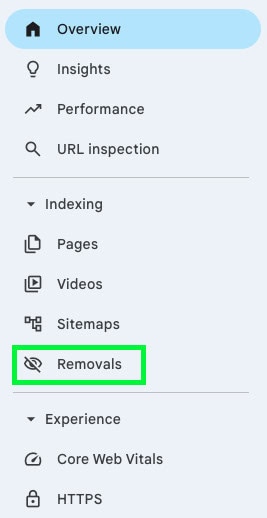
If someone with access to your website’s Google Search Console has manually used the URL Removal Tool (sometimes done experimentally, or during a previous moment of panic), those URLs will appear here. This is entirely human-controlled and is reversible. If you see URLs here that shouldn’t be blocked, it’s worth checking whether a previous removal request is responsible. You can find these within the ‘Removals’ tab in Search Console.

When Should You Actually Be Concerned?

Common sense dictates that if any important pages for your business are showing up in the ‘Not indexed’ report, these require further urgent investigation.

However, most of what appears in the ‘Not indexed’ report is either intentional or low priority.

That said, a handful of statuses genuinely warrant investigation:

  • Server errors (5xx) appearing persistently on pages that should be live. Investigate these promptly with your web team.
  • Not found (404s) on pages that should still exist. Check that no important pages have accidentally been deleted or had their URLs changed without a redirect in place.
  • Soft 404s on content that should be substantive. This may indicate pages with insufficient content, or broken filtering behaviour on eCommerce sites.
  • Crawled or Discovered – currently not indexed, when the URLs appearing there are pages you actively want to rank. This is a signal to review and improve the content quality and internal linking for those specific pages.
  • Blocked by robots.txt, if the URLs being blocked include pages you want Google to access and index.

Everything else: redirects, noindex tags, canonicals, paginated archives, is almost always either working as intended or a minor, low-priority consideration that doesn’t require urgent action.

What To Remember

In summary, while the indexing report is a vital tool that we regularly review to make sure that content is performing, a high number of excluded URLs is actually a positive indicator of a mature, well-governed site.

Google’s primary goal is to provide users with the highest quality, and most relevant answers for their search. By managing redirects, canonicals and noindex tags you are protecting site authority by making sure Google only sees your strongest, most up to date and relevant content (not duplicates or filtered versions of pages that can cannibalise your rankings and traffic), while ensuring Google does not crawl 600+ pages that do not have any search value, and instead focuses on your core service, lead generation, or product pages.

The figures in this report are not errors. They represent the full digital footprint of your site, actively managed to prioritise quality over quantity. We advise continuing to monitor these reports regularly to ensure your site’s index remains focused on growth.

It’s also worth noting that if every page flagged in this report were indexable by Google, this would likely hurt the sites position in Google rather than help it. If anything in the report genuinely concerns you, speak to your web team before acting on any recommendations from an external party.

A picture of James Coates.

If you’d like to learn more about our WordPress & WooCommerce Support & Maintenance plans, drop us an email or give James a call.

Our plans provide a holistic solution to your website’s performance, reliability and security, and are inclusive of premium tools and services.

button to visit contact page
Share Socially
Vikki Baker
Vikki Baker
Digital Marketing Manager, Cat Lady & Former Female Indiana Jones
Vikki has over 15 years of experience in Digital Marketing for WordPress specialist agencies. She loves WordPress for its simplicity of use, huge flexibility, and how great it is for SEO.
View Team Profile
See More Articles
Vikki Baker
Vikki Baker
Digital Marketing Manager, Cat Lady & Former Female Indiana Jones
Vikki has over 15 years of experience in Digital Marketing for WordPress specialist agencies. She loves WordPress for its simplicity of use, huge flexibility, and how great it is for SEO.
See More Articles
View Team Profile

If You Liked This, You Might Like These

Marketing
August 18th, 2026
13 min read

The Risks Of Domain Migrations & How To Manage Them

Discover the key factors in a successful domain migration. Understand the risks before making this crucial change.

Vikki BakerVikki Baker
 
Marketing
An email inbox open on a laptop screen.
July 3rd, 2026
9 min read

Email Tracking Compliance Just Got Harder. What Do UK Mar...

Stay informed about the latest developments in email tracking. Compliance in the EU and UK is more complex than ever for businesses.

Vikki BakerVikki Baker
 
Marketing
May 22nd, 2026
10 min read

What Is IAB TCF v2.3 And Does Your Website Actually Need It?

If you received an email from Microsoft, Google, or your CMP in early 2026 warning you about TCF v2.3, you ...

Vikki BakerVikki Baker
 
Looking For Support For
Your WordPress Website?
Let Us Take The Stress Of Website Maintenance & Support Off Your Plate
Let's Chat
studio@impactmedia.co.uk
020 3355 8747
Impact Media's LinkedIn
Impact Media's Twitter
Impact Media's Facebook
Impact Media's Instagram
Impact Media's Youtube
wordpress.org

About Impact

  • About Impact Media®
  • Meet The Impact Team
  • Why WordPress?
  • Our Web Development Process
  • Careers
  • Awards
  • Partners
  • Giving Back
  • 100K Tree Challenge

WordPress Services

  • WordPress Web Design
  • UX Design
  • WordPress Development
  • WordPress Evolve Retainers
  • WooCommerce Development
  • Multisite WordPress
  • Migrate To WordPress
  • Custom Integrations & Plugins
  • WordPress Consultancy

WordPress Support

  • WordPress Support & Maintenance
  • WordPress Managed Hosting
  • Case Studies
  • Insights
  • Contact Us

Addresses

London Address:

50 Liverpool Street,

London, EC2M 7PY, UK

+44 (0) 20 3355 8747


Registered Address:

Woodland Place, Hurricane Way

Wickford, SS11 8YB, UK

  • Privacy Policy
  • Cookie Policy
Impact Media logo
© Impact Media® 2003 - 2026
Impact Media is a trading name of IMDMS LTD. Company Reg. 05970261
Impact® & Impact Media®
are registered trademarks of IMDMS LTD