logo

WordPress Design Agency

020 3355 8747

Message Us
  • Home
  • About Impact®
    Learn More About Impact Media®
    • Meet The Team
       
    • Why WordPress
       
    • Careers
       
    • Giving Back
       
    • 100K Tree Challenge
       
    James Coates
    Schedule a discovery call with UX Specialist James
    Book A Call
  • WordPress Services
    Learn More About Our Services
    • WordPress Web Design
       
    • UX Design
       
    • WordPress Development
       
    • WordPress Support & Maintenance
       
    • WordPress Evolve Retainer
       
    • WordPress Multisite Development
       
    • WooCommerce
       
    • Replatform To WordPress
       
    • WordPress Consultancy
       
    • Integrations & Plugins
       
    • WordPress Managed Hosting
       
    • WordPress Health Check
       
    James Coates
    Schedule a discovery call with UX Specialist James
    Book A Call
  • Our Process
  • Case Studies
  • Insights
  • Contact Us
WordPress Design Agency
020 3355 8747
logo logo
Book A Call
Back
Menu
  • Home
     
  •  
    About Impact Media
    Learn More About The Impacters
    • Meet The Team
       
    • Why WordPress
       
    • Careers
       
    • Giving Back
       
    • 100K Tree Challenge
       
  •  
    Our Services
    Discover How We Can Help
    • WordPress Web Design
       
    • UX Design
       
    • WordPress Development
       
    • WordPress Support & Maintenance
       
    • WordPress Evolve Retainer
       
    • WordPress Multisite Development
       
    • WooCommerce
       
    • Replatform To WordPress
       
    • WordPress Consultancy
       
    • Integrations & Plugins
       
    • WordPress Managed Hosting
       
    • WordPress Health Check
       
  • Our Process
     
  • Case Studies
     
  • Insights
     
  • Contact Us
     
020 3355 8747
Mon - Fri • 9am - 5pm
Close

Oops! We could not locate your form.

Home / Insights / Can’t See Your Website Changes? Here’s the Fix
Back

Can’t See Your Website Changes? Here’s the Fix

Published 15.01.26
15th January 2026
Last Updated 14.07.26
14th July 2026

Newer
6 Min Read
James Coates
James Coates
Support & Maintenance
Older
6 Min Read
 
James Coates
James Coates
 
Support & Maintenance

Explaining browser caching, and how you can clear it quickly to see your website updates.
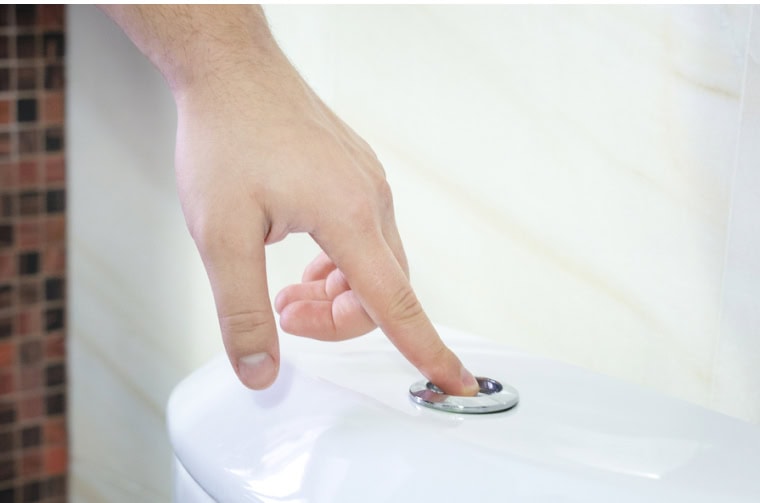
You’ve asked us to update your website. We’ve made the changes, but when you go and look at the updates, nothing’s different.

The problem is almost always your browser cache, and it takes 10 seconds to fix.

For instructions on how to quickly clear your browser cache, scroll down, but if you’d like to know more about what browser caching is, read on.

What Is Browser Caching And Why Does It Exist?

Browser caching is a mechanism that allows web browsers to store copies of website resources like images, stylesheets, JavaScript files, and other assets on a user’s local device. To learn about other types of caching used on the web, check out this post.

When someone visits a website for the first time, their browser downloads all the necessary files to display the page correctly. With caching enabled, the browser saves these files locally rather than discarding them. So when the user returns to the same website or navigates to another page on the site, the browser can retrieve these stored files from the local cache instead of downloading them again from the server.

The primary purpose of browser caching is to improve website performance and user experience. By serving cached files from the user’s device, pages load significantly faster on subsequent visits, reducing wait times and making the browsing experience feel more responsive.

This also reduces the amount of data that needs to be transferred over the network, which is particularly beneficial for users on slower internet connections or mobile data plans.

From a website owner’s perspective, caching reduces server load and bandwidth consumption, as the server doesn’t need to send the same files repeatedly to returning visitors. This can lead to cost savings and allows the server to handle more concurrent users efficiently.

Clearing Your Browser Cache

The Quick Fix (Try This First)

The first thing to try is a hard refresh. Press these keys together while viewing your website:

WindowsMac
ChromeCtrl + Shift + RCommand + Shift + R
FirefoxCtrl + Shift + RCommand + Shift + R
Safari–Command + Option + R

This forces your browser to reload the page fresh from the server, ignoring any stored files. In most cases, you’ll now see your updates.

Still Not Working? Clear Your Cache

If the hard refresh didn’t help, you’ll need to clear your browser cache. This sounds technical but takes about 30 seconds:

Chrome:

  • Press Ctrl + Shift + Delete (Windows) or Command + Shift + Delete (Mac)
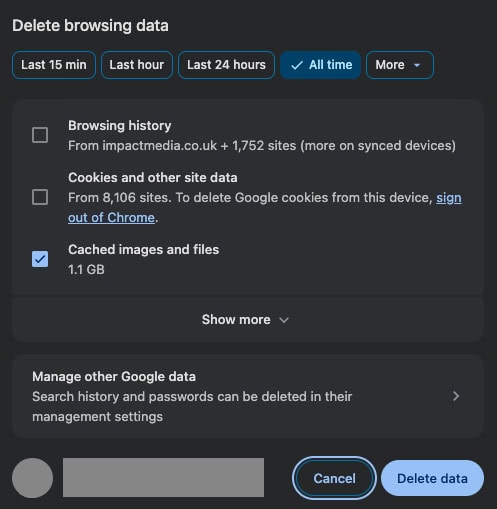
  • A window titled ‘Delete browsing data’ will appear
  • Set the time range to ‘All time’
  • Tick only ‘Cached images and files’ (untick the others if they’re selected)
  • Click the blue ‘Delete data’ button
  • Refresh your website, and you should see the changes

You can get to the same window by clicking menu (three dots ⋮) in the top-right corner of your browser window, and going to ‘Delete browsing data’.

Firefox:

  • Press Ctrl + Shift + Delete (Windows) or Command + Shift + Delete (Mac)
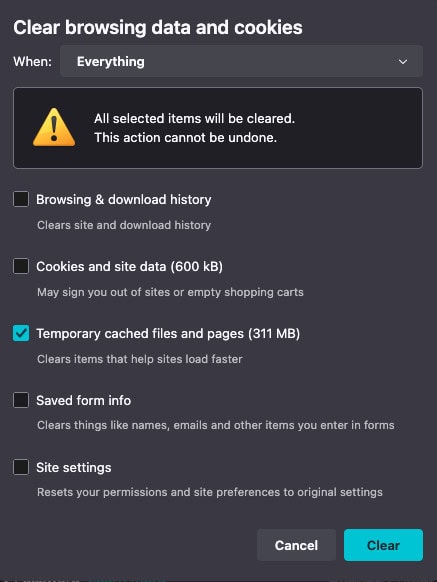
  • A window titled ‘Clear browsing data and cookies’ will appear
  • Set the time range to ‘Everything’
  • Tick only ‘Temporary cached files and pages’ (untick the others if they’re selected)
  • Click the ‘Clear’ button
  • Refresh your website, and you should see the changes

You can also get to this window by clicking the menu button (three horizontal lines) in the top right of the browser window, going to ‘Settings’, then to ‘Privacy and security’, scroll down to ‘Cookies and site data’ and then click the ‘Clear data button’.

Safari:

  • Click ‘Safari’ in the top menu bar
  • Select ‘Clear History’
  • Choose your time range
  • Click the ‘Clear history’ button
  • Refresh your website, and you should see the changes

This will however delete additional browsing data like recent searches and the history of web pages you visited.

Why Does This Delay Happen?

As mentioned previously, our browsers save copies of website files (images, code, styles) so pages load
faster on return visits. This is helpful most of the time, but it means you sometimes see yesterday’s version of a page rather than today’s.

Clearing your cache simply deletes these saved copies. The next time you visit, your browser downloads everything fresh.

Still Stuck?

If you’ve tried both methods and still can’t see your updates, get in touch and we can investigate from our end.

Occasionally there are other caches and factors at play, such as:

  • Server-level caching
  • Page builder caching (common builders like Elementor have their own caching)
  • CDN delays
  • Some firewalls have built in caching

Share Socially
James Coates
James Coates
UX & Web Strategist, Coffee Lover & Ex-Flower Arranging Champ
James is a UX specialist and is passionate about delivering better digital experiences. He provides insights on improving conversions, increasing sales and delivering more engaging content.
View Team Profile
See More Articles
James Coates
James Coates
UX & Web Strategist, Coffee Lover & Ex-Flower Arranging Champ
James is a UX specialist and is passionate about delivering better digital experiences. He provides insights on improving conversions, increasing sales and delivering more engaging content.
See More Articles
View Team Profile
Looking For Support For
Your WordPress Website?
Let Us Take The Stress Of Website Maintenance & Support Off Your Plate
Let's Chat
studio@impactmedia.co.uk
020 3355 8747
Impact Media's LinkedIn
Impact Media's Twitter
Impact Media's Facebook
Impact Media's Instagram
Impact Media's Youtube
wordpress.org

About Impact

  • About Impact Media®
  • Meet The Impact Team
  • Why WordPress?
  • Our Web Development Process
  • Careers
  • Awards
  • Partners
  • Giving Back
  • 100K Tree Challenge

WordPress Services

  • WordPress Web Design
  • UX Design
  • WordPress Development
  • WordPress Evolve Retainers
  • WooCommerce Development
  • Multisite WordPress
  • Migrate To WordPress
  • Custom Integrations & Plugins
  • WordPress Consultancy

WordPress Support

  • WordPress Support & Maintenance
  • WordPress Managed Hosting
  • Case Studies
  • Insights
  • Contact Us

Addresses

London Address:

50 Liverpool Street,

London, EC2M 7PY, UK

+44 (0) 20 3355 8747


Registered Address:

Woodland Place, Hurricane Way

Wickford, SS11 8YB, UK

  • Privacy Policy
  • Cookie Policy
Impact Media logo
© Impact Media® 2003 - 2026
Impact Media is a trading name of IMDMS LTD. Company Reg. 05970261
Impact® & Impact Media®
are registered trademarks of IMDMS LTD